Quick Start Guide
This guide demonstrates a minimal working example of the backtest-kit framework. You'll learn how to register a strategy, configure an exchange data source, set up a timeframe, and execute a backtest. For installation instructions, see Installation and Setup. For deeper understanding of execution modes and lifecycle concepts, see Core Concepts and Component Registration.
Overview: The Basic Flow
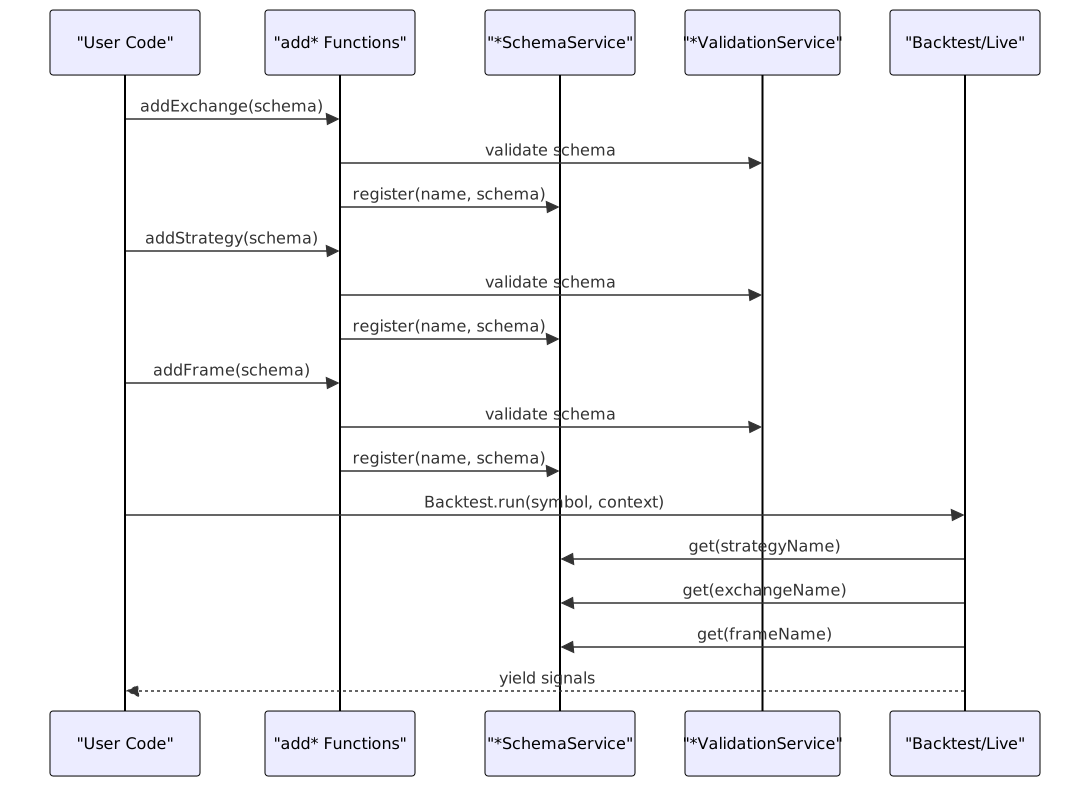
A minimal backtest workflow consists of four registration steps followed by execution:
Step 1: Exchange Configuration
The exchange provides historical candle data for backtesting. You must implement the IExchangeSchema interface with three required methods:
getCandles: Fetch OHLCV dataformatPrice: Format price to exchange precisionformatQuantity: Format quantity to exchange precision
import { addExchange, ICandleData, CandleInterval } from 'backtest-kit';
addExchange({
exchangeName: "binance",
async getCandles(
symbol: string,
interval: CandleInterval,
since: Date,
limit: number
): Promise<ICandleData[]> {
// Return historical candles from your data source
// This example returns mock data
const candles: ICandleData[] = [];
const intervalMs = 60000; // 1 minute
for (let i = 0; i < limit; i++) {
const timestamp = since.getTime() + i * intervalMs;
candles.push({
timestamp,
open: 50000 + Math.random() * 100,
high: 50100 + Math.random() * 100,
low: 49900 + Math.random() * 100,
close: 50000 + Math.random() * 100,
volume: 100
});
}
return candles;
},
async formatPrice(symbol: string, price: number): Promise<string> {
return price.toFixed(2); // 2 decimal places for BTC
},
async formatQuantity(symbol: string, quantity: number): Promise<string> {
return quantity.toFixed(8); // 8 decimal places
}
});
Key Points:
exchangeNamemust be unique across all registered exchangesgetCandlesis called automatically during backtest execution- The framework uses
getCandlesto fetch data backwards from execution time ICandleDatarequires:timestamp,open,high,low,close,volume
Step 2: Frame Configuration
The frame defines the backtest period and iteration interval:
import { addFrame, FrameInterval } from 'backtest-kit';
addFrame({
frameName: "1d-test",
interval: "1m", // Tick every 1 minute
startDate: new Date("2024-01-01T00:00:00Z"),
endDate: new Date("2024-01-02T00:00:00Z") // 1 day backtest
});
Available Intervals: "1m", "3m", "5m", "15m", "30m", "1h", "2h", "4h", "6h", "8h", "12h", "1d", "3d"
The framework generates timestamps at the specified interval between startDate and endDate. Each timestamp triggers a tick() call on your strategy.
Step 3: Strategy Definition
The strategy implements your trading logic. At minimum, you must provide:
strategyName: Unique identifierinterval: Signal generation throttle (minimum time betweengetSignalcalls)getSignal: Function that returns trading signals ornull
import { addStrategy, ISignalDto, SignalInterval } from 'backtest-kit';
addStrategy({
strategyName: "simple-long",
interval: "5m" as SignalInterval, // Check for signals every 5 minutes
async getSignal(symbol: string, when: Date): Promise<ISignalDto | null> {
// Your strategy logic here
// Return null when no signal, or return a signal object
// Example: Always long when price is available
return {
position: "long",
note: "Simple long strategy",
// priceOpen: undefined means open immediately at current price
priceTakeProfit: 51000, // Exit at +2% profit
priceStopLoss: 49000, // Exit at -2% loss
minuteEstimatedTime: 60 // Close after 60 minutes if not hit
};
}
});
Signal Fields:
position:"long"(buy) or"short"(sell)priceOpen(optional): Entry price for scheduled signals (limit orders). If omitted, opens immediately at current VWAPpriceTakeProfit: Target profit exit pricepriceStopLoss: Risk management exit priceminuteEstimatedTime: Maximum signal lifetime in minutes
Validation Rules:
- LONG:
priceStopLoss < priceOpen < priceTakeProfit - SHORT:
priceTakeProfit < priceOpen < priceStopLoss - All prices must be positive and finite
minuteEstimatedTimemust be positive integer
Step 4: Running the Backtest
Execute the backtest with Backtest.run():
import { Backtest } from 'backtest-kit';
// Synchronous execution - waits for completion
for await (const result of Backtest.run("BTCUSDT", {
strategyName: "simple-long",
exchangeName: "binance",
frameName: "1d-test"
})) {
console.log(`Action: ${result.action}`);
if (result.action === "closed") {
console.log(`PNL: ${result.pnl.pnlPercentage.toFixed(2)}%`);
console.log(`Reason: ${result.closeReason}`);
}
}
console.log("Backtest completed!");
Return Type: AsyncGenerator<IStrategyTickResult>
Each iteration yields a tick result with discriminated union type:
| Action | Description | Available Fields |
|---|---|---|
"idle" |
No active signal | currentPrice, signal: null |
"scheduled" |
Limit order created | signal: IScheduledSignalRow, currentPrice |
"opened" |
Position opened | signal: ISignalRow, currentPrice |
"active" |
Monitoring TP/SL | signal: ISignalRow, currentPrice |
"closed" |
Position closed | signal, pnl, closeReason, currentPrice |
"cancelled" |
Scheduled signal expired | signal: IScheduledSignalRow, currentPrice |
Step 5: Listening to Events
Instead of iterating results, you can listen to events asynchronously:
import { listenSignalBacktest, listenDoneBacktest, Backtest } from 'backtest-kit';
// Subscribe to signal events
const unsubscribe = listenSignalBacktest((result) => {
if (result.action === "closed") {
console.log(`Signal closed: ${result.signal.id}`);
console.log(`PNL: ${result.pnl.pnlPercentage.toFixed(2)}%`);
console.log(`Close reason: ${result.closeReason}`);
}
});
// Subscribe to completion
listenDoneBacktest((event) => {
console.log(`Backtest done: ${event.symbol} ${event.strategyName}`);
unsubscribe(); // Stop listening
});
// Run in background (non-blocking)
Backtest.background("BTCUSDT", {
strategyName: "simple-long",
exchangeName: "binance",
frameName: "1d-test"
});
Available Listeners:
listenSignalBacktest: All backtest signal eventslistenSignalLive: Live trading signal events onlylistenSignal: All signal events (both modes)listenDoneBacktest: Backtest completionlistenBacktestProgress: Progress updates during executionlistenError: Recoverable errorslistenExit: Fatal errors
Step 6: Getting Results
After execution completes, retrieve statistics:
import { Backtest } from 'backtest-kit';
// Get structured data
const stats = await Backtest.getData("BTCUSDT");
console.log(`Total Signals: ${stats.totalSignals}`);
console.log(`Win Rate: ${stats.winRate}%`);
console.log(`Sharpe Ratio: ${stats.sharpeRatio}`);
console.log(`Average PNL: ${stats.avgPnl}%`);
console.log(`Total PNL: ${stats.totalPnl}%`);
// Generate markdown report
const markdown = await Backtest.getReport("BTCUSDT");
console.log(markdown);
// Export to file
await Backtest.dump("BTCUSDT", "./results/backtest-report.md");
Statistics Structure (BacktestStatistics):
| Field | Type | Description |
|---|---|---|
totalSignals |
number |
Count of closed signals |
winRate |
number | null |
Percentage of profitable trades |
avgPnl |
number | null |
Average profit/loss per trade |
totalPnl |
number | null |
Cumulative profit/loss |
sharpeRatio |
number | null |
Risk-adjusted return metric |
certaintyRatio |
number | null |
Win probability metric |
signalList |
IStrategyTickResultClosed[] |
All closed signal details |
Complete Example
import {
addExchange,
addFrame,
addStrategy,
Backtest,
listenSignalBacktest,
listenDoneBacktest,
ICandleData,
ISignalDto
} from 'backtest-kit';
// 1. Register exchange
addExchange({
exchangeName: "binance",
async getCandles(symbol, interval, since, limit): Promise<ICandleData[]> {
const candles: ICandleData[] = [];
const intervalMs = 60000;
for (let i = 0; i < limit; i++) {
const timestamp = since.getTime() + i * intervalMs;
candles.push({
timestamp,
open: 50000 + Math.random() * 1000,
high: 50500 + Math.random() * 1000,
low: 49500 + Math.random() * 1000,
close: 50000 + Math.random() * 1000,
volume: 100
});
}
return candles;
},
async formatPrice(symbol, price) { return price.toFixed(2); },
async formatQuantity(symbol, quantity) { return quantity.toFixed(8); }
});
// 2. Configure backtest period
addFrame({
frameName: "1d-test",
interval: "1m",
startDate: new Date("2024-01-01T00:00:00Z"),
endDate: new Date("2024-01-02T00:00:00Z")
});
// 3. Define strategy
let signalGenerated = false;
addStrategy({
strategyName: "simple-long",
interval: "5m",
async getSignal(symbol, when): Promise<ISignalDto | null> {
if (signalGenerated) return null;
signalGenerated = true;
return {
position: "long",
note: "Test signal",
priceTakeProfit: 51000,
priceStopLoss: 49000,
minuteEstimatedTime: 60
};
}
});
// 4. Listen to events
listenSignalBacktest((result) => {
console.log(`[${result.action}] ${result.symbol}`);
if (result.action === "closed") {
console.log(` PNL: ${result.pnl.pnlPercentage.toFixed(2)}%`);
}
});
listenDoneBacktest(async (event) => {
console.log("Backtest completed!");
// 5. Get results
const stats = await Backtest.getData("BTCUSDT");
console.log(`Win Rate: ${stats.winRate}%`);
console.log(`Sharpe Ratio: ${stats.sharpeRatio}`);
// Export report
await Backtest.dump("BTCUSDT", "./backtest-report.md");
});
// 6. Execute
Backtest.background("BTCUSDT", {
strategyName: "simple-long",
exchangeName: "binance",
frameName: "1d-test"
});
Execution Flow Diagram

Next Steps
Essential Reading:
- Core Concepts - Understanding execution modes and signal lifecycle
- Component Registration - Deep dive into registration patterns
- Signal Lifecycle Overview - State transitions and validation
Advanced Topics:
- Live Trading API - Real-time execution with crash recovery
- Walker API - Strategy comparison and optimization
- Risk Management - Portfolio-level risk controls
- Custom Exchange Integration - Implement CCXT or database sources
Additional Examples:
- Backtest API - Full method reference
- Event Listeners - Complete event API
- Reporting and Analytics - Performance metrics and statistics