Component Registration
Purpose and Scope
Component registration is the mechanism by which users configure backtest-kit's core building blocks before executing backtests, live trading, or strategy optimization. This page explains the declarative registration pattern using add* functions and how registered schemas are stored in schema services for later retrieval.
For detailed API documentation of each registration function and its parameters, see Component Registration Functions. For schema interface definitions, see Component Schemas. For the internal implementation of schema services, see Schema Services.
Registration Architecture
The registration system follows a consistent three-step pattern:

Diagram: Component Registration Flow
Each add* function performs validation before storage, ensuring schemas are valid at configuration time rather than runtime. Schema services use the ToolRegistry pattern to store configurations in memory with type-safe retrieval.
Component Types
backtest-kit provides seven component types, each with a dedicated registration function:
| Component | Function | Purpose | Schema Type |
|---|---|---|---|
| Strategy | addStrategy |
Signal generation logic | IStrategySchema |
| Exchange | addExchange |
Market data source | IExchangeSchema |
| Frame | addFrame |
Backtest timeframe | IFrameSchema |
| Risk | addRisk |
Portfolio risk rules | IRiskSchema |
| Sizing | addSizing |
Position sizing method | ISizingSchema |
| Walker | addWalker |
Strategy comparison | IWalkerSchema |
| Optimizer | addOptimizer |
LLM strategy generation | IOptimizerSchema |
All registration functions share a consistent naming pattern: add<ComponentType>, where the component type matches the schema name.
Registration Implementation
Function Structure
Each registration function follows an identical implementation pattern:
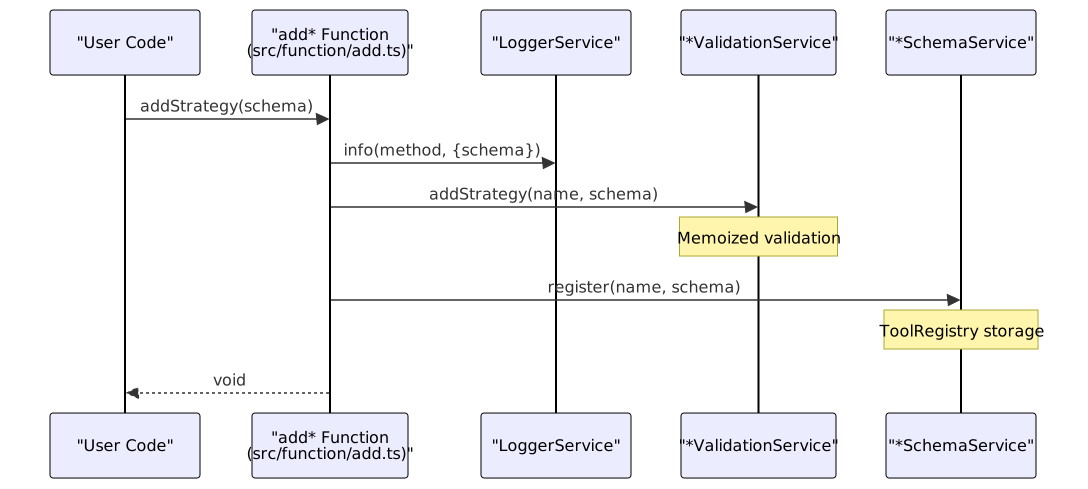
Diagram: Registration Function Execution Flow
All registration functions inject three dependencies via the DI container:
- LoggerService: Records registration attempts with full schema content
- ValidationService: Enforces business rules (e.g., required fields, value ranges)
- SchemaService: Persists validated schemas in
ToolRegistry
- src/function/add.ts:52-64 (Strategy example)
- src/function/add.ts:101-113 (Exchange example)
- src/lib/index.ts:61-63 (Logger service injection)
- src/lib/index.ts:98-112 (Schema service injection)
Example: Strategy Registration
export function addStrategy(strategySchema: IStrategySchema) {
backtest.loggerService.info(ADD_STRATEGY_METHOD_NAME, {
strategySchema,
});
backtest.strategyValidationService.addStrategy(
strategySchema.strategyName,
strategySchema
);
backtest.strategySchemaService.register(
strategySchema.strategyName,
strategySchema
);
}
Execution sequence:
loggerService.info()logs:"add.addStrategy"with full schema objectstrategyValidationService.addStrategy()validates:strategyNameis non-empty stringintervalis valid value ("1m"|"3m"|"5m"|"15m"|"30m"|"1h")getSignalis an async functionriskNameorriskListis provided (if risk management enabled)
strategySchemaService.register()stores schema inToolRegistrykeyed bystrategyName
If validation fails, an error is thrown and the schema is not registered.
- src/function/add.ts:52-64
- src/lib/services/validation/StrategyValidationService.ts
- src/lib/services/schema/StrategySchemaService.ts
Schema Service Storage
ToolRegistry Pattern
Schema services use ToolRegistry from di-kit to store component configurations:

Diagram: ToolRegistry Usage in Schema Services
Each schema service extends a base pattern:
-
Storage: In-memory
Map<string, TSchema>viaToolRegistry -
Key: Component name (e.g.,
strategyName,exchangeName) -
Value: Full schema object (e.g.,
IStrategySchema,IExchangeSchema) -
Retrieval: Type-safe
get(name)method -
Validation:
has(name)to check existence before retrieval -
package.json:75-78 (di-kit dependency)
-
src/lib/core/types.ts:20-28 (Schema service symbols)
Schema Service Instances
All schema services are registered as singletons in the DI container:
{
provide(TYPES.exchangeSchemaService, () => new ExchangeSchemaService());
provide(TYPES.strategySchemaService, () => new StrategySchemaService());
provide(TYPES.frameSchemaService, () => new FrameSchemaService());
provide(TYPES.walkerSchemaService, () => new WalkerSchemaService());
provide(TYPES.sizingSchemaService, () => new SizingSchemaService());
provide(TYPES.riskSchemaService, () => new RiskSchemaService());
provide(TYPES.optimizerSchemaService, () => new OptimizerSchemaService());
}
Singleton behavior: Each schema service is instantiated once and shared across the entire application. This ensures that all components (validation services, connection services, command services) access the same registry.
Complete Registration Example
A typical backtest setup registers multiple components with dependencies between them:

Diagram: Component Registration Dependencies
Registration order matters when components reference each other by name. For example:
- Exchange must be registered before Strategy (referenced in execution)
- Risk must be registered before Strategy (if
riskNameis specified) - Strategy must be registered before Walker (referenced in
strategiesarray) - Frame must be registered before Walker (referenced in execution)
Note: Validation services check for missing dependencies during registration. If a strategy references a non-existent riskName, addStrategy() throws an error.
Code Example from Demo
// 1. Register exchange (no dependencies)
addExchange({
exchangeName: "test_exchange",
getCandles: async (symbol, interval, since, limit) => {
const exchange = new ccxt.binance();
const ohlcv = await exchange.fetchOHLCV(symbol, interval, since.getTime(), limit);
return ohlcv.map(([timestamp, open, high, low, close, volume]) => ({
timestamp, open, high, low, close, volume
}));
},
formatPrice: async (symbol, price) => price.toFixed(2),
formatQuantity: async (symbol, quantity) => quantity.toFixed(8),
});
// 2. Register risk (no dependencies)
addRisk({
riskName: "demo_risk",
validations: [
{
validate: ({ pendingSignal, currentPrice }) => {
const { priceOpen = currentPrice, priceTakeProfit, position } = pendingSignal;
const tpDistance = position === "long"
? ((priceTakeProfit - priceOpen) / priceOpen) * 100
: ((priceOpen - priceTakeProfit) / priceOpen) * 100;
if (tpDistance < 1) {
throw new Error(`TP distance ${tpDistance.toFixed(2)}% < 1%`);
}
},
note: "TP distance must be at least 1%",
},
],
});
// 3. Register frame (no dependencies)
addFrame({
frameName: "test_frame",
interval: "1m",
startDate: new Date("2025-12-01T00:00:00.000Z"),
endDate: new Date("2025-12-01T23:59:59.000Z"),
});
// 4. Register strategy (references risk)
addStrategy({
strategyName: "test_strategy",
interval: "5m",
riskName: "demo_risk", // References registered risk
getSignal: async (symbol) => {
// Strategy logic
},
});
// 5. Execute backtest (references all components)
Backtest.background("BTCUSDT", {
strategyName: "test_strategy",
exchangeName: "test_exchange",
frameName: "test_frame",
});
Validation During Registration
Validation Service Architecture

Diagram: Validation Service Processing
Validation layers:
-
Type Validation: Ensures required fields exist and have correct types
- Example:
strategyNamemust be a non-empty string - Example:
getSignalmust be an async function
- Example:
-
Business Logic Validation: Enforces domain-specific rules
- Example:
intervalmust be one of:"1m","3m","5m","15m","30m","1h" - Example:
startDatemust be beforeendDatein frames
- Example:
-
Reference Validation: Checks that referenced components exist
- Example: If strategy has
riskName: "demo_risk", the risk must be registered - Example: If walker has
exchangeName: "binance", the exchange must be registered
- Example: If strategy has
-
Memoization: Validation results are cached by component name
- Prevents redundant validation for the same component
- Enabled via
memoize()fromfunctools-kit
- src/lib/services/validation/*
- src/function/add.ts:56-59 (Strategy validation call)
- package.json:74-79 (functools-kit dependency)
Example: Strategy Validation
export function addStrategy(strategySchema: IStrategySchema) {
// Validation call before registration
backtest.strategyValidationService.addStrategy(
strategySchema.strategyName,
strategySchema
);
// Only reaches here if validation passes
backtest.strategySchemaService.register(
strategySchema.strategyName,
strategySchema
);
}
What StrategyValidationService.addStrategy() checks:
strategyNameis a string (non-empty)intervalis one of the valid intervalsgetSignalis a function- If
riskNameis provided, checkriskSchemaService.has(riskName)returnstrue - If
riskListis provided, check all risk names exist inriskSchemaService - Callbacks (if provided) are functions
If validation fails: Error is thrown immediately, preventing registration. The schema is not stored in the schema service.
Component Retrieval
Connection Service Pattern
Registered schemas are retrieved by connection services, which create client instances on demand:

Diagram: Schema Retrieval During Execution
Retrieval pattern:
- User calls execution function:
Backtest.run(symbol, { strategyName, exchangeName, frameName }) - Command service delegates to connection service
- Connection service retrieves schema from schema service using component name
- Connection service creates client instance (e.g.,
ClientStrategy) with schema - Connection service memoizes client instance (singleton per
symbol:strategyName:modekey) - Client uses schema during execution (e.g., calls
getSignal()function)
Memoization key structure:
- Strategy:
${symbol}:${strategyName}:${backtest ? 'backtest' : 'live'} - Exchange:
${exchangeName}:${backtest ? 'backtest' : 'live'} - Risk:
${riskName} - Sizing:
${sizingName} - Frame:
${frameName}
This ensures proper isolation:
-
Strategies are isolated by symbol and execution mode
-
Exchanges have separate instances for backtest vs. live (temporal isolation)
-
Risk/Sizing/Frame use simpler keys (no mode dependency)
Example: Strategy Client Creation
When Backtest.run("BTCUSDT", { strategyName: "test_strategy", ... }) executes:
BacktestCommandServicecallsStrategyConnectionService.getClient("BTCUSDT", "test_strategy", true)- Connection service computes memoization key:
"BTCUSDT:test_strategy:backtest" - If not cached, connection service:
- Calls
StrategySchemaService.get("test_strategy")→ returnsIStrategySchema - Creates
new ClientStrategy(schema, symbol, backtest=true) - Caches client under memoization key
- Calls
- Returns cached/created
ClientStrategyinstance - Command service calls
clientStrategy.backtest(timeframes)to execute strategy
- src/lib/services/connection/StrategyConnectionService.ts
- src/lib/services/command/BacktestCommandService.ts
- src/client/ClientStrategy.ts
Registration vs. Execution
Understanding the separation between registration phase and execution phase is critical:
| Phase | When | Purpose | Services Involved |
|---|---|---|---|
| Registration | Before execution | Declare components | add* functions, Validation Services, Schema Services |
| Execution | During run()/background() |
Use components | Command Services, Connection Services, Client Classes |
Registration is declarative: Users specify what to use, not how or when to use it.
Execution is imperative: Framework orchestrates component usage based on execution mode (backtest/live/walker).
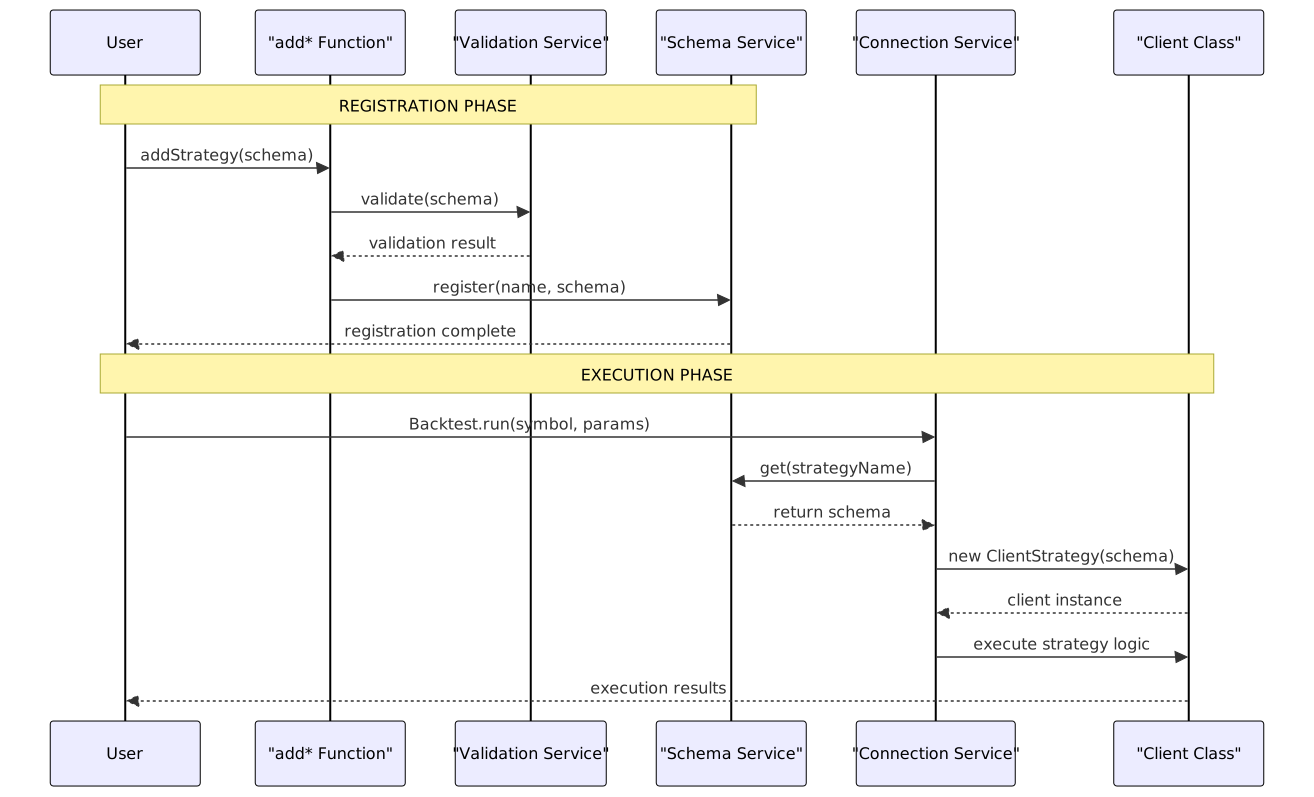
Diagram: Registration and Execution Sequence
Key benefits of separation:
- Early validation: Errors detected at configuration time, not during execution
- Reusability: Same schema can be used in multiple executions (different symbols, modes)
- Testability: Components can be registered once and tested multiple times
- Isolation: Registration state is global, execution state is scoped to specific runs
- src/function/add.ts:1-444 (Registration phase)
- src/lib/services/command/* (Execution phase)
- src/lib/services/connection/* (Bridge between phases)
Summary
Component registration in backtest-kit follows a consistent, type-safe pattern:
- User calls
add*function with schema object - Validation service checks schema validity and dependencies
- Schema service stores validated schema in
ToolRegistry - Connection services retrieve schemas during execution
- Client instances are created with schemas to perform work
This architecture provides:
- Early error detection via registration-time validation
- Type safety through TypeScript interfaces
- Dependency resolution by checking references at registration
- Efficient execution via memoized client instances
- Clean separation between configuration and execution
For detailed parameter documentation, see Component Registration Functions. For schema interfaces, see Component Schemas. For connection service implementation, see Connection Services.