Walker Mode
Walker Mode provides multi-strategy comparison and optimization by running multiple backtests in sequence and ranking results by a chosen performance metric. This execution mode automates the process of testing different strategy configurations against the same market data and selecting the best performer.
For information about running individual backtests, see Backtesting. For live trading execution, see Live Trading. For details about the component registration system, see Component Registration.
Purpose and Scope
Walker Mode solves the strategy selection problem by:
- Sequential Execution - Runs multiple strategy backtests in series against the same timeframe
- Metric-Based Ranking - Compares strategies using configurable metrics (Sharpe ratio, win rate, total PNL, etc.)
- Automated Selection - Identifies the best-performing strategy based on the chosen metric
- Progress Tracking - Emits progress events after each strategy completes
- Comprehensive Reporting - Generates comparison tables with all strategy statistics
Walker Mode wraps the Backtest execution mode and orchestrates multiple runs, collecting and comparing results automatically.
Walker Schema Definition
IWalkerSchema Structure
Walker configuration is registered via addWalker and stored in WalkerSchemaService. The schema defines which strategies to compare, what timeframe to use, and which metric to optimize.
interface IWalkerSchema {
walkerName: string; // Unique identifier for this walker
exchangeName: string; // Exchange data source (used for all strategies)
frameName: string; // Timeframe generator (used for all strategies)
strategies: string[]; // List of strategyName values to compare
metric?: string; // Metric for ranking (default: "sharpeRatio")
callbacks?: IWalkerCallbacks; // Optional lifecycle callbacks
}
Available Metrics:
sharpeRatio(default) - Risk-adjusted return (higher is better)winRate- Win percentage (higher is better)avgPnl- Average PNL percentage (higher is better)totalPnl- Total PNL percentage (higher is better)certaintyRatio- avgWin / |avgLoss| (higher is better)
Registration Example:
addWalker({
walkerName: "btc-walker",
exchangeName: "binance",
frameName: "1d-backtest",
strategies: ["strategy-a", "strategy-b", "strategy-c"],
metric: "sharpeRatio"
});
Architecture Overview
Component Interaction Diagram

Key Responsibilities:
Walkerclass - Public API entry point with convenience methodsWalkerGlobalService- Validation orchestration and delegationWalkerLogicPublicService- Context propagation wrapperWalkerLogicPrivateService- Core orchestration loop (not shown in files but referenced)WalkerMarkdownService- Aggregates results and generates comparison reports
Execution Flow
Sequential Strategy Testing
Walker Mode executes strategies sequentially, not in parallel. This ensures deterministic results and prevents resource contention.

Step-by-Step Process:
- Validation - Validate walker, exchange, frame, and all strategies
- Schema Retrieval - Get walker schema from
WalkerSchemaService - Data Clearing - Clear markdown services for all strategies
- Strategy Loop - For each strategy in
strategiesarray:- Clear strategy-specific data (
backtestMarkdownService,scheduleMarkdownService,strategyGlobalService,riskGlobalService) - Run
Backtest.run()with the strategy - Collect statistics from
BacktestMarkdownService.getData() - Emit progress event via
walkerEmitter - Update best strategy if metric improved
- Clear strategy-specific data (
- Completion - Emit final results via
walkerCompleteSubject - Reporting - Generate comparison report via
WalkerMarkdownService
Data Clearing and Isolation
Strategy-Level Clearing
Before each strategy runs, Walker clears accumulated data to ensure isolation:

Clearing Logic:
The Walker class performs clearing in run() method before delegating to WalkerGlobalService:
// Clear backtest data for all strategies
for (const strategyName of walkerSchema.strategies) {
// Clear markdown services
backtest.backtestMarkdownService.clear(strategyName);
backtest.scheduleMarkdownService.clear(strategyName);
// Clear strategy state
backtest.strategyGlobalService.clear(strategyName);
// Clear risk state if strategy has risk profile
const { riskName } = backtest.strategySchemaService.get(strategyName);
riskName && backtest.riskGlobalService.clear(riskName);
}
This ensures each strategy starts fresh with no accumulated signals or state from previous runs.
Progress Tracking and Events
Event Emission Timeline
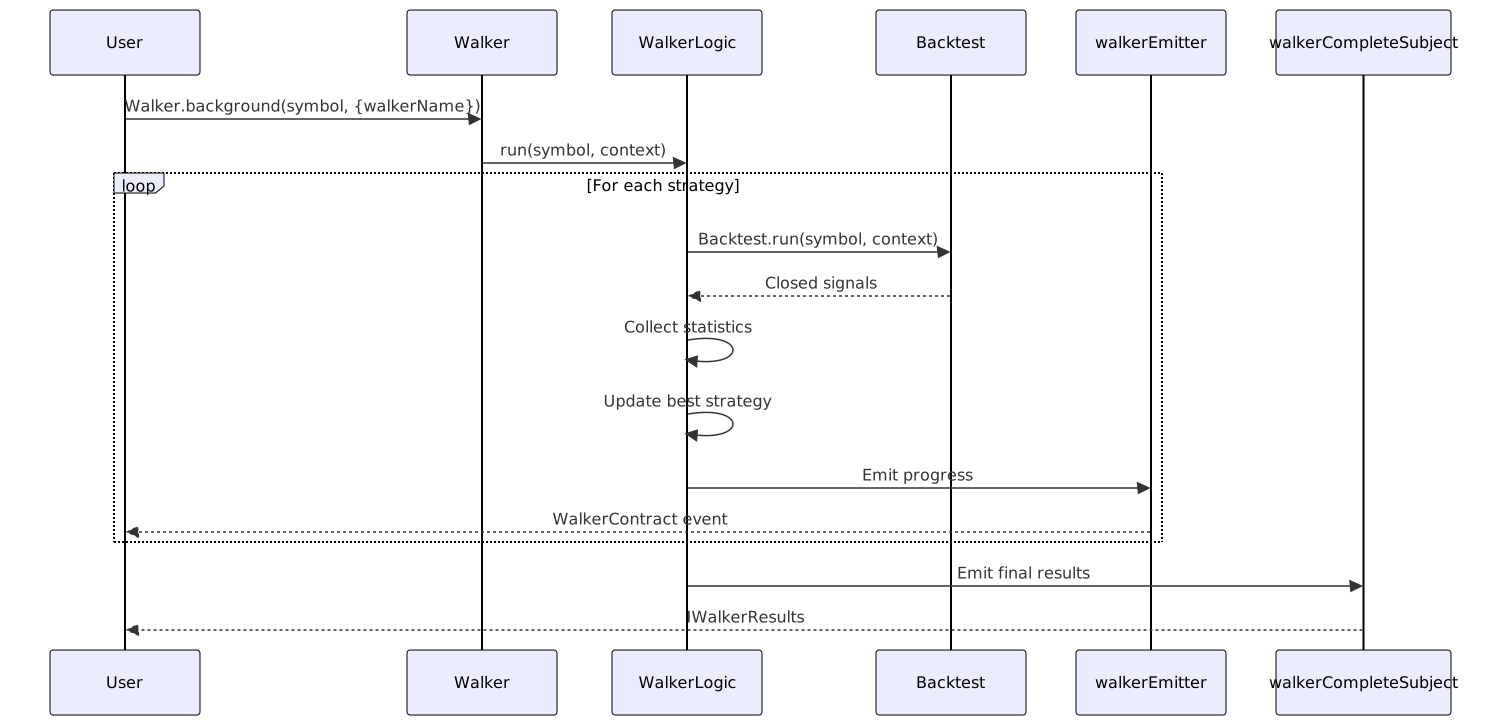
WalkerContract Structure
Progress events emitted via walkerEmitter after each strategy completes:
interface WalkerContract {
walkerName: string; // Walker identifier
symbol: string; // Trading symbol
strategyName: string; // Current strategy name
strategiesTested: number; // Count of completed strategies
totalStrategies: number; // Total strategies to test
bestStrategy: string; // Best strategy so far
bestMetric: number; // Best metric value so far
metricValue: number; // Current strategy's metric value
}
Event Listeners
Progress Tracking:
import { listenWalker } from "backtest-kit";
listenWalker((event) => {
console.log(`Progress: ${event.strategiesTested}/${event.totalStrategies}`);
console.log(`Best: ${event.bestStrategy} (${event.bestMetric})`);
console.log(`Current: ${event.strategyName} (${event.metricValue})`);
});
Completion Tracking:
import { listenWalkerComplete } from "backtest-kit";
listenWalkerComplete((results) => {
console.log("Best strategy:", results.bestStrategy);
console.log("Best metric:", results.bestMetric);
console.log("All results:", results.strategies);
});
Metric Comparison Logic
IWalkerResults Structure
The final results object returned by Walker.getData() and emitted via walkerCompleteSubject:
interface IWalkerResults {
bestStrategy: string; // Name of best-performing strategy
bestMetric: number; // Value of the comparison metric
strategies: Array<{
strategyName: string; // Strategy identifier
stats: BacktestStatistics; // Full statistics from BacktestMarkdownService
metric: number; // Extracted metric value used for comparison
}>;
}
Metric Extraction
The WalkerMarkdownService.getData() method extracts the chosen metric from each strategy's statistics:
Metric Selection Logic:
- Default metric is
sharpeRatioif not specified - Metric extracted from
BacktestStatisticsfor each strategy - Strategies sorted by metric value (descending - higher is better)
- Best strategy is the first after sorting
Available Metrics from BacktestStatistics:
sharpeRatio- Risk-adjusted returnwinRate- Win percentage (0-100)avgPnl- Average PNL percentagetotalPnl- Cumulative PNL percentagecertaintyRatio- avgWin / |avgLoss|
All metrics return null if unsafe (NaN, Infinity), which are handled appropriately during comparison.
Report Generation
WalkerMarkdownService
The WalkerMarkdownService aggregates statistics from individual strategy backtests and generates comparison tables.
Key Methods:
class WalkerMarkdownService {
// Collect statistics from all strategies
getData(
walkerName: string,
symbol: string,
metric: string,
context: { exchangeName: string; frameName: string }
): Promise<IWalkerResults>
// Generate markdown comparison report
getReport(
walkerName: string,
symbol: string,
metric: string,
context: { exchangeName: string; frameName: string }
): Promise<string>
// Save report to disk
dump(
walkerName: string,
symbol: string,
metric: string,
context: { exchangeName: string; frameName: string },
path?: string
): Promise<void>
}
Report Structure
The markdown report includes:
- Header - Walker name, symbol, exchange, frame
- Best Strategy - Winner with metric value
- Comparison Table - All strategies sorted by metric
- Individual Statistics - Per-strategy breakdown with all metrics
Example Report Output:
# Walker Report: btc-walker (BTCUSDT)
**Exchange:** binance | **Timeframe:** 1d-backtest | **Metric:** sharpeRatio
**Best Strategy:** strategy-b (1.85)
| Strategy | Sharpe | Win Rate | Avg PNL | Total PNL | Signals |
|----------|--------|----------|---------|-----------|---------|
| strategy-b | 1.85 | 68.5% | +1.45% | +45.30% | 38 |
| strategy-a | 1.23 | 62.3% | +0.95% | +32.10% | 45 |
| strategy-c | 0.98 | 55.2% | +0.55% | +18.20% | 28 |
Walker API Reference
Walker Class Methods
The Walker singleton provides the public API for walker operations.

Method Details
Walker.run()
Runs walker comparison and yields progress updates:
Walker.run(
symbol: string,
context: { walkerName: string }
): AsyncGenerator<WalkerContract>
Yields progress event after each strategy completes. Allows manual iteration for custom control flow.
Walker.background()
Runs walker comparison in background without yielding results:
Walker.background(
symbol: string,
context: { walkerName: string }
): () => void
Returns cancellation function. Useful for fire-and-forget execution with event listeners handling results.
Walker.getData()
Retrieves walker results data:
Walker.getData(
symbol: string,
walkerName: string
): Promise<IWalkerResults>
Returns structured data with best strategy and all strategy statistics.
Walker.getReport()
Generates markdown comparison report:
Walker.getReport(
symbol: string,
walkerName: string
): Promise<string>
Returns formatted markdown string with comparison table.
Walker.dump()
Saves comparison report to disk:
Walker.dump(
symbol: string,
walkerName: string,
path?: string
): Promise<void>
Default path: ./logs/walker/{walkerName}.md
Usage Examples
Basic Walker Usage
import { addWalker, Walker, listenWalkerComplete } from "backtest-kit";
// Register walker configuration
addWalker({
walkerName: "btc-walker",
exchangeName: "binance",
frameName: "1d-backtest",
strategies: ["strategy-a", "strategy-b", "strategy-c"],
metric: "sharpeRatio"
});
// Run walker in background
Walker.background("BTCUSDT", {
walkerName: "btc-walker"
});
// Listen for completion
listenWalkerComplete((results) => {
console.log("Best strategy:", results.bestStrategy);
console.log("Best metric:", results.bestMetric);
// Save report
Walker.dump("BTCUSDT", "btc-walker");
});
Manual Iteration
// Iterate progress updates manually
for await (const progress of Walker.run("BTCUSDT", {
walkerName: "btc-walker"
})) {
console.log(`Testing: ${progress.strategyName}`);
console.log(`Progress: ${progress.strategiesTested}/${progress.totalStrategies}`);
console.log(`Best so far: ${progress.bestStrategy} (${progress.bestMetric})`);
// Early termination if a strategy meets criteria
if (progress.bestMetric > 2.0) {
console.log("Found excellent strategy, stopping");
break;
}
}
Programmatic Result Analysis
// Get raw results for analysis
const results = await Walker.getData("BTCUSDT", "btc-walker");
// Filter strategies by threshold
const goodStrategies = results.strategies.filter(s => s.metric > 1.5);
// Find strategy with best win rate
const bestWinRate = results.strategies.reduce((best, current) => {
return current.stats.winRate > best.stats.winRate ? current : best;
});
console.log("Strategies with Sharpe > 1.5:", goodStrategies.length);
console.log("Best win rate:", bestWinRate.strategyName, bestWinRate.stats.winRate);
Walker Callbacks
IWalkerCallbacks Interface
Optional callbacks for lifecycle events during walker execution:
interface IWalkerCallbacks {
onStrategyStart?: (strategyName: string, symbol: string) => void;
onStrategyComplete?: (strategyName: string, symbol: string, stats: BacktestStatistics) => void;
onComplete?: (results: IWalkerResults) => void;
}
Callback Execution Timeline:
onStrategyStart- Called before each strategy backtest beginsonStrategyComplete- Called after each strategy backtest finishesonComplete- Called once after all strategies tested
Usage Example:
addWalker({
walkerName: "btc-walker",
exchangeName: "binance",
frameName: "1d-backtest",
strategies: ["strategy-a", "strategy-b", "strategy-c"],
metric: "sharpeRatio",
callbacks: {
onStrategyStart: (strategyName, symbol) => {
console.log(`Starting ${strategyName} on ${symbol}`);
},
onStrategyComplete: (strategyName, symbol, stats) => {
console.log(`${strategyName} completed:`, stats.sharpeRatio);
},
onComplete: (results) => {
console.log("Winner:", results.bestStrategy);
}
}
});
Integration with Other Modes
Walker vs Backtest Mode

Key Differences:
| Aspect | Backtest Mode | Walker Mode |
|---|---|---|
| Strategy Count | One | Multiple |
| Execution | Direct | Sequential orchestration |
| Results | Per-strategy statistics | Comparative ranking |
| Use Case | Test single strategy | Find best strategy |
| API Entry | Backtest.run() |
Walker.run() |
Walker Mode internally uses Backtest Mode for each strategy, then aggregates and compares results.
Walker and Risk Management
If strategies use risk profiles, walker clears risk state before each strategy:
const { riskName } = backtest.strategySchemaService.get(strategyName);
riskName && backtest.riskGlobalService.clear(riskName);
This ensures proper isolation of active positions between strategy runs.
Validation Flow
Multi-Level Validation
Walker performs comprehensive validation before execution:

Validation Sequence:
- Validate walker schema exists
- Validate exchange schema exists
- Validate frame schema exists
- For each strategy in walker:
- Validate strategy schema exists
- Validate risk schema exists (if strategy has
riskName)
- Proceed to execution
Any validation failure throws an error before execution begins, preventing partial runs.
Performance Considerations
Memory Efficiency
Walker Mode runs strategies sequentially, not in parallel, to:
- Prevent Memory Bloat - Only one strategy's data in memory at a time
- Ensure Determinism - No race conditions between strategies
- Simplify State Management - Clear separation between strategy runs
Data Clearing Strategy
Before each strategy runs, accumulated data is cleared:
BacktestMarkdownService.clear(strategyName)- Clear closed signalsScheduleMarkdownService.clear(strategyName)- Clear scheduled/cancelled signalsStrategyGlobalService.clear(strategyName)- Clear active signal stateRiskGlobalService.clear(riskName)- Clear active positions
This prevents memory accumulation across multiple strategy runs.
Progress Emission
Progress events are emitted after each strategy completes, not after each signal. This reduces event volume and provides meaningful checkpoints for long-running comparisons.
Error Handling
Background Execution Errors
When using Walker.background(), errors are caught and emitted via errorEmitter:
task().catch((error) =>
errorEmitter.next(new Error(getErrorMessage(error)))
);
Subscribe to errors:
import { listenError } from "backtest-kit";
listenError((error) => {
console.error("Walker error:", error.message);
});
Cancellation
The cancellation function returned by Walker.background() stops all strategies:
const cancel = Walker.background("BTCUSDT", { walkerName: "btc-walker" });
// Later: stop walker
cancel();
This calls strategyGlobalService.stop() for each strategy in the walker's strategy list.
File System Structure
Walker reports are saved to disk with this structure:
./logs/walker/
btc-walker.md # Walker comparison report
./logs/backtest/
strategy-a.md # Individual strategy reports
strategy-b.md
strategy-c.md
Each strategy's individual backtest report is preserved, and the walker creates a combined comparison report.
Custom path can be specified:
await Walker.dump("BTCUSDT", "btc-walker", "./custom/path");