Schedule API
The Schedule API provides statistical tracking and reporting for scheduled signals (limit orders) in the backtest-kit framework. This API specifically monitors signals that specify a priceOpen entry point and tracks whether they activate or get cancelled before execution.
For tracking standard opened/closed signals, see 4.3 Backtest API and 4.4 Live Trading API. For comprehensive signal lifecycle concepts, see 2.2 Signal Lifecycle Overview and 8.3 Scheduled Signals.
Overview
The Schedule API monitors the lifecycle of scheduled signals—signals that wait for market price to reach a specific entry point (priceOpen) before activating. Unlike regular signals that execute immediately at current market price, scheduled signals remain in a pending state until either:
- Activation: Price reaches
priceOpen, signal transitions to opened state - Cancellation: Timeout expires or stop loss hit before activation
This API accumulates two event types per strategy:
- Scheduled events: When a new scheduled signal is created
- Cancelled events: When a scheduled signal fails to activate
The primary metric provided is the cancellation rate—the percentage of scheduled signals that never activate. A high cancellation rate indicates aggressive entry prices that rarely execute.
Data Structures
ScheduleStatistics Interface
The ScheduleStatistics interface returned by Schedule.getData() provides comprehensive metrics about scheduled signal behavior:
| Property | Type | Description |
|---|---|---|
eventList |
ScheduledEvent[] |
Array of all scheduled/cancelled events with full details |
totalEvents |
number |
Total count of all events (scheduled + cancelled) |
totalScheduled |
number |
Count of scheduled signal creation events |
totalCancelled |
number |
Count of cancelled signal events |
cancellationRate |
number | null |
Percentage of scheduled signals that cancelled (0-100), null if no scheduled signals |
avgWaitTime |
number | null |
Average minutes between scheduled and cancelled timestamps, null if no cancelled signals |
Safe Math: All calculated metrics return null when calculation would produce invalid results (e.g., division by zero).
ScheduledEvent Interface
Each event in eventList represents a point-in-time snapshot of a scheduled signal:
interface ScheduledEvent {
timestamp: number; // scheduledAt for scheduled, closeTimestamp for cancelled
action: "scheduled" | "cancelled";
symbol: string; // e.g., "BTCUSDT"
signalId: string; // UUID v4
position: "long" | "short";
note?: string; // Optional user description
currentPrice: number; // VWAP at event time
priceOpen: number; // Entry price signal is waiting for
takeProfit: number; // TP target
stopLoss: number; // SL exit
closeTimestamp?: number; // Only for cancelled events
duration?: number; // Minutes waited (only for cancelled)
}
Public API Methods
The Schedule singleton provides four methods for interacting with scheduled signal data. All methods are asynchronous and work with per-strategy storage.
Schedule.getData()
Retrieves statistical data for a strategy's scheduled signals.
Signature:
Schedule.getData(strategyName: StrategyName): Promise<ScheduleStatistics>
Parameters:
strategyName- Unique strategy identifier
Returns: Promise<ScheduleStatistics> with all metrics and event list
Example:
const stats = await Schedule.getData("limit-order-strategy");
console.log(`Cancellation rate: ${stats.cancellationRate}%`);
console.log(`Avg wait time: ${stats.avgWaitTime} minutes`);
Schedule.getReport()
Generates a markdown-formatted report with tabular event data and summary statistics.
Signature:
Schedule.getReport(strategyName: StrategyName): Promise<string>
Parameters:
strategyName- Unique strategy identifier
Returns: Promise<string> containing markdown table and statistics footer
Example:
const markdown = await Schedule.getReport("limit-order-strategy");
console.log(markdown);
Schedule.dump()
Saves the markdown report to disk.
Signature:
Schedule.dump(strategyName: StrategyName, path?: string): Promise<void>
Parameters:
strategyName- Unique strategy identifierpath- Optional directory path (default:"./logs/schedule")
Behavior:
- Creates directory if it doesn't exist
- Writes file as
{strategyName}.md - Logs success/failure to console
Example:
// Default path: ./logs/schedule/limit-order-strategy.md
await Schedule.dump("limit-order-strategy");
// Custom path: ./reports/schedule/limit-order-strategy.md
await Schedule.dump("limit-order-strategy", "./reports/schedule");
Schedule.clear()
Clears accumulated event data from memory.
Signature:
Schedule.clear(strategyName?: StrategyName): Promise<void>
Parameters:
strategyName- Optional strategy name to clear specific strategy data
Behavior:
- If
strategyNameprovided: Clears only that strategy's data - If omitted: Clears all strategies' data
Example:
// Clear specific strategy
await Schedule.clear("limit-order-strategy");
// Clear all strategies
await Schedule.clear();
Service Architecture
The Schedule API follows the framework's layered service architecture with specialized markdown reporting components.

Architecture Layers:
- Public API Layer (src/classes/Schedule.ts): Singleton wrapper providing simplified method names and logging
- Service Layer (src/lib/services/markdown/ScheduleMarkdownService.ts): Event subscription, storage management, statistics calculation
- Storage Layer: Per-strategy
ReportStorageinstances created via memoization - Event System: Subject-based pub-sub for signal event propagation
Key Design Patterns:
- Memoization: One
ReportStorageinstance per strategy name (src/lib/services/markdown/ScheduleMarkdownService.ts:382-385) - Singleshot initialization: Event subscription happens once (src/lib/services/markdown/ScheduleMarkdownService.ts:528-531)
- Event-driven accumulation: No polling, pure reactive data collection
Event Flow and Data Accumulation
The following diagram shows how scheduled signal events flow from strategy execution through the event system to the Schedule API's storage.
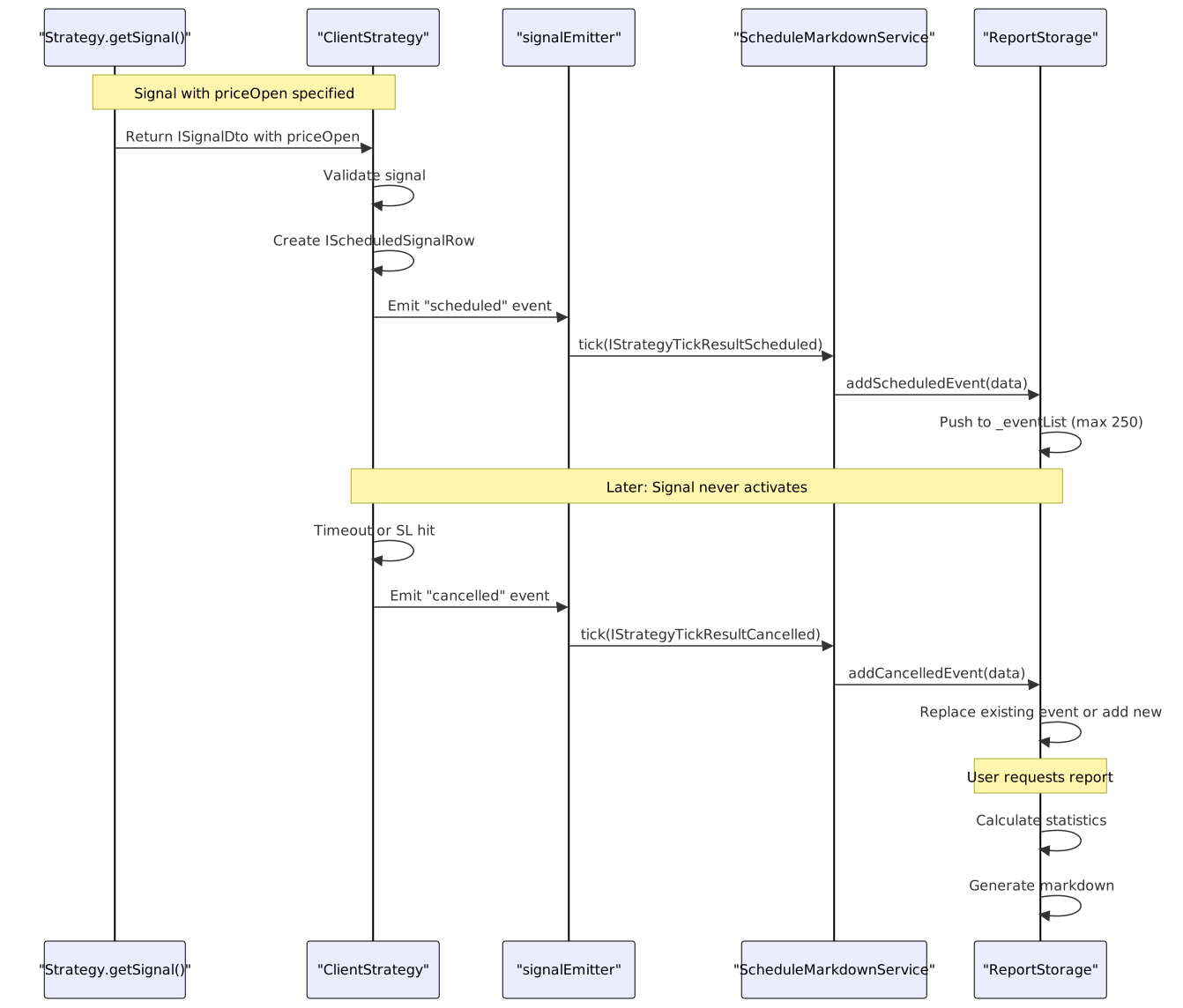
Event Processing Rules:
-
Scheduled Events (src/lib/services/markdown/ScheduleMarkdownService.ts:176-194):
- Appended to
_eventList - Trimmed if exceeds
MAX_EVENTS = 250
- Appended to
-
Cancelled Events (src/lib/services/markdown/ScheduleMarkdownService.ts:202-237):
- Replace existing event with same
signalIdif found - Otherwise append as new event
- Includes
duration(minutes between scheduled and cancelled)
- Replace existing event with same
Memory Management:
- Fixed maximum of 250 events per strategy (src/lib/services/markdown/ScheduleMarkdownService.ts:161)
- FIFO removal: oldest events dropped when limit exceeded
- Separate storage per strategy via memoization key
Statistics Calculation
The ReportStorage.getData() method computes all metrics from the accumulated event list using safe mathematical operations.
Calculation Logic:
// Cancellation Rate
cancellationRate = (totalCancelled / totalScheduled) * 100
// Returns null if totalScheduled === 0
// Average Wait Time (for cancelled signals only)
avgWaitTime = sum(cancelledEvents.duration) / totalCancelled
// Returns null if totalCancelled === 0
Safe Math Implementation:
All calculated values return null when the denominator would be zero, preventing NaN or Infinity results in reports.
Empty Data Handling:
When no events exist, getData() returns:
{
eventList: [],
totalEvents: 0,
totalScheduled: 0,
totalCancelled: 0,
cancellationRate: null,
avgWaitTime: null
}
Report Generation
The markdown report contains a table of all events followed by summary statistics.
Report Structure

Table Columns:
The markdown table includes 11 columns defined in the columns array (src/lib/services/markdown/ScheduleMarkdownService.ts:101-158):
| Column | Description | Example |
|---|---|---|
| Timestamp | ISO 8601 timestamp | 2024-01-01T12:00:00.000Z |
| Action | Event type | SCHEDULED or CANCELLED |
| Symbol | Trading pair | BTCUSDT |
| Signal ID | UUID v4 identifier | a1b2c3d4-... |
| Position | Trade direction | LONG or SHORT |
| Note | User description | Breakout entry |
| Current Price | VWAP at event time | 50000.12345678 USD |
| Entry Price | Scheduled priceOpen | 49500.00000000 USD |
| Take Profit | TP target | 52000.00000000 USD |
| Stop Loss | SL exit | 48000.00000000 USD |
| Wait Time (min) | Minutes waited (cancelled only) | 45 or N/A |
Statistics Footer:
**Total events:** 10
**Scheduled signals:** 7
**Cancelled signals:** 3
**Cancellation rate:** 42.86% (lower is better)
**Average wait time (cancelled):** 38.50 minutes
Initialization and Event Subscription
The ScheduleMarkdownService automatically subscribes to signal events when first accessed using the singleshot pattern.
Initialization Flow:
// ScheduleMarkdownService.init() - singleshot pattern
protected init = singleshot(async () => {
this.loggerService.log("scheduleMarkdownService init");
signalEmitter.subscribe(this.tick);
});
Subscription Details:
- Subscribes to
signalEmitter(general event stream) - Filters for
action === "scheduled"andaction === "cancelled"(src/lib/services/markdown/ScheduleMarkdownService.ts:408-412) - Ignores
opened,active,closed, andidleevents - Subscription persists for application lifetime
Automatic Invocation:
The init() method is called automatically when:
Schedule.getData()is invokedSchedule.getReport()is invokedSchedule.dump()is invoked
No manual initialization required by users.
Usage Patterns
Basic Usage: Track Cancellation Rate
import { addStrategy, Backtest, Schedule } from "backtest-kit";
// Strategy with aggressive entry prices
addStrategy({
strategyName: "limit-scalper",
interval: "5m",
getSignal: async (symbol) => {
const price = await getAveragePrice(symbol);
return {
position: "long",
priceOpen: price - 100, // Entry 100 below current
priceTakeProfit: price + 500,
priceStopLoss: price - 200,
minuteEstimatedTime: 60
};
}
});
// Run backtest
for await (const _ of Backtest.run("BTCUSDT", {
strategyName: "limit-scalper",
exchangeName: "binance",
frameName: "1week-test"
})) {}
// Check cancellation rate
const stats = await Schedule.getData("limit-scalper");
console.log(`Cancellation rate: ${stats.cancellationRate}%`);
if (stats.cancellationRate > 80) {
console.warn("Entry prices too aggressive - 80% never activate");
}
Advanced Usage: Multi-Symbol Analysis
import { Schedule } from "backtest-kit";
const symbols = ["BTCUSDT", "ETHUSDT", "SOLUSDT"];
const strategyName = "limit-scalper";
// Run backtests for all symbols...
// (Schedule automatically tracks all scheduled signals)
// Analyze cancellation patterns
const stats = await Schedule.getData(strategyName);
const cancelledBySymbol = stats.eventList
.filter(e => e.action === "cancelled")
.reduce((acc, event) => {
acc[event.symbol] = (acc[event.symbol] || 0) + 1;
return acc;
}, {});
console.log("Cancellations by symbol:", cancelledBySymbol);
// Generate report
await Schedule.dump(strategyName);
Continuous Monitoring in Live Trading
import { Live, Schedule, listenSignalLive } from "backtest-kit";
// Start live trading with scheduled signals
Live.background("BTCUSDT", {
strategyName: "limit-scalper",
exchangeName: "binance"
});
// Monitor cancellation rate every 5 minutes
setInterval(async () => {
const stats = await Schedule.getData("limit-scalper");
console.log(`Live stats:
Scheduled: ${stats.totalScheduled}
Cancelled: ${stats.totalCancelled}
Rate: ${stats.cancellationRate}%
Avg wait: ${stats.avgWaitTime} min
`);
// Auto-save report
await Schedule.dump("limit-scalper");
}, 5 * 60 * 1000);
Relationship to Signal Lifecycle
The Schedule API fits into the broader signal lifecycle as follows:

API Specialization:
- Schedule API: Tracks pre-activation events (
scheduled,cancelled) - Backtest/Live APIs: Track post-activation events (
opened,active,closed) - Complete picture: Use both APIs together for full lifecycle visibility
Storage and Memory Considerations
Per-Strategy Isolation
Each strategy maintains its own isolated ReportStorage instance via memoization:
private getStorage = memoize<(strategyName: string) => ReportStorage>(
([strategyName]) => `${strategyName}`,
() => new ReportStorage()
);
Implications:
- No data cross-contamination between strategies
- Multiple strategies can run concurrently without interference
- Clearing one strategy's data doesn't affect others
Event List Size Limits
The _eventList array has a fixed maximum size:
const MAX_EVENTS = 250;
// In addScheduledEvent/addCancelledEvent
if (this._eventList.length > MAX_EVENTS) {
this._eventList.shift(); // Remove oldest event
}
Behavior:
- Maximum 250 events stored per strategy
- FIFO eviction when limit exceeded
- Prevents unbounded memory growth in long-running processes
- Lost events don't affect statistics calculation (windowed view)
Consideration for Live Trading: In production live trading with high signal frequency, 250 events may represent only recent history. Periodic dumps preserve complete historical data.
Testing and Validation
The test suite validates all Schedule API functionality:
Test Coverage
| Test Case | Purpose | File Reference |
|---|---|---|
Schedule.getData returns ScheduleStatistics structure |
Validates interface contract | test/spec/scheduled.test.mjs:15-82 |
Schedule.getData calculates cancellation rate |
Verifies metric calculation | test/spec/scheduled.test.mjs:84-154 |
Schedule.getData returns null for unsafe math |
Tests safe math with empty data | test/spec/scheduled.test.mjs:156-209 |
Schedule.getData tracks lifecycle |
Validates event accumulation | test/spec/scheduled.test.mjs:211-289 |
Key Assertions:
ScheduleStatisticsstructure has all required fields- Metrics return
nullfor invalid calculations - Events accumulate correctly in
eventList - Callbacks (
onSchedule,onCancel) fire appropriately
Integration with Other APIs
Complementary to Backtest/Live APIs
// Track both scheduled AND opened/closed signals
for await (const result of Backtest.run("BTCUSDT", context)) {
if (result.action === "closed") {
// Backtest API tracks this
console.log("Position closed:", result.pnl.pnlPercentage);
}
}
// After backtest completes
const backtestStats = await Backtest.getData("my-strategy");
const scheduleStats = await Schedule.getData("my-strategy");
console.log(`
Opened signals: ${backtestStats.totalSignals}
Scheduled signals: ${scheduleStats.totalScheduled}
Cancelled signals: ${scheduleStats.totalCancelled}
Entry success rate: ${(1 - scheduleStats.cancellationRate/100) * 100}%
`);
Works in Both Execution Modes
The Schedule API functions identically in backtest and live modes:
| Execution Mode | Signal Detection | Cancellation Detection |
|---|---|---|
| Backtest | Fast-forward candle iteration detects priceOpen activation | Timeout or SL hit during candle processing |
| Live | VWAP monitoring detects priceOpen activation | Timeout or SL hit during real-time monitoring |
Event emission uses the same emitters in both modes, so Schedule API receives identical event structures.