Training vs Testing Ranges
Purpose and Scope
This document explains the training and testing range architecture in the Optimizer system. Training ranges (rangeTrain) define multiple historical periods used to generate strategy variants, while the testing range (rangeTest) defines a single held-out period for evaluating which strategy performs best. This approach enables automated strategy discovery across different market conditions without overfitting to a single historical period.
For information about the broader Optimizer architecture and data collection pipeline, see Optimizer Architecture. For details on LLM integration and strategy prompting, see LLM Integration. For code generation mechanics, see Strategy Code Generation.
Conceptual Model
The Optimizer uses a train/test split philosophy analogous to machine learning:

Key Insight: Each training range represents a distinct market regime. By generating strategies from multiple regimes, the system produces diverse trading logic. The testing range acts as a held-out validation set to identify which strategy generalizes best to unseen market conditions.
Training Ranges Configuration
Training ranges are defined via the rangeTrain array in IOptimizerSchema. Each range corresponds to one generated strategy variant.
Schema Definition
| Field | Type | Description |
|---|---|---|
rangeTrain |
IOptimizerRange[] |
Array of training periods, each generates one strategy |
startDate |
Date |
Start date of training period (inclusive) |
endDate |
Date |
End date of training period (inclusive) |
note |
string? |
Optional description of market conditions |
Data Collection Per Training Range
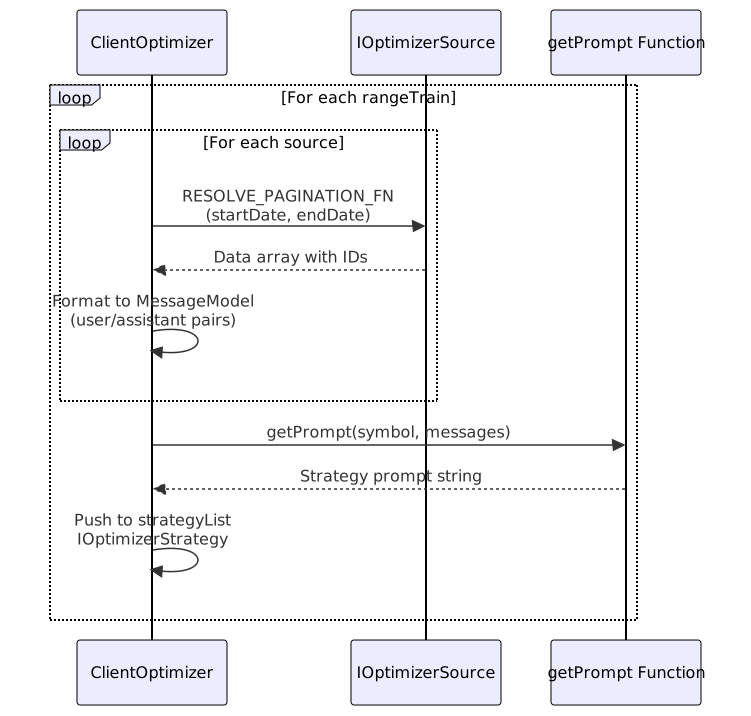
For each training range, the Optimizer:
- Fetches data from all configured sources within the date boundaries
- Builds LLM conversation history by formatting fetched data into user/assistant messages
- Generates strategy prompt by calling
getPrompt()with the complete conversation history - Creates strategy variant with unique name derived from range index
Training Range Iteration
The core iteration logic processes each training range sequentially:
// From ClientOptimizer.ts lines 104-198
for (const { startDate, endDate } of self.params.rangeTrain) {
const messageList: MessageModel[] = [];
for (const source of self.params.source) {
// Fetch data within training range dates
const data = await RESOLVE_PAGINATION_FN(source, {
symbol,
startDate,
endDate,
});
// Build conversation history
messageList.push(
{ role: "user", content: userContent },
{ role: "assistant", content: assistantContent }
);
}
// Generate strategy prompt from conversation
strategyList.push({
symbol,
name,
messages: messageList,
strategy: await self.params.getPrompt(symbol, messageList),
});
}
Progress Tracking: The Optimizer emits progress events as processedSources / totalSources where totalSources = rangeTrain.length * source.length. This enables real-time monitoring via listenOptimizerProgress.
Testing Range Configuration
The testing range (rangeTest) is a single IOptimizerRange used for strategy evaluation. Unlike training ranges which generate strategies, the testing range provides data for comparison.
Schema Definition
| Field | Type | Description |
|---|---|---|
rangeTest |
IOptimizerRange |
Single testing period for Walker evaluation |
startDate |
Date |
Start date of test period (inclusive) |
endDate |
Date |
End date of test period (inclusive) |
note |
string? |
Optional description (e.g., "Q3 2024 validation") |
Purpose and Usage
The testing range serves three critical functions:
- Out-of-Sample Validation: Ensures strategies don't overfit to training data
- Comparative Benchmarking: Provides consistent evaluation period for all strategy variants
- Performance Ranking: Walker uses test period metrics to identify best strategy
Anti-Pattern: Do not overlap training and testing ranges. This creates data leakage and invalidates the evaluation.
Best Practice: Use chronologically sequential ranges (e.g., train on Jan-Jun, test on Jul-Aug) to simulate realistic forward-testing conditions.
Code Generation Pipeline
The Optimizer translates training/testing ranges into executable TypeScript code with distinct frames and strategies.
Frame Generation Mapping

Frame Naming Convention:
- Training frames:
{prefix}_train_frame-{index}where index starts at 1 - Testing frame:
{prefix}_test_frame(always singular)
Strategy Generation Mapping

Strategy Naming Convention: {prefix}_strategy-{index} where index starts at 1 and matches the order of strategyData array.
Critical Detail: Walker always uses prefix_test_frame (the testing range), never the training frames. Training frames exist only for data collection during strategy generation, not for backtest execution.
Complete Code Structure
The generated .mjs file has the following structure:
| Section | Purpose | Code Template Method |
|---|---|---|
| 1. Imports | Ollama, CCXT, backtest-kit | getTopBanner() |
| 2. Helpers | dumpJson() for audit trail |
getJsonDumpTemplate() |
| 3. LLM Functions | text() and json() |
getTextTemplate(), getJsonTemplate() |
| 4. Exchange | CCXT Binance integration | getExchangeTemplate() |
| 5. Train Frames | One per rangeTrain entry |
getFrameTemplate() (loop) |
| 6. Test Frame | Single frame from rangeTest |
getFrameTemplate() (once) |
| 7. Strategies | One per rangeTrain entry |
getStrategyTemplate() (loop) |
| 8. Walker | Compares all on test frame | getWalkerTemplate() |
| 9. Launcher | Event listeners, execution | getLauncherTemplate() |
Walker-Based Selection
The Walker compares all generated strategies on the testing range to identify the best performer.
Execution Flow
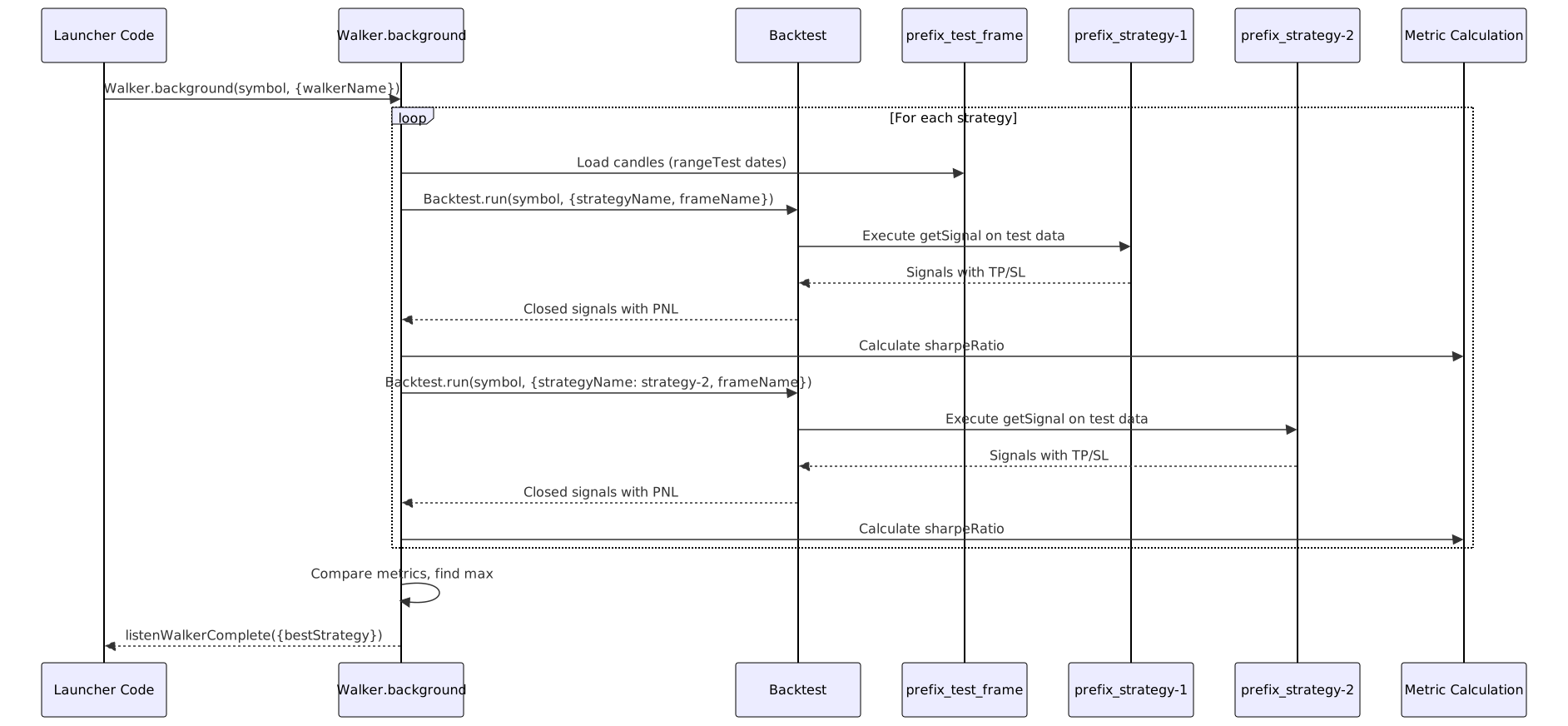
Metric Selection: The Walker uses sharpeRatio as the default comparison metric (configurable via IWalkerSchema.metric). Strategies are ranked in descending order, and the highest metric wins.
Best Strategy Identification
The Walker emits results via listenWalkerComplete event:
// Generated in OptimizerTemplateService.ts lines 429-432
listenWalkerComplete((results) => {
console.log("Walker completed:", results.bestStrategy);
Walker.dump(symbol, results.walkerName);
});
Result Structure: WalkerCompleteContract includes:
bestStrategy: Name of highest-performing strategybestMetric: Metric value for best strategystrategies: Array of all strategies with their metrics
Practical Usage Patterns
Example Configuration
import { addOptimizer } from "backtest-kit";
addOptimizer({
optimizerName: "multi-regime-optimizer",
// Training ranges: 3 different market conditions
rangeTrain: [
{
note: "Bull market Q1 2024",
startDate: new Date("2024-01-01"),
endDate: new Date("2024-03-31"),
},
{
note: "Bear market Q2 2024",
startDate: new Date("2024-04-01"),
endDate: new Date("2024-06-30"),
},
{
note: "Sideways Q3 2024",
startDate: new Date("2024-07-01"),
endDate: new Date("2024-09-30"),
},
],
// Testing range: held-out Q4 2024
rangeTest: {
note: "Validation period Q4 2024",
startDate: new Date("2024-10-01"),
endDate: new Date("2024-12-31"),
},
source: [/* data sources */],
getPrompt: async (symbol, messages) => {/* strategy generation */},
});
Result: Generates 3 strategies (prefix_strategy-1, prefix_strategy-2, prefix_strategy-3), backtests all on Q4 2024, selects best.
Temporal Validation Best Practices
| Pattern | Description | Rationale |
|---|---|---|
| Sequential Ranges | Train on past, test on future | Mimics realistic forward-testing |
| Gap Period | Leave gap between train and test | Reduces autocorrelation effects |
| Multiple Regimes | Use 3-5 diverse training ranges | Generates diverse strategy variants |
| Consistent Duration | Equal-length training ranges | Fair comparison across regimes |
| Rolling Windows | Slide train/test forward | Validates strategy robustness over time |
Anti-Pattern Example: Training on January and testing on February, then reusing February's results to modify the strategy. This creates look-ahead bias and invalidates the test.
Progress Monitoring
The Optimizer emits progress events during data collection:
import { listenOptimizerProgress } from "backtest-kit";
listenOptimizerProgress((event) => {
console.log(`Progress: ${(event.progress * 100).toFixed(2)}%`);
console.log(`Processed: ${event.processedSources} / ${event.totalSources}`);
console.log(`Optimizer: ${event.optimizerName}, Symbol: ${event.symbol}`);
});
Calculation: Progress is processedSources / (rangeTrain.length * source.length). If you have 3 training ranges and 2 sources, total sources = 6.
File Export and Execution
Generated File Structure
The Optimizer.dump() method saves a complete executable file:
Filename Format: {optimizerName}_{symbol}.mjs
Example: For optimizerName: "my-optimizer" and symbol: "BTCUSDT", generates my-optimizer_BTCUSDT.mjs
Execution: The generated file is self-contained and can be run with:
node my-optimizer_BTCUSDT.mjs
Audit Trail Generation
Each generated strategy includes dumpJson() helper that saves LLM conversations to ./dump/strategy/{resultId}/:
| File | Content |
|---|---|
00_system_prompt.md |
System messages and output data |
01_user_message.md |
First user input (1h candles) |
02_user_message.md |
Second user input (15m candles) |
03_user_message.md |
Third user input (5m candles) |
04_user_message.md |
Fourth user input (1m candles) |
05_user_message.md |
Strategy generation request |
06_llm_output.md |
Final LLM signal decision |
This enables complete reproducibility and debugging of strategy generation logic.
Summary
The training vs testing range architecture enables automated strategy discovery with proper validation:
- Training Ranges (
rangeTrain): Define multiple historical periods representing diverse market conditions - One Strategy Per Range: Each training range generates exactly one strategy variant optimized for that period's characteristics
- Testing Range (
rangeTest): Single held-out period for unbiased evaluation of all generated strategies - Walker Comparison: Executes all strategies on test range, ranks by metric (default:
sharpeRatio) - Best Strategy Selection: Identifies strategy with highest test-period performance
Key Advantage: By training on multiple market regimes and testing on unseen data, the system avoids overfitting to specific historical patterns while discovering diverse trading logic suited to different conditions.