Strategy Code Generation
This page documents the code generation system used by the Optimizer to produce executable trading strategy scripts. The generation process transforms collected data and LLM conversation histories into standalone Node.js files that implement multi-timeframe trading strategies with Walker-based comparison.
For information about data collection and LLM integration, see AI-Powered Strategy Optimization. For details on prompt engineering and conversation building, see LLM Integration. For information about walk-forward validation, see Training vs Testing Ranges.
Template System Architecture
The code generation system uses a template-based approach where 11 distinct template methods produce individual code sections. These sections are assembled in a specific order by ClientOptimizer.getCode() to create a complete executable file.
IOptimizerTemplate Interface
The template system is defined by the IOptimizerTemplate interface, which specifies 11 methods that each generate a specific section of the output file. Default implementations are provided by OptimizerTemplateService, but any method can be overridden in the optimizer schema configuration.
Template Methods by Category:
| Category | Method | Purpose | Output Type |
|---|---|---|---|
| Initialization | getTopBanner() |
Shebang, imports, constants | ES module header |
| Helper Functions | getJsonDumpTemplate() |
Debug output writer | Async function |
getTextTemplate() |
LLM text generation | Async function | |
getJsonTemplate() |
LLM structured output | Async function | |
| Component Config | getExchangeTemplate() |
Exchange integration | addExchange() call |
getFrameTemplate() |
Timeframe definition | addFrame() call |
|
getStrategyTemplate() |
Strategy with LLM | addStrategy() call |
|
getWalkerTemplate() |
Strategy comparison | addWalker() call |
|
| Execution | getLauncherTemplate() |
Walker launcher + listeners | Walker.background() + event handlers |
| Conversation | getUserMessage() |
Data prompt formatting | String content |
getAssistantMessage() |
LLM response formatting | String content |
Template System Diagram:

Template Method Reference
Each template method generates a specific code section with consistent escaping and formatting. All methods accept symbol as the first parameter and return a string (or Promise resolving to string) containing valid TypeScript/JavaScript code.
Initialization Templates
getTopBanner
Generates the file header with shebang, imports, and constants.
Signature:
getTopBanner(symbol: string): Promise<string>
Output Structure:
- Shebang line (
#!/usr/bin/env node) - Ollama import for LLM integration
- CCXT import for exchange connectivity
- backtest-kit imports (strategy registration, execution, listeners)
- Node.js built-in imports (
fs/promises,path) - UUID import for debug file naming
WARN_KBconstant for message size warnings
Implementation: src/lib/services/template/OptimizerTemplateService.ts:35-65
Helper Function Templates
getJsonDumpTemplate
Generates the dumpJson() helper function for debugging LLM conversations. Creates a directory structure under ./dump/strategy/{resultId}/ containing:
00_system_prompt.md- System messages and output data{nn}_user_message.md- User input messages by sequence{nn}_llm_output.md- Final LLM response
The function checks for message size and warns if any exceed WARN_KB (100 KB).
Signature:
getJsonDumpTemplate(symbol: string): Promise<string>
Implementation: src/lib/services/template/OptimizerTemplateService.ts:446-540
getTextTemplate
Generates the text() helper function for free-form LLM strategy generation. Uses Ollama's deepseek-v3.1:671b model with a system prompt that requests concise trading strategy reports without greetings or explanations.
The function:
- Initializes Ollama client with API key from environment
- Injects system prompt requesting strategy-only output
- Appends user query for market analysis (support/resistance, LONG/SHORT entry points, risk/reward ratios)
- Requests fundamental analysis rather than dry technical analysis
- Returns escaped content suitable for template literal insertion
Signature:
getTextTemplate(symbol: string): Promise<string>
Implementation: src/lib/services/template/OptimizerTemplateService.ts:549-606
getJsonTemplate
Generates the json() helper function for structured signal generation. Uses JSON schema enforcement to produce signals with:
position: "wait" | "long" | "short"note: Professional trading recommendationpriceOpen: Entry price (market or limit)priceTakeProfit: Target pricepriceStopLoss: Stop priceminuteEstimatedTime: Expected duration (max 360 minutes)
The system prompt includes detailed rules for:
- Position type selection criteria
- Entry price determination (immediate or deferred)
- Exit level calculation (must follow LONG/SHORT logic)
- Time estimation using technical indicators
Signature:
getJsonTemplate(symbol: string): Promise<string>
Implementation: src/lib/services/template/OptimizerTemplateService.ts:623-706
Component Configuration Templates
getExchangeTemplate
Generates addExchange() call with CCXT Binance integration. Includes:
getCandles(): Fetches OHLCV data viafetchOHLCV()formatPrice(): Two decimal placesformatQuantity(): Eight decimal places
The exchange name is dynamically generated with a random prefix to avoid collisions.
Signature:
getExchangeTemplate(symbol: string, exchangeName: ExchangeName): Promise<string>
Implementation: src/lib/services/template/OptimizerTemplateService.ts:308-336
getFrameTemplate
Generates addFrame() call defining a backtest timeframe. Parameters are escaped to prevent code injection attacks.
Signature:
getFrameTemplate(
symbol: string,
frameName: string,
interval: CandleInterval,
startDate: Date,
endDate: Date
): Promise<string>
Implementation: src/lib/services/template/OptimizerTemplateService.ts:348-379
getStrategyTemplate
Generates addStrategy() call with multi-timeframe LLM integration. The strategy's getSignal() function:
- Fetches candles from four timeframes (1m, 5m, 15m, 1h)
- Formats candles as markdown with timestamps
- Builds message history with progressive timeframe analysis:
- Message 1-2: Medium-term trend (1h)
- Message 3-4: Short-term trend (15m)
- Message 5-6: Primary timeframe (5m)
- Message 7-8: Micro-structure (1m)
- Message 9: Final signal request with injected strategy prompt
- Calls
json(messages)to get structured signal - Calls
dumpJson()to save conversation for debugging
The strategy prompt from getPrompt() is escaped and injected into the final message, creating a feedback loop where the LLM both designed the strategy and executes it.
Signature:
getStrategyTemplate(
strategyName: string,
interval: string,
prompt: string
): Promise<string>
Implementation: src/lib/services/template/OptimizerTemplateService.ts:167-298
getWalkerTemplate
Generates addWalker() call for strategy comparison. References:
- Walker name (with random prefix)
- Exchange name
- Test frame name
- Array of strategy names to compare
All strings are escaped to prevent injection.
Signature:
getWalkerTemplate(
walkerName: string,
exchangeName: string,
frameName: string,
strategies: string[]
): Promise<string>
Implementation: src/lib/services/template/OptimizerTemplateService.ts:121-156
Execution Templates
getLauncherTemplate
Generates Walker execution code with comprehensive event listeners:
Walker.background(): Async executionlistenSignalBacktest(): Log each signallistenBacktestProgress(): Progress percentage and frame countslistenWalkerProgress(): Strategy comparison progresslistenWalkerComplete(): Final results and auto-dumplistenDoneBacktest(): Individual strategy completionlistenError(): Error handling
Signature:
getLauncherTemplate(symbol: string, walkerName: string): Promise<string>
Implementation: src/lib/services/template/OptimizerTemplateService.ts:389-437
Conversation Formatting Templates
getUserMessage
Formats data from a source into a user message for LLM conversation. Default implementation creates a simple prompt with JSON serialized data.
Signature:
getUserMessage<Data extends IOptimizerData>(
symbol: string,
data: Data[],
name: string
): Promise<string>
Implementation: src/lib/services/template/OptimizerTemplateService.ts:76-87
getAssistantMessage
Formats the expected assistant response for a data source. Default implementation returns a simple acknowledgment ("ОК").
Signature:
getAssistantMessage<Data extends IOptimizerData>(
symbol: string,
data: Data[],
name: string
): Promise<string>
Implementation: src/lib/services/template/OptimizerTemplateService.ts:98-109
Code Assembly Pipeline
The assembly pipeline in GET_STRATEGY_CODE_FN calls template methods in a specific sequence to build a complete executable file. The function generates unique prefixes for component names to prevent collisions between generated files.
Assembly Sequence Diagram:
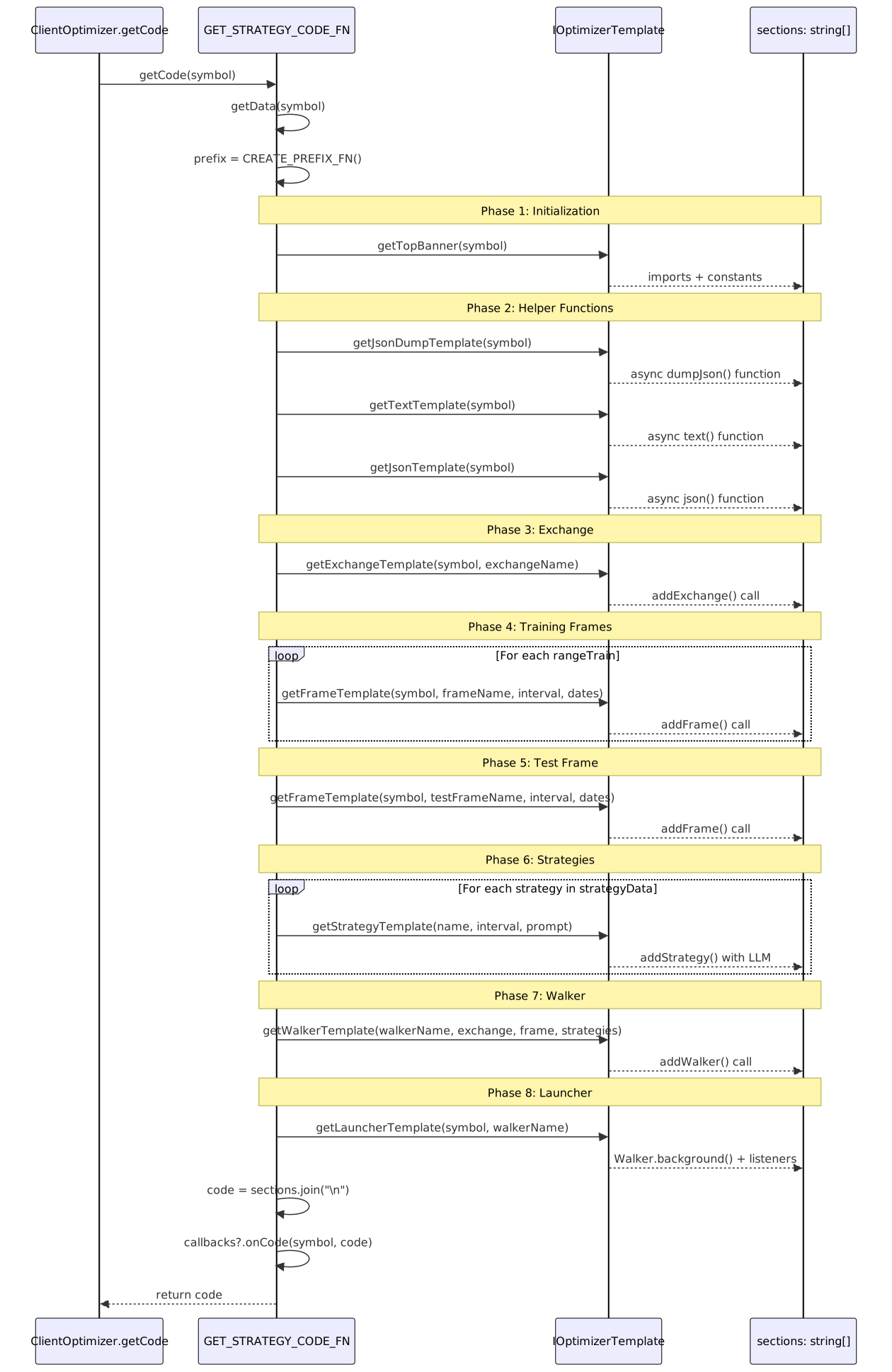
Pipeline Implementation Details:
The assembly pipeline consists of 9 sequential phases:
- Top Banner - Imports and constants src/client/ClientOptimizer.ts:233-236
- JSON Dump Helper - Debug output function src/client/ClientOptimizer.ts:239-242
- Helper Functions - text() and json() LLM wrappers src/client/ClientOptimizer.ts:245-253
- Exchange Configuration - CCXT integration src/client/ClientOptimizer.ts:256-264
- Training Frames - One per rangeTrain entry src/client/ClientOptimizer.ts:267-282
- Test Frame - Single validation frame src/client/ClientOptimizer.ts:285-297
- Strategy Definitions - One per generated strategy src/client/ClientOptimizer.ts:300-314
- Walker Configuration - Strategy comparison setup src/client/ClientOptimizer.ts:317-332
- Launcher Code - Execution and event listeners src/client/ClientOptimizer.ts:335-341
Each section is separated by empty lines for readability. The CREATE_PREFIX_FN() generates a random 7-character identifier that prefixes all component names to ensure uniqueness.
Template Customization
Templates can be partially overridden in the optimizer schema by providing a template field with custom implementations. The OptimizerConnectionService merges custom templates with defaults from OptimizerTemplateService.
Template Merging Diagram:

Example: Custom Strategy Template
addOptimizer({
optimizerName: "my-optimizer",
rangeTrain: [/* ... */],
rangeTest: {/* ... */},
source: [/* ... */],
getPrompt: async (symbol, messages) => {/* ... */},
template: {
// Override only getStrategyTemplate
getStrategyTemplate: async (strategyName, interval, prompt) => {
return `
addStrategy({
strategyName: "${strategyName}",
interval: "${interval}",
getSignal: async (symbol) => {
// Custom implementation without LLM
const candles = await getCandles(symbol, "1m", 50);
// ... custom logic
return signal;
},
});
`;
},
// All other methods use defaults
},
});
The merging process uses destructuring with default fallbacks:
const {
getAssistantMessage = this.optimizerTemplateService.getAssistantMessage,
getExchangeTemplate = this.optimizerTemplateService.getExchangeTemplate,
// ... all 11 methods
} = rawTemplate;
This pattern allows selective override of any template method while maintaining defaults for others.
Generated Code Structure
The generated file follows a consistent structure designed for immediate execution. All components are configured in the correct order to satisfy dependency requirements.
Generated File Structure:
#!/usr/bin/env node
// Imports (Ollama, CCXT, backtest-kit, fs, path, uuid)
const WARN_KB = 100;
// Helper Functions
async function dumpJson(resultId, history, result, outputDir) { /* ... */ }
async function text(messages) { /* ... */ }
async function json(messages) { /* ... */ }
// Exchange Configuration
addExchange({ exchangeName: "{prefix}_exchange", getCandles: ..., formatPrice: ..., formatQuantity: ... });
// Training Frames
addFrame({ frameName: "{prefix}_train_frame-1", interval: "1m", startDate: ..., endDate: ... });
addFrame({ frameName: "{prefix}_train_frame-2", interval: "1m", startDate: ..., endDate: ... });
// ... more training frames
// Test Frame
addFrame({ frameName: "{prefix}_test_frame", interval: "1m", startDate: ..., endDate: ... });
// Strategies
addStrategy({ strategyName: "{prefix}_strategy-1", interval: "5m", getSignal: async (symbol) => { /* LLM integration */ } });
addStrategy({ strategyName: "{prefix}_strategy-2", interval: "5m", getSignal: async (symbol) => { /* LLM integration */ } });
// ... more strategies
// Walker Configuration
addWalker({ walkerName: "{prefix}_walker", exchangeName: "{prefix}_exchange", frameName: "{prefix}_test_frame", strategies: [...] });
// Launcher
Walker.background(symbol, { walkerName: "{prefix}_walker" });
listenSignalBacktest((event) => { console.log(event); });
listenBacktestProgress((event) => { /* ... */ });
listenWalkerProgress((event) => { /* ... */ });
listenWalkerComplete((results) => { /* ... */ });
listenDoneBacktest((event) => { /* ... */ });
listenError((error) => { /* ... */ });
Naming Conventions:
{prefix}: Random 7-character string fromCREATE_PREFIX_FN()- Exchange:
{prefix}_exchange - Train frames:
{prefix}_train_frame-{n}(n = 1-based index) - Test frame:
{prefix}_test_frame - Strategies:
{prefix}_strategy-{n}(n = 1-based index) - Walker:
{prefix}_walker
The prefix ensures that multiple generated files can coexist in the same codebase without naming conflicts.
Security and Escaping
All template methods implement string escaping to prevent code injection attacks. User-controlled strings (symbol, names, prompts) are escaped before insertion into generated code.
Escape Patterns by Template:
| Template | Escaped Parameters | Escape Pattern |
|---|---|---|
getWalkerTemplate |
walkerName, exchangeName, frameName, strategies | Backslash: \\, Quote: \" |
getStrategyTemplate |
strategyName, interval, prompt | Backslash: \\, Quote: \", Backtick: \`, Dollar: \$ |
getExchangeTemplate |
exchangeName | Backslash: \\, Quote: \" |
getFrameTemplate |
frameName, interval | Backslash: \\, Quote: \" |
getLauncherTemplate |
symbol, walkerName | Backslash: \\, Quote: \" |
getTextTemplate |
symbol | Backslash: \\, Backtick: \`, Dollar: \$ |
Example from getStrategyTemplate:
const escapedPrompt = String(prompt)
.replace(/\\/g, '\\\\')
.replace(/`/g, '\\`')
.replace(/\$/g, '\\$');
The prompt escaping is particularly important since it contains LLM-generated content that will be embedded in a template literal. Without proper escaping, malicious content could break out of the string context.
Integration with Execution Pipeline
The generated code integrates seamlessly with backtest-kit's execution modes. The Walker configuration uses the test frame to validate all generated strategies, producing a comparative report.
Execution Flow:

The generated strategies use environment-based authentication (process.env.OLLAMA_API_KEY) for Ollama API access, allowing the same code to run in different environments without modification.