LLM Integration
This page documents the integration between backtest-kit's Optimizer system and Large Language Models via the Ollama API. The integration is implemented through three core helper functions (text(), json(), dumpJson()) that are generated by OptimizerTemplateService and included in every optimizer-generated strategy file.
The LLM integration enables automated strategy generation by processing historical market data through multi-timeframe analysis and producing structured trading signals via JSON schema enforcement.
For information about the overall optimizer architecture, see Optimizer Architecture. For details on data source pagination, see Data Collection Pipeline. For the complete code generation process, see Strategy Code Generation.
Ollama API Integration
The optimizer integrates with Ollama hosting the deepseek-v3.1:671b model. Authentication uses the OLLAMA_API_KEY environment variable. The integration consists of three template methods in OptimizerTemplateService:
| Template Method | Generated Function | Purpose |
|---|---|---|
getTextTemplate() |
text(messages) |
Unstructured market analysis |
getJsonTemplate() |
json(messages) |
Structured signal generation with schema |
getJsonDumpTemplate() |
dumpJson(resultId, history, result) |
Debug output to ./dump/strategy/{uuid}/ |
LLM Integration Data Flow

Message Construction in ClientOptimizer
The GET_STRATEGY_DATA_FN function in ClientOptimizer builds conversation history by iterating through rangeTrain and calling RESOLVE_PAGINATION_FN for each source. Each source contributes a user-assistant message pair using either custom formatters or defaults from OptimizerTemplateService.
Message Construction Flow in GET_STRATEGY_DATA_FN

DEFAULT_USER_FN and DEFAULT_ASSISTANT_FN Implementation
These functions delegate to OptimizerTemplateService methods:
| Function | Signature | Delegates To |
|---|---|---|
DEFAULT_USER_FN |
(symbol, data, name, self) => Promise<string> |
self.params.template.getUserMessage(symbol, data, name) |
DEFAULT_ASSISTANT_FN |
(symbol, data, name, self) => Promise<string> |
self.params.template.getAssistantMessage(symbol, data, name) |
MessageModel Interface
The MessageModel type from src/model/Message.model.ts defines the conversation structure:
interface MessageModel {
role: "assistant" | "system" | "user";
content: string;
}
Helper Function Generation
OptimizerTemplateService generates three helper functions that are injected into every optimizer-created strategy file. These functions encapsulate Ollama API calls with consistent configuration.
Generated Helper Functions
| Template Method | Generated Function | Purpose | Return Type |
|---|---|---|---|
getTextTemplate(symbol) |
async text(messages) |
Unstructured market analysis | Promise<string> |
getJsonTemplate(symbol) |
async json(messages) |
Structured signal with JSON schema | Promise<object> |
getJsonDumpTemplate(symbol) |
async dumpJson(resultId, history, result) |
Debug logging to disk | Promise<void> |
Ollama Client Configuration in Generated Code
Both text() and json() helpers instantiate the Ollama client identically:
const ollama = new Ollama({
host: "https://ollama.com",
headers: {
Authorization: `Bearer ${process.env.OLLAMA_API_KEY}`,
},
});
getTextTemplate() - Unstructured Analysis
The getTextTemplate() method generates a text(messages) helper for fundamental market analysis. The function prepends system instructions and appends a final user query requesting entry conditions.
text() Function Structure

System Message Content
The system message instructs the LLM to produce copy-paste ready output:
В ответ напиши торговую стратегию где нет ничего лишнего,
только отчёт готовый для копипасты целиком
**ВАЖНО**: Не здоровайся, не говори что делаешь - только отчёт!
Final User Message Template
The function appends a final user query with the symbol injected via escapedSymbol:
На каких условиях мне купить ${escapedSymbol}?
Дай анализ рынка на основе поддержки/сопротивления, точек входа в LONG/SHORT позиции.
Какой RR ставить для позиций?
Предпочтительны LONG или SHORT позиции?
Сделай не сухой технический, а фундаментальный анализ, содержащий стратигическую рекомендацию
getJsonTemplate() - Structured Signal Generation
The getJsonTemplate() method generates a json(messages) helper that enforces a JSON schema for trading signals. This is the primary function called in generated addStrategy.getSignal() implementations.
json() Function Structure

ollama.chat() Parameters
The json() helper calls ollama.chat() with the format parameter to enforce schema:
| Parameter | Value |
|---|---|
model |
"deepseek-v3.1:671b" |
messages |
[{role: "system", content}, ...messages] |
format |
JSON schema object with 6 required properties |
Multi-Timeframe Analysis in getStrategyTemplate()
The getStrategyTemplate() method generates addStrategy() calls where getSignal() implements a progressive multi-timeframe analysis. The function calls getCandles() four times and builds a messages array with five user-assistant message pairs before calling json(messages).
getSignal() Execution Flow

Timeframe Parameters
| Variable Name | Interval | Count | Comment in Code |
|---|---|---|---|
mediumTermCandles |
"1h" |
24 |
// Сообщение 1: Среднесрочный тренд |
shortTermCandles |
"15m" |
24 |
// Сообщение 2: Краткосрочный тренд |
mainTermCandles |
"5m" |
24 |
// Сообщение 3: Основной таймфрейм |
microTermCandles |
"1m" |
30 |
// Сообщение 4: Микро-структура |
formatCandles() Local Function
The generated code includes a local formatCandles() function for consistent OHLCV formatting:
function formatCandles(candles, timeframe) {
return candles.map((c) =>
`${new Date(c.timestamp).toISOString()}[${timeframe}]: O:${c.open} H:${c.high} L:${c.low} C:${c.close} V:${c.volume}`
).join("\n");
}
JSON Schema Enforcement in json() Helper
The json() helper function passes a format parameter to ollama.chat() that defines a strict JSON schema. Ollama's JSON mode ensures the LLM output conforms to the schema structure.
ollama.chat() format Parameter Structure

Schema Property Definitions
The schema enforces six required fields with specific types and descriptions:
| Property Name | Type | Enum Values | Description Field |
|---|---|---|---|
position |
"string" |
["wait", "long", "short"] |
"Trade decision: wait (no signal), long (buy), or short (sell)" |
note |
"string" |
- | "Professional trading recommendation with price levels" |
priceOpen |
"number" |
- | "Entry price (current market price or limit order price)" |
priceTakeProfit |
"number" |
- | "Take profit target price" |
priceStopLoss |
"number" |
- | "Stop loss exit price" |
minuteEstimatedTime |
"number" |
- | "Expected time to reach TP in minutes (max 360)" |
System Message Content
The system message in json() provides detailed trading rules split into four sections:
| Section | Key Content |
|---|---|
| ТИПЫ ПОЗИЦИЙ | position='wait': no signal, position='long': bullish, position='short': bearish |
| ЦЕНА ВХОДА (priceOpen) | Can be current market price or limit order price based on technical analysis |
| УРОВНИ ВЫХОДА | LONG: priceTakeProfit > priceOpen > priceStopLoss, SHORT: priceStopLoss > priceOpen > priceTakeProfit |
| ВРЕМЕННЫЕ РАМКИ | minuteEstimatedTime based on ATR, ADX, MACD, Momentum, Slope (max 360) |
Template Override System
OptimizerTemplateService provides defaults for all IOptimizerTemplate methods. These can be overridden at the schema level (IOptimizerSchema.template) or per-source level (IOptimizerSource.user/assistant).
Template Method Resolution in OptimizerConnectionService

IOptimizerTemplate Method List
The service provides defaults for eleven template methods:
| Method Name | Default Return | Purpose |
|---|---|---|
getUserMessage(symbol, data, name) |
"Прочитай данные и скажи ОК\n\n" + JSON.stringify(data) |
User message formatter |
getAssistantMessage(symbol, data, name) |
"ОК" |
Assistant message formatter |
getTopBanner(symbol) |
Shebang + imports + WARN_KB | File header |
getTextTemplate(symbol) |
async function text(messages) {...} |
LLM text analysis helper |
getJsonTemplate(symbol) |
async function json(messages) {...} |
LLM JSON schema helper |
getJsonDumpTemplate(symbol) |
async function dumpJson(...) {...} |
Debug output helper |
getExchangeTemplate(symbol, exchangeName) |
addExchange({...}) |
CCXT Binance integration |
getFrameTemplate(symbol, frameName, ...) |
addFrame({...}) |
Timeframe configuration |
getStrategyTemplate(strategyName, interval, prompt) |
addStrategy({...}) |
Strategy with getSignal |
getWalkerTemplate(walkerName, ...) |
addWalker({...}) |
Strategy comparison |
getLauncherTemplate(symbol, walkerName) |
Walker.background(...) + listeners |
Execution and event handling |
Override Levels
Custom formatters can be provided at two granularities:
| Level | Interface | Override Fields | Scope |
|---|---|---|---|
| Schema Level | IOptimizerSchema.template |
Partial<IOptimizerTemplate> |
All sources in this optimizer |
| Source Level | IOptimizerSource.user/assistant |
(symbol, data, name) => string | Promise<string> |
Specific source only |
Debug Logging with dumpJson()
The getJsonDumpTemplate() method generates an async dumpJson(resultId, history, result, outputDir) function that writes conversation history and LLM output to ./dump/strategy/{resultId}/. This function is called in every generated getSignal() implementation.
dumpJson() Execution Flow

Generated File Structure
| Filename Pattern | Content Description | Line Range |
|---|---|---|
00_system_prompt.md |
ResultId, output JSON, all system messages | src/lib/services/template/OptimizerTemplateService.ts:470-498 |
01_user_message.md, 02_user_message.md, ... |
ResultId, user input N, size check via Buffer.byteLength() |
src/lib/services/template/OptimizerTemplateService.ts:500-525 |
XX_llm_output.md (where XX = userMessages.length + 1) |
ResultId, full output JSON | src/lib/services/template/OptimizerTemplateService.ts:527-543 |
WARN_KB Threshold
The constant WARN_KB = 100 (KB) is checked for each user message:
const messageSizeBytes = Buffer.byteLength(message.content, "utf8");
const messageSizeKb = Math.floor(messageSizeBytes / 1024);
if (messageSizeKb > WARN_KB) {
console.warn(
`User message ${idx + 1} is ${messageSizeBytes} bytes (${messageSizeKb}kb), which exceeds warning limit`
);
}
Return Early Logic
If the resultId folder already exists, dumpJson() returns immediately without writing files. This prevents overwriting debug output on subsequent calls with the same UUID.
Integration with Strategy Execution
The generated LLM-based strategies integrate seamlessly with the backtest-kit execution framework. The getSignal() function calls json(messages) to get trading signals, which are then validated and executed.
Signal Execution Flow
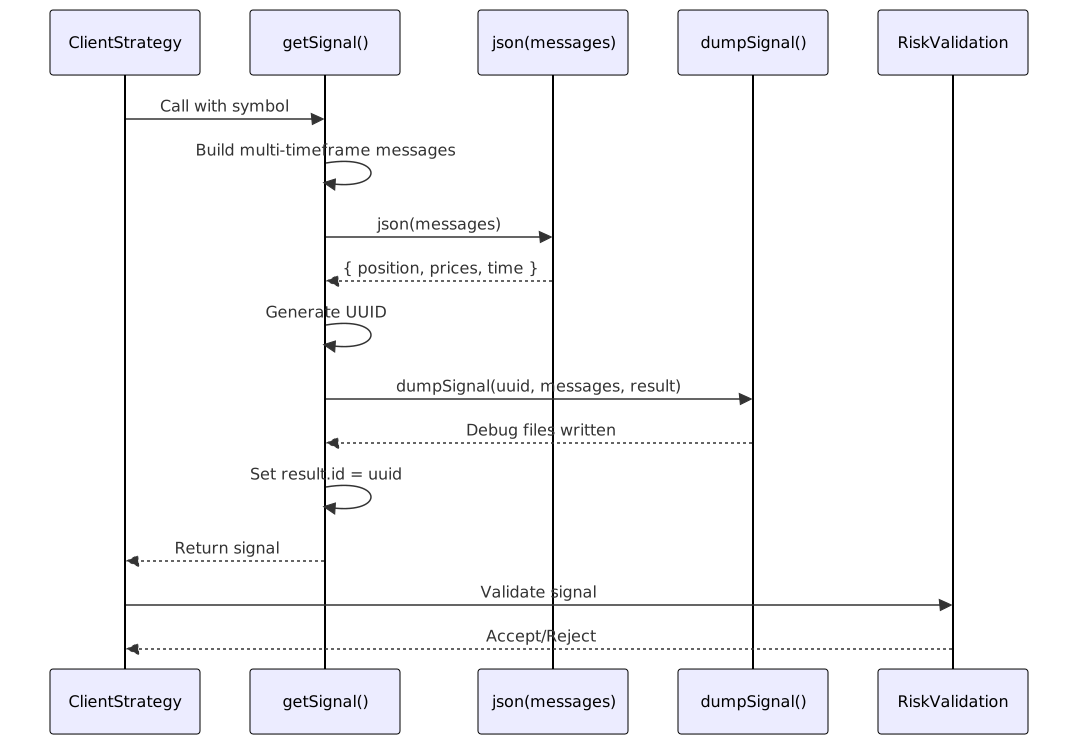
Generated Strategy Example
The optimizer generates strategies that follow this pattern:
addStrategy({
strategyName: "xyz_strategy-1",
interval: "5m",
getSignal: async (symbol) => {
const messages = [];
// 1-4: Multi-timeframe data loading
const microTermCandles = await getCandles(symbol, "1m", 30);
const mainTermCandles = await getCandles(symbol, "5m", 24);
// ... build messages array
// 5: Request signal with strategy prompt
messages.push({ role: "user", content: strategyPrompt });
const resultId = uuid();
const result = await json(messages);
await dumpJson(resultId, messages, result);
result.id = resultId;
return result;
},
});