Data Collection Pipeline
Purpose and Scope
This document describes the data collection phase of the AI-powered optimizer, where historical trading data is fetched from external sources, paginated, formatted into LLM conversation messages, and accumulated across multiple training ranges. For information about the overall optimizer architecture and how components connect, see Optimizer Architecture. For details on how the collected data is sent to the LLM after collection, see LLM Integration.
The data collection pipeline is implemented primarily in ClientOptimizer.getData() and processes sources sequentially for each training date range, building up a conversation history that provides market context for strategy generation.
Source Configuration
Source Type Definitions
The optimizer supports two types of data source configurations, both defined in the IOptimizerSchema.source array:
Simple Function Source
A function implementing IOptimizerSourceFn that accepts pagination parameters and returns data:
type SimpleSoure = (args: IOptimizerFetchArgs) => Data[] | Promise<Data[]>
This form uses default message formatters from OptimizerTemplateService.
Full Configuration Source
An object implementing IOptimizerSource with custom message formatters:
interface IOptimizerSource {
name: string;
fetch: IOptimizerSourceFn;
user?: (symbol, data, name) => string | Promise<string>;
assistant?: (symbol, data, name) => string | Promise<string>;
}
This form allows customization of how data is presented to the LLM.
Data Source Interface Requirements
All data returned from sources must implement IOptimizerData with a unique id field:
interface IOptimizerData {
id: string | number;
}
The id field enables deduplication when paginating through large datasets. Without unique IDs, the same records could be processed multiple times.

Diagram: Source Type Configuration Options
Pagination Architecture
Automatic Pagination with functools-kit
The optimizer uses functools-kit utilities to handle pagination automatically, eliminating the need for manual offset/limit management in user code. The RESOLVE_PAGINATION_FN function at src/client/ClientOptimizer.ts:70-88 orchestrates this:

Diagram: RESOLVE_PAGINATION_FN Pagination Pipeline
The pagination process consists of three stages implemented via functools-kit:
- Iteration:
iterateDocumentscreates a generator that repeatedly invokes the user'sfetchfunction withcreateRequestcallback, incrementingoffsetbyITERATION_LIMIT(25) each iteration until a page returns fewer items than the limit - Deduplication:
distinctDocumentspipes the generator through a filter using(data) => data.idas the comparison key to remove duplicate records across pages - Resolution:
resolveDocumentsconsumes the async generator and accumulates all items into a final array
Fetch Arguments Structure
When the pagination system calls the user's fetch function, it provides IOptimizerFetchArgs:
| Parameter | Type | Source | Description |
|---|---|---|---|
symbol |
string |
from filterData |
Trading pair identifier (e.g., "BTCUSDT") |
startDate |
Date |
from filterData |
Range start (inclusive) |
endDate |
Date |
from filterData |
Range end (inclusive) |
limit |
number |
ITERATION_LIMIT |
Maximum records per page (25) |
offset |
number |
pagination loop | Number of records to skip |
Fetch Arguments Structure
When the pagination system calls the user's fetch function, it provides:
| Parameter | Type | Description |
|---|---|---|
symbol |
string |
Trading pair identifier (e.g., "BTCUSDT") |
startDate |
Date |
Range start (inclusive) |
endDate |
Date |
Range end (inclusive) |
limit |
number |
Maximum records per page (25) |
offset |
number |
Number of records to skip |
Data Collection Execution Flow
Main Collection Function
The GET_STRATEGY_DATA_FN function at src/client/ClientOptimizer.ts:99-215 implements the complete data collection pipeline. It is called by ClientOptimizer.getData() and processes all training ranges sequentially.
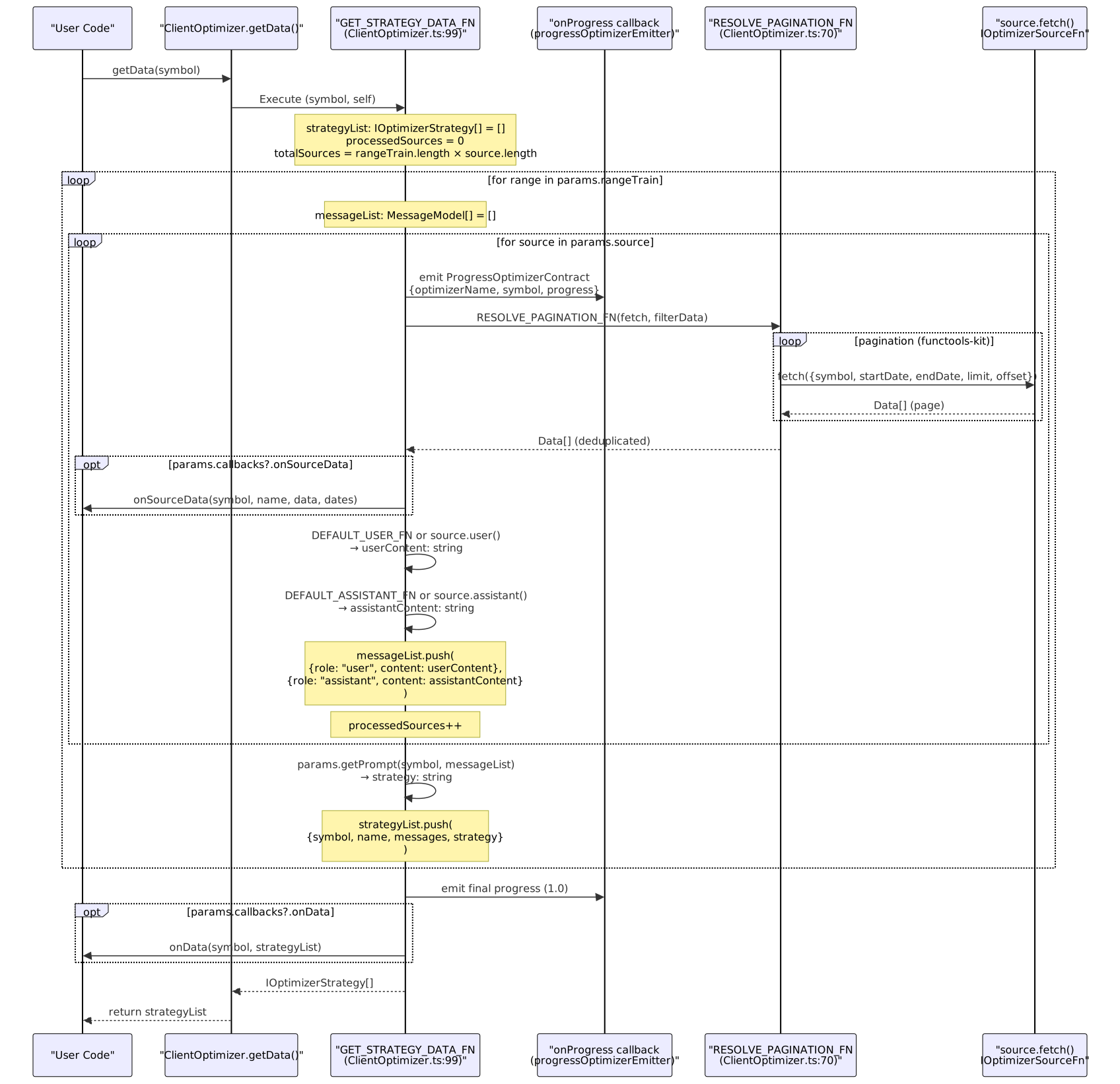
Diagram: GET_STRATEGY_DATA_FN Execution Flow
Progress Tracking
The optimizer emits ProgressOptimizerContract events at two key points:
- Before processing each source: Shows incremental progress through all sources across all training ranges
- After completing all sources: Emits final 100% completion
Progress calculation:
totalSources = rangeTrain.length × source.length
progress = processedSources / totalSources
The progress events are emitted via progressOptimizerEmitter which can be observed using listenOptimizerProgress().
Message Formatting System
Default Message Formatters
The OptimizerTemplateService provides default formatters accessible via template delegation:
User Message Formatter (DEFAULT_USER_FN at src/client/ClientOptimizer.ts:34-41)
const DEFAULT_USER_FN = async (symbol, data, name, self) => {
return await self.params.template.getUserMessage(symbol, data, name);
};
The default implementation in OptimizerTemplateService.getUserMessage at src/lib/services/template/OptimizerTemplateService.ts:77-88 returns:
"Прочитай данные и скажи ОК\n\n" + JSON.stringify(data)
Assistant Message Formatter (DEFAULT_ASSISTANT_FN at src/client/ClientOptimizer.ts:53-60)
const DEFAULT_ASSISTANT_FN = async (symbol, data, name, self) => {
return await self.params.template.getAssistantMessage(symbol, data, name);
};
The default implementation in OptimizerTemplateService.getAssistantMessage at src/lib/services/template/OptimizerTemplateService.ts:99-110 returns:
"ОК"
These simple defaults acknowledge data receipt without processing, allowing the LLM to focus on later strategy generation prompts.
Custom Message Formatters
Sources can override default formatters by providing user and assistant functions in the IOptimizerSource configuration:

Diagram: Message Formatter Selection in GET_STRATEGY_DATA_FN
Custom formatters (when provided in IOptimizerSource) receive:
symbol: Trading pair identifierdata: Complete deduplicatedData[]array fromRESOLVE_PAGINATION_FNname: Source name fromsource.nameorDEFAULT_SOURCE_NAMEself: TheClientOptimizerinstance for accessingparams.template
They must return string | Promise<string> containing the message content.
Message List Structure
For each training range, the optimizer builds a messageList array by appending user/assistant pairs for each source:
messageList: MessageModel[] = [
{ role: "user", content: "<formatted data from source 1>" },
{ role: "assistant", content: "<acknowledgment for source 1>" },
{ role: "user", content: "<formatted data from source 2>" },
{ role: "assistant", content: "<acknowledgment for source 2>" },
// ... one pair per source
]
This conversation history provides the LLM with sequential context across multiple timeframes or data types before requesting a strategy recommendation.
Multi-Timeframe Data Collection Example
CCXT Dumper Integration
The demo implementation shows a real-world pattern for collecting multi-timeframe technical indicator data from a historical database service:

Diagram: Multi-Timeframe Data Source Architecture
Source Configuration Pattern
Each timeframe source follows this structure:
| Component | Purpose |
|---|---|
name |
Identifies the timeframe (e.g., "long-term-range") |
fetch() |
Constructs URL with query params, calls REST API |
user() |
Formats data as markdown table with indicator metadata |
assistant() |
Returns acknowledgment message |
The user() formatter typically includes:
- Markdown table: Raw indicator values with timestamps
- Data sources section: Explains each indicator's calculation period and units
- Context information: Lookback periods, timeframe details
This provides the LLM with both numerical data and interpretive context.
Pagination Implementation
The demo sources use fetchApi from functools-kit with URL query parameters:
const url = new URL(`${process.env.CCXT_DUMPER_URL}/view/long-term-range`);
url.searchParams.set("symbol", symbol);
url.searchParams.set("startDate", startDate.getTime());
url.searchParams.set("endDate", endDate.getTime());
url.searchParams.set("limit", limit || 1000);
url.searchParams.set("offset", offset || 0);
The CCXT Dumper service returns paginated results matching the limit/offset semantics expected by RESOLVE_PAGINATION_FN.
Training Range Configuration
The demo defines 7 consecutive training days and 1 test day:
const TRAIN_RANGE = [
{ note: "24 ноября 2025", startDate: ..., endDate: ... },
{ note: "25 ноября 2025", startDate: ..., endDate: ... },
// ... 5 more days
];
const TEST_RANGE = {
note: "1 декабря 2025",
startDate: new Date("2025-12-01T00:00:00Z"),
endDate: new Date("2025-12-01T23:59:59Z"),
};
For each training day, the optimizer collects all 4 timeframes, generating 7 separate strategy variants (one per day) that will later be compared via Walker on the test range.
Callbacks and Lifecycle Hooks
Available Callbacks
The optimizer schema supports three callbacks related to data collection:
| Callback | Trigger Point | Parameters |
|---|---|---|
onSourceData |
After each source fetch completes | symbol, sourceName, data, startDate, endDate |
onData |
After all training ranges complete | symbol, strategyList |
onCode |
After code generation (not collection phase) | symbol, code |
onDump |
After file write (not collection phase) | symbol, filepath |
The onSourceData callback executes during collection and receives the raw deduplicated data array for each source, enabling:
- Data validation
- Logging/debugging
- Custom persistence
- Analytics
Integration with OptimizerConnectionService
The OptimizerConnectionService retrieves the schema, merges templates, and instantiates ClientOptimizer:

Diagram: Service Layer Dependency Flow
The OptimizerConnectionService.getOptimizer() method at src/lib/services/connection/OptimizerConnectionService.ts:59-113 is responsible for:
- Calling
optimizerSchemaService.get(optimizerName)to retrieveIOptimizerSchema - Extracting
schema.templatepartial overrides (if provided) - Merging with default methods from
OptimizerTemplateServiceto create completeIOptimizerTemplate - Constructing
ClientOptimizerwithIOptimizerParams(includes logger, merged template, callbacks) - Passing
COMMIT_PROGRESS_FNcallback for emitting progress events toprogressOptimizerEmitter - Memoizing the instance by
optimizerNamefor reuse
Error Handling and Edge Cases
Empty Data Handling
If a source returns an empty array (no data for the date range), the optimizer still formats and appends message pairs to messageList. The LLM receives empty data context, which it may interpret as "no trading activity" or "insufficient data."
Missing Source Name
When using the simple function source type (IOptimizerSourceFn without configuration object), the name defaults to DEFAULT_SOURCE_NAME = "unknown" defined at src/client/ClientOptimizer.ts:20. This name appears in:
- Progress events (
ProgressOptimizerContract) - Callback parameters (
onSourceData) - Generated strategy metadata (
IOptimizerStrategy.name)
The name extraction logic at src/client/ClientOptimizer.ts:188-191 handles both source types:
const name = "name" in source
? source.name || DEFAULT_SOURCE_NAME
: DEFAULT_SOURCE_NAME;
Duplicate ID Handling
The distinctDocuments function compares records by their id field. If multiple records share the same ID across different pages, only the first occurrence is kept. This prevents double-counting but requires that source IDs are stable and unique.
Async Formatter Execution
Both user and assistant formatters support async execution. The optimizer waits for both to resolve using Promise.all() before appending to messageList:
const [userContent, assistantContent] = await Promise.all([
user(symbol, data, name, self),
assistant(symbol, data, name, self),
]);
This enables formatters to perform async operations like:
- API calls for additional context
- Database lookups
- File I/O for templates
Performance Considerations
Sequential Source Processing
Sources are processed sequentially within each training range (not in parallel). This design choice:
- Simplifies progress tracking
- Preserves message ordering
- Reduces concurrent API load on external services
- Enables early error detection
Memory Accumulation
The complete messageList for each training range is held in memory until getPrompt() is called. For large datasets or many sources, this can consume significant memory. Consider:
- Limiting data returned per source
- Using summary statistics instead of raw records
- Processing ranges incrementally
Pagination Limit
The ITERATION_LIMIT = 25 controls page size for pagination. Smaller values mean more API calls but less memory per request. Larger values reduce API overhead but require more memory per page.
Summary
The data collection pipeline transforms external data sources into structured LLM conversation context through these key operations:
- Source registration via
IOptimizerSchema.sourcearray - Pagination via functools-kit utilities for large datasets
- Message formatting with customizable user/assistant functions
- Training range iteration to generate multiple strategy variants
- Progress tracking with
ProgressOptimizerContractevents - Callback hooks for monitoring and validation
The collected data (represented as IOptimizerStrategy[]) serves as input to the LLM integration phase described in LLM Integration, where it is combined with system prompts to generate trading strategy recommendations.