Reporting and Analytics
This document describes the reporting and analytics capabilities of the backtest-kit framework. The system provides markdown-based reports for both backtest and live trading modes, accumulating signal events and calculating performance statistics.
For information about signal lifecycle and PnL calculations that feed into reports, see Signal Lifecycle. For details on the public API methods to retrieve reports, see Backtest API and Live Trading API.
Overview
The reporting system consists of four specialized markdown services that passively observe execution events and accumulate them for analysis:
- BacktestMarkdownService: Accumulates only closed signals from backtest execution
- LiveMarkdownService: Accumulates all tick events (idle, opened, active, closed) from live trading
- WalkerMarkdownService: Accumulates strategy comparison results with best strategy selection
- ScheduleMarkdownService: Tracks scheduled and cancelled signals to measure limit order effectiveness
All services operate independently from the main execution flow, subscribing to events via event emitters and maintaining isolated storage per strategy/walker. Reports are generated on-demand and can be exported to markdown files in ./logs/{mode}/ directories.
Additionally, the framework provides performance profiling via performanceEmitter, which tracks execution timing metrics for bottleneck analysis.
Reporting System Architecture Diagram

Service Architecture
BacktestMarkdownService
The BacktestMarkdownService class is designed for post-execution analysis of backtest results. It only processes closed signals, ignoring opened and active states to focus on completed trades.
| Feature | Implementation |
|---|---|
| Event Source | signalBacktestEmitter |
| Event Types | Only closed actions |
| Storage Model | Accumulates all closed signals chronologically in _signalList array |
| Default Output Path | ./logs/backtest/{strategyName}.md |
| Initialization | Automatic via singleshot decorator on first method call |
| Memoization Key | strategyName |
The service maintains a memoized ReportStorage instance per strategy name via getStorage = memoize((strategyName) => new ReportStorage()), ensuring isolated data collection when multiple strategies run concurrently. The storage accumulates IStrategyTickResultClosed objects in an internal array.
The tick() method filters events:
if (data.action !== "closed") {
return; // Ignore non-closed events
}
const storage = this.getStorage(data.strategyName);
storage.addSignal(data);
LiveMarkdownService
The LiveMarkdownService class provides operational visibility into live trading activity. Unlike the backtest service, it captures all tick events to provide a complete audit trail.
| Feature | Implementation |
|---|---|
| Event Source | signalLiveEmitter |
| Event Types | idle, opened, active, closed |
| Storage Model | Updates existing events by signalId for active/closed, appends for idle/opened |
| Max Events | 250 events (with FIFO eviction via shift()) |
| Default Output Path | ./logs/live/{strategyName}.md |
| Initialization | Automatic via singleshot decorator on first method call |
| Memoization Key | strategyName |
The service uses a more sophisticated storage mechanism that replaces existing events with the same signalId for active and closed actions, ensuring the report shows the latest state of each signal. This prevents duplicate entries when a signal transitions from active to closed.
For idle events, the service implements smart replacement logic:
- If the last event is
idleand noopened/activeevents follow it, replace it (avoids idle spam) - Otherwise, append the new idle event
WalkerMarkdownService
The WalkerMarkdownService class generates comparison reports for multi-strategy backtests executed via Walker.run(). It accumulates results from each strategy and ranks them by a configurable metric.
| Feature | Implementation |
|---|---|
| Event Source | walkerEmitter (progress) and walkerCompleteSubject (final results) |
| Event Types | Strategy completion events with statistics |
| Storage Model | Accumulates per-strategy results in _strategyResults map |
| Default Output Path | ./logs/walker/{walkerName}-{symbol}.md |
| Initialization | Automatic via singleshot decorator on first method call |
| Memoization Key | ${walkerName}:${symbol} |
The service provides getData() which returns:
bestStrategy: Strategy name with highest metric valuebestMetric: The metric value of the best strategystrategies: Array of all strategies with their stats and metric values, sorted descending
Metrics supported for comparison (specified in IWalkerSchema.metric):
sharpeRatio(default)winRateavgPnltotalPnlcertaintyRatio
ScheduleMarkdownService
The ScheduleMarkdownService class tracks scheduled signals (limit orders) and their outcomes to measure strategy effectiveness with limit orders.
| Feature | Implementation |
|---|---|
| Event Source | signalEmitter (both live and backtest) |
| Event Types | scheduled, cancelled |
| Storage Model | Updates existing events by signalId for cancelled, appends for scheduled |
| Max Events | 250 events (with FIFO eviction via shift()) |
| Default Output Path | ./logs/schedule/{strategyName}.md |
| Initialization | Automatic via singleshot decorator on first method call |
| Memoization Key | strategyName |
The service calculates key metrics for limit order effectiveness:
- Cancellation Rate:
(totalCancelled / totalScheduled) * 100- Lower is better - Average Wait Time: Mean duration for cancelled signals in minutes
Scheduled signals are created when signal.priceOpen is specified (price must reach entry before activation). They transition to cancelled if:
- Timeout expires (
CC_SCHEDULE_AWAIT_MINUTESminutes pass without activation) - Stop loss price is hit before entry price
Report Structure
Column Configuration
Both services define their reports using a Column interface that specifies extraction and formatting logic:

Backtest Report Columns
The backtest report focuses on completed trade analysis with the following columns:
| Column | Format | Source |
|---|---|---|
| Signal ID | Plain text | data.signal.id |
| Symbol | Plain text | data.signal.symbol |
| Position | Uppercase | data.signal.position.toUpperCase() |
| Note | Plain text or "N/A" | data.signal.note ?? "N/A" |
| Open Price | Fixed 8 decimals + " USD" | data.signal.priceOpen.toFixed(8) |
| Close Price | Fixed 8 decimals + " USD" | data.currentPrice.toFixed(8) |
| Take Profit | Fixed 8 decimals + " USD" | data.signal.priceTakeProfit.toFixed(8) |
| Stop Loss | Fixed 8 decimals + " USD" | data.signal.priceStopLoss.toFixed(8) |
| PNL (net) | Fixed 2 decimals + "%" with sign | ${pnl > 0 ? "+" : ""}${pnl.toFixed(2)}% |
| Close Reason | Plain text | data.closeReason |
| Duration (min) | Integer minutes | Math.round((closeTimestamp - pendingAt) / 60000) |
| Open Time | ISO 8601 | new Date(data.signal.pendingAt).toISOString() |
| Close Time | ISO 8601 | new Date(data.closeTimestamp).toISOString() |
Live Report Columns
The live trading report includes all event types with these columns:
| Column | Format | Nullable |
|---|---|---|
| Timestamp | ISO 8601 | No |
| Action | Uppercase (IDLE, OPENED, ACTIVE, CLOSED) | No |
| Symbol | Plain text or "N/A" | Yes |
| Signal ID | Plain text or "N/A" | Yes |
| Position | Uppercase or "N/A" | Yes |
| Note | Plain text or "N/A" | Yes |
| Current Price | Fixed 8 decimals + " USD" | No |
| Open Price | Fixed 8 decimals + " USD" or "N/A" | Yes |
| Take Profit | Fixed 8 decimals + " USD" or "N/A" | Yes |
| Stop Loss | Fixed 8 decimals + " USD" or "N/A" | Yes |
| PNL (net) | Fixed 2 decimals + "%" with sign or "N/A" | Yes |
| Close Reason | Plain text or "N/A" | Yes |
| Duration (min) | Integer minutes or "N/A" | Yes |
The nullable columns are only populated for relevant event types (e.g., pnl only exists for closed events, signalId does not exist for idle events).
Schedule Report Columns
The schedule report tracks scheduled and cancelled limit order signals:
| Column | Format | Nullable |
|---|---|---|
| Timestamp | ISO 8601 | No |
| Action | Uppercase (SCHEDULED, CANCELLED) | No |
| Symbol | Plain text | No |
| Signal ID | Plain text | No |
| Position | Uppercase | No |
| Note | Plain text or "N/A" | Yes |
| Current Price | Fixed 8 decimals + " USD" | No |
| Entry Price | Fixed 8 decimals + " USD" | No |
| Take Profit | Fixed 8 decimals + " USD" | No |
| Stop Loss | Fixed 8 decimals + " USD" | No |
| Wait Time (min) | Integer minutes or "N/A" | Yes (only for cancelled) |
The Wait Time column shows how long the signal waited before cancellation (timeout or SL hit before entry).
Walker Report Structure
Walker reports are different from signal-based reports. Instead of a table of individual signals, they display a comparison table of strategies with their aggregate statistics.
Walker Report Format
# Walker Comparison: my-walker
Symbol: BTCUSDT
Metric: sharpeRatio
| Strategy | Win Rate | Avg PNL | Total PNL | Sharpe Ratio | Metric Value |
|----------|----------|---------|-----------|--------------|--------------|
| strategy-a | 65.2% | +1.85% | +45.3% | 1.92 | 1.92 |
| strategy-b | 58.3% | +1.45% | +38.7% | 1.67 | 1.67 |
| strategy-c | 52.1% | +1.12% | +28.4% | 1.34 | 1.34 |
Best Strategy: strategy-a
Best Metric: 1.92
The table is sorted descending by the selected metric, making it easy to identify the best-performing strategy at a glance.
Data Storage and Event Processing
ReportStorage Implementation
Both services use an internal ReportStorage class to manage data accumulation:

Backtest Event Processing
The backtest service implements a simple append-only model:
// Simplified logic from BacktestMarkdownService.tick()
if (data.action !== "closed") {
return; // Ignore non-closed events
}
const storage = this.getStorage(data.strategyName);
storage.addSignal(data); // Append to list
Each closed signal is appended to the _signalList array without modification.
Live Event Processing
The live service implements an update-or-append model to handle signal state transitions:

This design ensures that each signal appears only once in the final report, showing its most recent state.
Statistics Calculation
Common Metrics
Both BacktestMarkdownService and LiveMarkdownService calculate comprehensive performance statistics using the getData() method. All numeric metrics return null if the calculation would produce NaN, Infinity, or non-numeric values (via isUnsafe() guard function).
Safe Math Guard Function
function isUnsafe(value: number | null): boolean {
if (typeof value !== "number") return true;
if (isNaN(value)) return true;
if (!isFinite(value)) return true;
return false;
}
This prevents display of invalid metrics like NaN% or Infinity in reports, returning null instead which renders as "N/A" in markdown.
Statistical Metrics Table
| Metric | Formula | Implementation | Interpretation |
|---|---|---|---|
| Total Signals/Events | Count of closed signals | signalList.length or eventList.filter(e => e.action === "closed").length |
Total completed trades |
| Win Count | Signals with PNL > 0 | signals.filter(s => s.pnl.pnlPercentage > 0).length |
Number of profitable trades |
| Loss Count | Signals with PNL < 0 | signals.filter(s => s.pnl.pnlPercentage < 0).length |
Number of losing trades |
| Win Rate | (winCount / totalSignals) * 100 |
Percentage (0-100) | Higher is better |
| Average PNL | sum(pnl) / totalSignals |
Mean percentage return per trade | Higher is better |
| Total PNL | sum(pnl) |
Cumulative percentage return | Higher is better |
| Standard Deviation | sqrt(variance) where variance = sum((pnl - avgPnl)^2) / totalSignals |
Volatility of returns | Lower is better |
| Sharpe Ratio | avgPnl / stdDev (risk-free rate = 0) |
Risk-adjusted return | Higher is better |
| Annualized Sharpe Ratio | sharpeRatio * sqrt(365) |
Sharpe scaled to yearly basis | Higher is better |
| Certainty Ratio | avgWin / abs(avgLoss) |
Ratio of average win to average loss | Higher is better |
| Expected Yearly Returns | avgPnl * tradesPerYear where tradesPerYear = 365 / avgDurationDays |
Projected annual return | Higher is better |
Sharpe Ratio Calculation Example
const avgPnl = signals.reduce((sum, s) => sum + s.pnl.pnlPercentage, 0) / totalSignals;
const returns = signals.map(s => s.pnl.pnlPercentage);
const variance = returns.reduce((sum, r) => sum + Math.pow(r - avgPnl, 2), 0) / totalSignals;
const stdDev = Math.sqrt(variance);
const sharpeRatio = stdDev > 0 ? avgPnl / stdDev : 0;
const annualizedSharpeRatio = sharpeRatio * Math.sqrt(365);
Certainty Ratio Calculation Example
const wins = signals.filter(s => s.pnl.pnlPercentage > 0);
const losses = signals.filter(s => s.pnl.pnlPercentage < 0);
const avgWin = wins.length > 0
? wins.reduce((sum, s) => sum + s.pnl.pnlPercentage, 0) / wins.length
: 0;
const avgLoss = losses.length > 0
? losses.reduce((sum, s) => sum + s.pnl.pnlPercentage, 0) / losses.length
: 0;
const certaintyRatio = avgLoss < 0 ? avgWin / Math.abs(avgLoss) : 0;
Expected Yearly Returns Calculation Example
const avgDurationMs = signals.reduce(
(sum, s) => sum + (s.closeTimestamp - s.signal.pendingAt),
0
) / totalSignals;
const avgDurationDays = avgDurationMs / (1000 * 60 * 60 * 24);
const tradesPerYear = avgDurationDays > 0 ? 365 / avgDurationDays : 0;
const expectedYearlyReturns = avgPnl * tradesPerYear;
All calculations return null if the result is unsafe, which renders as "N/A" in markdown reports.
Backtest Statistics Interface
export interface BacktestStatistics {
signalList: IStrategyTickResultClosed[];
totalSignals: number;
winCount: number;
lossCount: number;
winRate: number | null;
avgPnl: number | null;
totalPnl: number | null;
stdDev: number | null;
sharpeRatio: number | null;
annualizedSharpeRatio: number | null;
certaintyRatio: number | null;
expectedYearlyReturns: number | null;
}
Live Statistics Interface
export interface LiveStatistics {
eventList: TickEvent[];
totalEvents: number;
totalClosed: number;
winCount: number;
lossCount: number;
winRate: number | null;
avgPnl: number | null;
totalPnl: number | null;
stdDev: number | null;
sharpeRatio: number | null;
annualizedSharpeRatio: number | null;
certaintyRatio: number | null;
expectedYearlyReturns: number | null;
}
The only difference from backtest statistics is that eventList includes all event types (idle, opened, active, closed), not just closed signals.
Schedule Statistics Interface
export interface ScheduleStatistics {
eventList: ScheduledEvent[];
totalEvents: number;
totalScheduled: number;
totalCancelled: number;
cancellationRate: number | null;
avgWaitTime: number | null;
}
Schedule statistics focus on limit order effectiveness rather than trading performance.
Performance Profiling
The framework provides built-in performance profiling via the performanceEmitter to track execution timing for bottleneck analysis.
Performance Metrics Event
export interface PerformanceContract {
metricType: string;
duration: number; // milliseconds
strategyName?: string;
symbol?: string;
timestamp: number;
}
Metric Types
The framework emits the following metric types during execution:
| Metric Type | Description | Source |
|---|---|---|
backtest_total |
Total backtest execution time | Entire Backtest.run() duration |
backtest_timeframe |
Time to generate timeframe array | Frame.getTimeframe() call |
backtest_signal |
Time per signal generation + validation | Strategy.tick() call |
live_tick |
Time per live tick iteration | Each iteration of Live.run() loop |
Listening to Performance Events
import { listenPerformance } from "backtest-kit";
const unsubscribe = listenPerformance((event) => {
console.log(`${event.metricType}: ${event.duration.toFixed(2)}ms`);
if (event.duration > 100) {
console.warn("Slow operation detected:", event.metricType);
}
});
// Later: stop listening
unsubscribe();
Events are processed sequentially via queued() wrapper to prevent concurrent callback execution, ensuring consistent metric aggregation even with async callbacks.
Public API Methods
getData() Methods
All markdown services provide a getData() method that returns structured statistics without formatting:
| API Method | Return Type | Description |
|---|---|---|
Backtest.getData(strategyName) |
BacktestStatistics |
All closed signals with calculated metrics |
Live.getData(strategyName) |
LiveStatistics |
All events (idle/opened/active/closed) with metrics |
Schedule.getData(strategyName) |
ScheduleStatistics |
Scheduled/cancelled events with cancellation metrics |
Walker.getData(symbol, walkerName) |
IWalkerResults |
Strategy comparison with best strategy selection |
Usage Example
// Get backtest statistics
const backtestStats = await Backtest.getData("my-strategy");
console.log("Sharpe Ratio:", backtestStats.sharpeRatio);
console.log("Win Rate:", backtestStats.winRate);
// Get live statistics
const liveStats = await Live.getData("my-strategy");
console.log("Total Events:", liveStats.totalEvents);
console.log("Closed Signals:", liveStats.totalClosed);
// Get schedule statistics
const scheduleStats = await Schedule.getData("my-strategy");
console.log("Cancellation Rate:", scheduleStats.cancellationRate);
console.log("Avg Wait Time:", scheduleStats.avgWaitTime);
// Get walker results
const walkerResults = await Walker.getData("BTCUSDT", "my-walker");
console.log("Best Strategy:", walkerResults.bestStrategy);
console.log("Best Metric:", walkerResults.bestMetric);
getReport() Methods
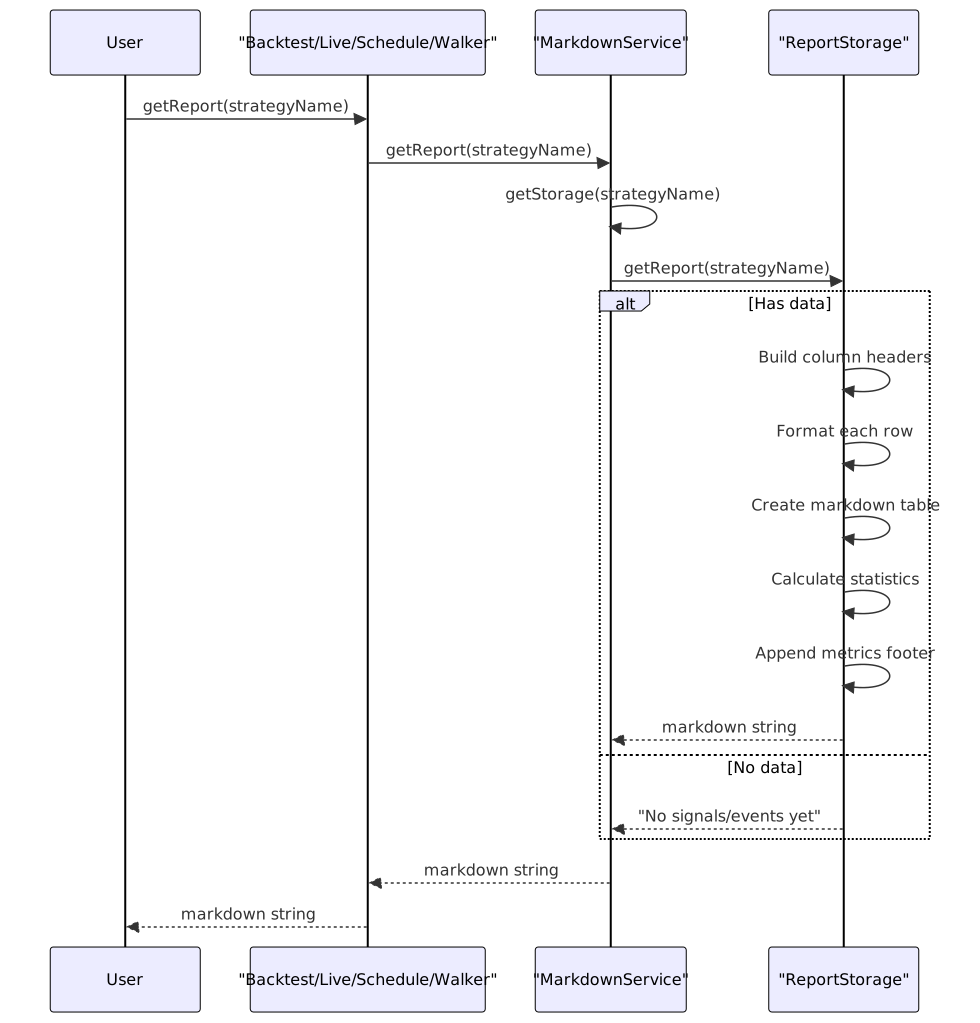
All markdown services expose a getReport() method that returns a markdown-formatted string:
Report Generation Flow Diagram
Usage Example
// Backtest
const backtestReport = await Backtest.getReport("my-strategy");
console.log(backtestReport);
// Live
const liveReport = await Live.getReport("my-strategy");
console.log(liveReport);
// Schedule
const scheduleReport = await Schedule.getReport("my-strategy");
console.log(scheduleReport);
// Walker
const walkerReport = await Walker.getReport("BTCUSDT", "my-walker");
console.log(walkerReport);
dump() Methods - Saving Reports to Disk
The dump() method writes reports to the file system:
| Method | Default Path | File Name | Behavior |
|---|---|---|---|
Backtest.dump(strategyName, path?) |
./logs/backtest/ |
{strategyName}.md |
Creates directory recursively, overwrites existing file |
Live.dump(strategyName, path?) |
./logs/live/ |
{strategyName}.md |
Creates directory recursively, overwrites existing file |
Schedule.dump(strategyName, path?) |
./logs/schedule/ |
{strategyName}.md |
Creates directory recursively, overwrites existing file |
Walker.dump(symbol, walkerName, path?) |
./logs/walker/ |
{walkerName}-{symbol}.md |
Creates directory recursively, overwrites existing file |
The method uses Node.js fs/promises for async file operations:
// Internal implementation
const dir = join(process.cwd(), path);
await mkdir(dir, { recursive: true });
await writeFile(filepath, markdown, "utf-8");
console.log(`Report saved: ${filepath}`);
Error handling logs failures to console but does not throw exceptions, ensuring that report generation failures don't crash the main application.
Usage Example
// Save to default paths
await Backtest.dump("my-strategy");
await Live.dump("my-strategy");
await Schedule.dump("my-strategy");
await Walker.dump("BTCUSDT", "my-walker");
// Save to custom paths
await Backtest.dump("my-strategy", "./custom/path");
await Live.dump("my-strategy", "./custom/path");
await Schedule.dump("my-strategy", "./custom/path");
await Walker.dump("BTCUSDT", "my-walker", "./custom/path");
clear() Methods - Clearing Accumulated Data
The clear() method resets accumulated data by removing memoized ReportStorage instances:
| Method | Behavior |
|---|---|
Backtest.clear(strategyName?) |
Clears backtest report data for strategy (or all if omitted) |
Live.clear(strategyName?) |
Clears live report data for strategy (or all if omitted) |
Schedule.clear(strategyName?) |
Clears schedule report data for strategy (or all if omitted) |
Walker.clear(walkerName?) |
Clears walker report data for walker (or all if omitted) |
Implementation Detail
The clear() method delegates to the memoized getStorage function's clear() method, which is provided by the memoize() utility from functools-kit:
// Service implementation
private getStorage = memoize<(strategyName: string) => ReportStorage>(
([strategyName]) => `${strategyName}`, // Key function
() => new ReportStorage() // Factory function
);
public clear = async (strategyName?: StrategyName) => {
this.getStorage.clear(strategyName); // Clear cache entry
};
- Clearing with a specific key removes only that cache entry
- Clearing without arguments removes all cached instances
Usage Example
// Clear specific strategy/walker data
await Backtest.clear("my-strategy");
await Live.clear("my-strategy");
await Schedule.clear("my-strategy");
await Walker.clear("my-walker");
// Clear all accumulated data
await Backtest.clear();
await Live.clear();
await Schedule.clear();
await Walker.clear();
Initialization and Event Subscription
Automatic Initialization
Both services use the singleshot decorator from functools-kit to ensure initialization happens exactly once:
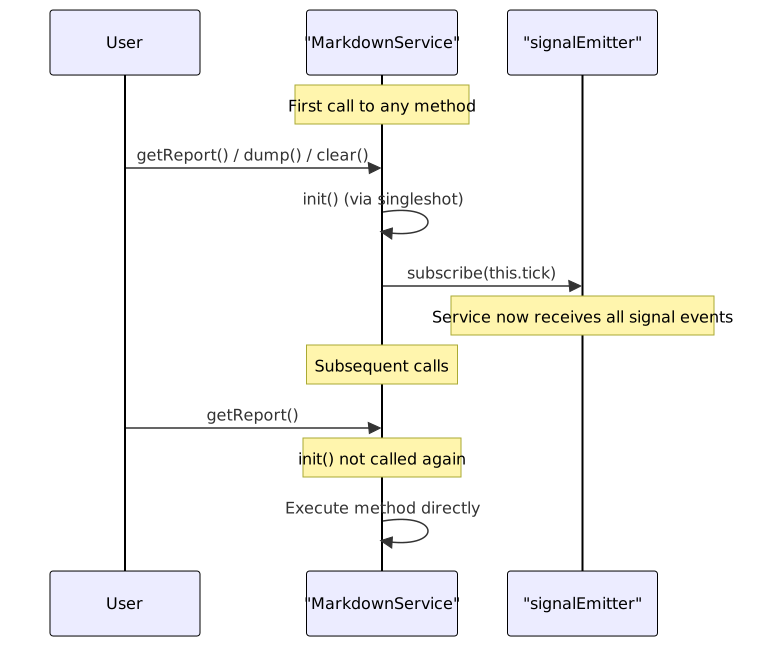
The init() method is protected and automatically invoked on first service use. It subscribes the service's tick() method to the appropriate signal emitter.
Event Emitter Binding

The emitters are defined in src/config/emitters.ts and use the event system to decouple signal generation from report accumulation.
Markdown Table Formatting
All markdown services use the str.newline() utility from functools-kit to generate markdown tables. The table formatting follows GitHub Flavored Markdown syntax:
| Column 1 | Column 2 | Column 3 |
|----------|----------|----------|
| Value 1 | Value 2 | Value 3 |
| Value 4 | Value 5 | Value 6 |
Table Generation Process
- Define column configuration with
key,label, andformatfunction - Extract column headers:
columns.map(col => col.label) - Create separator row:
columns.map(() => "---") - Map each signal/event to data row:
signals.map(signal => columns.map(col => col.format(signal))) - Combine into table:
[header, separator, ...rows] - Format each row:
row => \| ${row.join(" | ")} |`` - Join with newlines via
str.newline() - Wrap in markdown document with title and statistics
Implementation Example
const header = columns.map((col) => col.label);
const separator = columns.map(() => "---");
const rows = signalList.map((signal) =>
columns.map((col) => col.format(signal))
);
const tableData = [header, separator, ...rows];
const table = str.newline(tableData.map(row => `| ${row.join(" | ")} |`));
return str.newline(
`# Report Title`,
"",
table,
"",
`**Statistics here**`
);
Integration with Execution Flow
The markdown services operate completely independently from the main execution loop:

This architecture ensures that report generation never blocks strategy execution or impacts performance. The event-driven design allows reports to be generated incrementally as signals close, rather than requiring post-processing of execution results.