Cross-Cutting Concerns
This page documents system-wide concerns that affect multiple components across the backtest-kit architecture. These concerns include logging, error handling, and persistence, which are not specific to any single component but are fundamental to the system's operation.
For component-specific logging, error handling, or persistence behavior, see the individual component documentation in Client Implementations, Service Layer, or Signal Lifecycle.
15.1 Logging System
The logging system provides a standardized interface for recording diagnostic information across all components. It uses dependency injection to ensure all services have access to logging capabilities without tight coupling.
ILogger Interface
The ILogger interface defines four severity levels for logging operations:
| Method | Severity | Use Case |
|---|---|---|
log() |
General | Significant events or state changes |
debug() |
Diagnostic | Detailed information for troubleshooting |
info() |
Informational | High-level overview of system activity |
warn() |
Warning | Potentially problematic situations |
Configuration
Users configure the logger implementation via setLogger():
import { setLogger } from 'backtest-kit';
const customLogger = {
log: (topic, ...args) => console.log(`[LOG] ${topic}`, ...args),
debug: (topic, ...args) => console.debug(`[DEBUG] ${topic}`, ...args),
info: (topic, ...args) => console.info(`[INFO] ${topic}`, ...args),
warn: (topic, ...args) => console.warn(`[WARN] ${topic}`, ...args),
};
setLogger(customLogger);
The logger is stored in LoggerService and injected throughout the system via the dependency injection container.
src/function/setup.ts, src/lib/services/base/LoggerService.ts
Dependency Injection Pattern

Logging Conventions
Each component logs with a consistent topic format:
| Component | Log Topic Format | Example |
|---|---|---|
| Global Services | {serviceName} {methodName} |
"strategyGlobalService tick" |
| Connection Services | {serviceName} {methodName} |
"strategyConnectionService getStrategy" |
| Client Implementations | {className} {methodName} |
"ClientStrategy tick" |
| Persistence Layer | {className}.{methodName} |
"PersistBase.waitForInit" |
src/client/ClientStrategy.ts, src/lib/services/global/StrategyGlobalService.ts, src/classes/Persist.ts:45-53
Usage Examples
// Service layer logging
this.loggerService.log("strategyGlobalService tick", {
symbol,
strategyName,
backtest
});
// Client layer logging with structured data
this.params.logger.debug("ClientPartial profit level reached", {
symbol,
signalId: data.id,
level,
revenuePercent,
backtest
});
// Persistence layer logging with entity context
swarm.loggerService.debug("PersistBase.readValue", {
entityName: this.entityName,
entityId
});
15.2 Error Handling
The error handling system distinguishes between recoverable and fatal errors, providing appropriate mechanisms for each scenario.
Error Classification

Error Emitters
| Emitter | Purpose | When to Use | Execution Impact |
|---|---|---|---|
errorEmitter |
Recoverable errors | API failures, transient issues | Continues execution |
exitEmitter |
Fatal errors | System failures, unrecoverable states | Terminates execution |
validationSubject |
Validation errors | Risk rule violations | Rejects signal only |
src/config/emitters.ts:36-44, src/config/emitters.ts:109-112
Event Listeners
import { listenError, listenExit, listenValidation } from 'backtest-kit';
// Recoverable errors - execution continues
listenError((error) => {
console.error('Recoverable error:', error.message);
// Log to monitoring, send non-critical alerts
});
// Fatal errors - execution terminates
listenExit((error) => {
console.error('FATAL ERROR:', error.message);
// Send critical alerts, trigger restart logic
});
// Risk validation errors - signal rejected
listenValidation((error) => {
console.warn('Risk validation failed:', error.message);
// Track rejection patterns, adjust parameters
});
Try-Catch Patterns
Pattern 1: Graceful Degradation with Default Value
// From PersistBase - retry with fallback
const success = await trycatch(
retry(
async () => {
await fs.unlink(filePath);
return true;
},
BASE_UNLINK_RETRY_COUNT, // 5 attempts
BASE_UNLINK_RETRY_DELAY // 1000ms between attempts
),
{
defaultValue: false // Return false if all retries fail
}
);
src/classes/Persist.ts:155-177
Pattern 2: Error Transformation
// From ClientExchange - transform to user-friendly message
try {
const fileContent = await fs.readFile(filePath, 'utf-8');
return JSON.parse(fileContent);
} catch (error: any) {
if (error?.code === 'ENOENT') {
throw new Error(`Entity ${this.entityName}:${entityId} not found`);
}
throw new Error(
`Failed to read entity: ${getErrorMessage(error)}`
);
}
src/classes/Persist.ts:258-272
Pattern 3: Background Error Emission
// Background execution wraps async generators
try {
for await (const result of generator) {
// Process result
}
} catch (error) {
errorEmitter.next(error); // Emit recoverable error
// Continue execution
}
src/classes/Backtest.ts, src/classes/Live.ts
Validation Error Handling

15.3 Persistence Layer
The persistence layer provides crash-safe storage for live trading state using atomic file operations and automatic validation.
PersistBase Abstract Class
PersistBase is the foundation for all persistence adapters, implementing CRUD operations with automatic directory management and corruption recovery.

Directory Structure
| Adapter | Directory Pattern | Entity ID | Data Type |
|---|---|---|---|
PersistSignalAdapter |
./dump/data/signal/{symbol}_{strategy}/ |
symbol |
ISignalRow | null |
PersistRiskAdapter |
./dump/data/risk/{riskName}/ |
riskName |
IRiskActivePosition[] |
PersistScheduleAdapter |
./dump/data/schedule/{symbol}_{strategy}/ |
symbol |
IScheduledSignalRow[] |
PersistPartialAdapter |
./dump/data/partial/{symbol}_{strategy}/ |
symbol |
Record<signalId, IPartialData> |
src/classes/Persist.ts:514-783
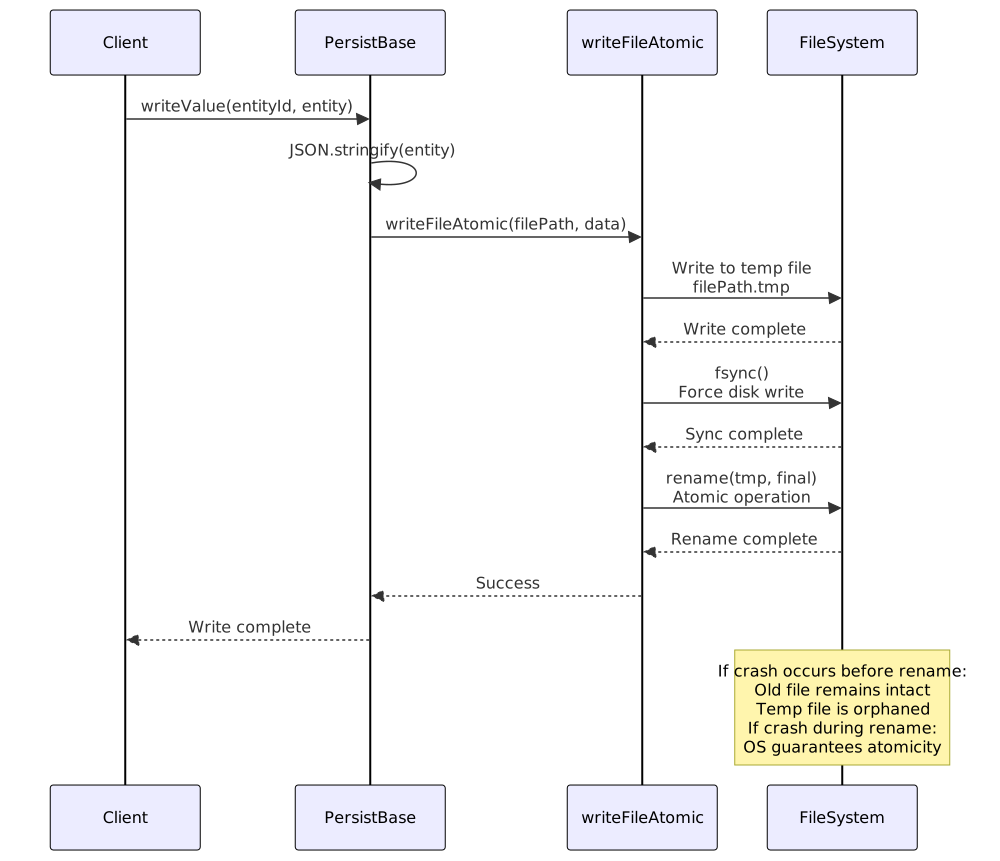
Atomic Write Pattern
The atomic write pattern ensures that files are never left in a corrupted state, even if the process crashes during write operations.
Initialization and Validation
On initialization, PersistBase validates all existing files and automatically removes corrupted ones:
// From PersistBase.waitForInit implementation
await fs.mkdir(self._directory, { recursive: true });
for await (const key of self.keys()) {
try {
await self.readValue(key); // Validate by attempting to read
} catch {
const filePath = self._getFilePath(key);
console.error(
`backtest-kit PersistBase found invalid document for filePath=${filePath}`
);
// Retry deletion up to 5 times with 1s delay
const success = await retry(
async () => {
await fs.unlink(filePath);
return true;
},
BASE_UNLINK_RETRY_COUNT, // 5
BASE_UNLINK_RETRY_DELAY // 1000ms
);
if (!success) {
console.error(
`backtest-kit PersistBase failed to remove invalid document`
);
}
}
}
src/classes/Persist.ts:132-153
Crash Recovery Integration

Custom Persistence Adapters
Users can replace the default file-based persistence with custom implementations (e.g., Redis, MongoDB):
import { PersistBase, PersistSignalAdapter } from 'backtest-kit';
class RedisPersist extends PersistBase {
private redis: RedisClient;
constructor(entityName: string, baseDir: string) {
super(entityName, baseDir);
this.redis = createRedisClient();
}
async readValue(entityId: string) {
const data = await this.redis.get(`${this.entityName}:${entityId}`);
return JSON.parse(data);
}
async writeValue(entityId: string, entity: any) {
const data = JSON.stringify(entity);
await this.redis.set(`${this.entityName}:${entityId}`, data);
}
async hasValue(entityId: string) {
return await this.redis.exists(`${this.entityName}:${entityId}`);
}
// Implement other required methods...
}
// Register custom adapter
PersistSignalAdapter.usePersistSignalAdapter(RedisPersist);
Persistence Adapter Comparison
| Adapter | Purpose | Write Frequency | Data Size | Backtest Mode |
|---|---|---|---|---|
PersistSignalAdapter |
Active signal state | Every signal state change | ~1KB per signal | Disabled |
PersistRiskAdapter |
Portfolio positions | Every position add/remove | ~5-50KB per risk profile | Disabled |
PersistScheduleAdapter |
Scheduled signals | Every scheduled signal update | ~5-50KB per strategy | Disabled |
PersistPartialAdapter |
Profit/loss levels | Every level milestone | ~1-5KB per signal | Disabled |
All adapters skip persistence in backtest mode (backtest=true) for performance, as crash recovery is unnecessary for historical simulations.
src/client/ClientPartial.ts:214-218, src/classes/Persist.ts
Async Iteration Support
PersistBase implements async iteration for convenient data access:
// Iterate all entities
for await (const entity of persistAdapter.values()) {
console.log(entity);
}
// Iterate all keys
for await (const key of persistAdapter.keys()) {
console.log(key);
}
// Filter entities
for await (const entity of persistAdapter.filter(e => e.status === 'active')) {
console.log(entity);
}
// Take first N entities
for await (const entity of persistAdapter.take(10)) {
console.log(entity);
}