Partial Profit/Loss Tracking
Purpose: This document describes the partial profit/loss tracking system that monitors trading signals and emits events when they reach percentage-based profit or loss milestones (10%, 20%, 30%, etc.). This enables tracking partial take-profit and stop-loss behavior, generating detailed reports, and monitoring strategy performance at granular levels.
For information about overall reporting infrastructure, see Reporting and Analytics. For risk management and portfolio constraints, see Risk Management. For signal lifecycle states, see Signal Lifecycle.
System Overview
The partial tracking system monitors active trading signals and emits events when they reach predefined profit or loss levels. Each level (10%, 20%, 30%...100%) is emitted exactly once per signal using Set-based deduplication. The system persists state to disk for crash recovery in live trading mode.
Key Components
| Component | File | Purpose |
|---|---|---|
ClientPartial |
src/client/ClientPartial.ts:1-478 | Core implementation tracking profit/loss levels per signal |
PartialConnectionService |
src/lib/services/connection/PartialConnectionService.ts:1-267 | Factory creating memoized ClientPartial instances |
PartialGlobalService |
src/lib/services/global/PartialGlobalService.ts:1-205 | Global service delegating to connection layer |
PartialMarkdownService |
src/lib/services/markdown/PartialMarkdownService.ts:1-478 | Accumulates events and generates markdown reports |
PersistPartialAdapter |
src/classes/Persist.ts:1-600 | Atomic persistence for partial state |
Data Flow

Profit/Loss Level System
The system tracks profit and loss milestones at 10-percentage-point intervals from 10% to 100%. Each level is emitted exactly once per signal to prevent duplicate notifications.
Level Definitions
Profit Levels (positive price movement):
const PROFIT_LEVELS: PartialLevel[] = [10, 20, 30, 40, 50, 60, 70, 80, 90, 100];
Loss Levels (negative price movement):
const LOSS_LEVELS: PartialLevel[] = [10, 20, 30, 40, 50, 60, 70, 80, 90, 100];
Note: Loss levels are stored as absolute values (10, 20, 30) but represent negative percentages (-10%, -20%, -30%).
State Structure
The IPartialState interface uses Sets for O(1) deduplication and lookup:
interface IPartialState {
profitLevels: Set<PartialLevel>; // Reached profit levels
lossLevels: Set<PartialLevel>; // Reached loss levels
}
State is stored in a Map<signalId, IPartialState> within each ClientPartial instance. For persistence, Sets are converted to arrays in IPartialData format.
ClientPartial Architecture
ClientPartial is the core implementation responsible for tracking profit/loss levels for a single signal. Instances are created per signal ID and memoized by PartialConnectionService.
Initialization Pattern

The initialization uses a sentinel value NEED_FETCH to ensure waitForInit() is called before operations. The singleshot pattern from functools-kit guarantees initialization happens exactly once per symbol-strategy combination.
Level Detection Logic
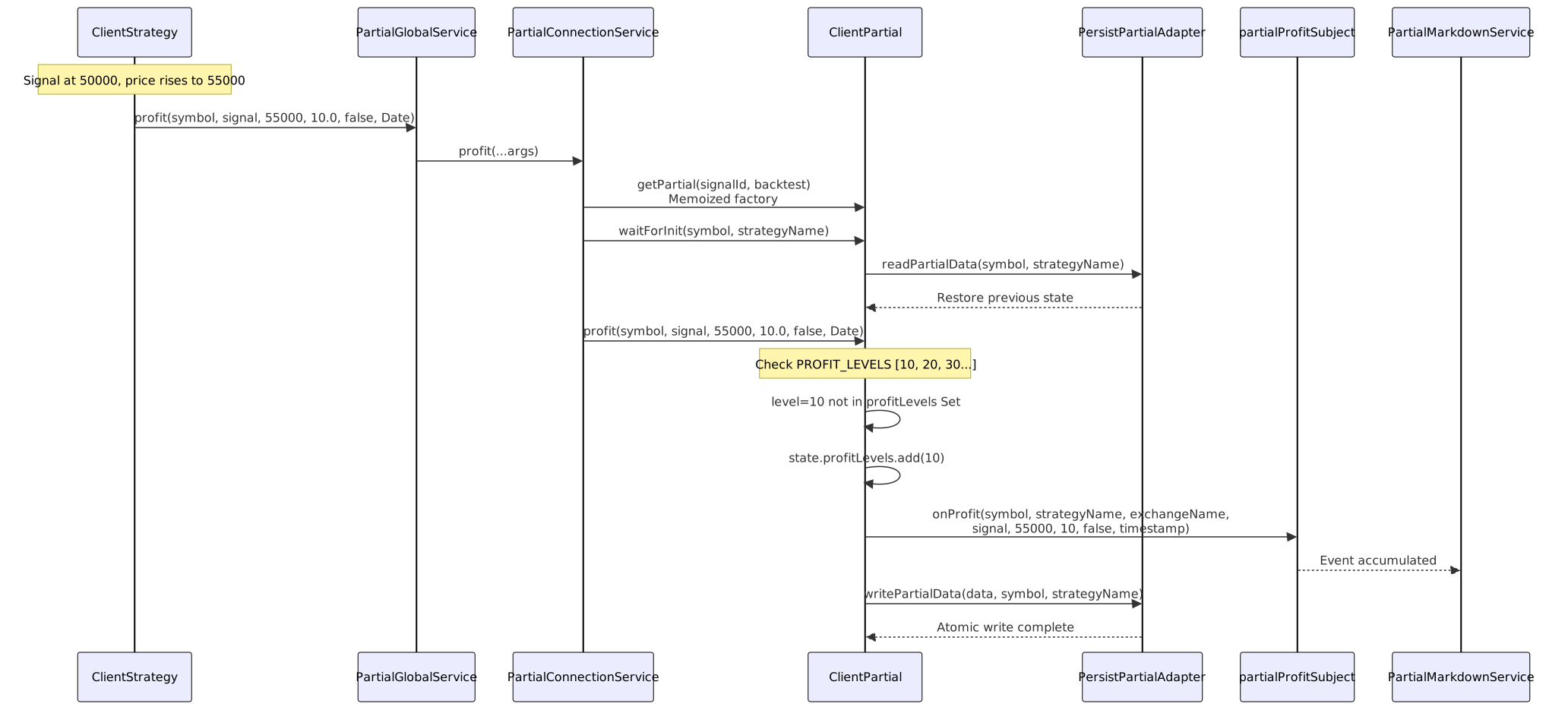
The HANDLE_PROFIT_FN and HANDLE_LOSS_FN functions iterate through level arrays and check for newly reached milestones:
Profit Detection src/client/ClientPartial.ts:44-105:
- Retrieve or create state for signal ID
- Iterate through
PROFIT_LEVELSarray - For each level: check if
revenuePercent >= levelAND level not instate.profitLevelsSet - If new level reached: add to Set, emit event via
params.onProfit(), mark for persistence - After all levels processed: call
_persistState()if any changes occurred
Loss Detection src/client/ClientPartial.ts:122-184:
- Convert negative
lossPercentto absolute value:absLoss = Math.abs(lossPercent) - Iterate through
LOSS_LEVELSarray - For each level: check if
absLoss >= levelAND level not instate.lossLevelsSet - If new level reached: add to Set, emit event via
params.onLoss(), mark for persistence - After all levels processed: call
_persistState()if any changes occurred
Method Flow Diagram
Event Contracts
PartialProfitContract
Emitted when a signal reaches a new profit level milestone:
| Field | Type | Description |
|---|---|---|
symbol |
string |
Trading pair (e.g., "BTCUSDT") |
strategyName |
string |
Strategy that generated the signal |
exchangeName |
string |
Exchange where signal is executing |
data |
ISignalRow |
Complete signal data (id, position, prices) |
currentPrice |
number |
Market price when level reached |
level |
PartialLevel |
Profit level reached (10, 20...100) |
backtest |
boolean |
True if backtest mode, false if live |
timestamp |
number |
Event time (ms since Unix epoch) |
PartialLossContract
Emitted when a signal reaches a new loss level milestone:
| Field | Type | Description |
|---|---|---|
symbol |
string |
Trading pair (e.g., "BTCUSDT") |
strategyName |
string |
Strategy that generated the signal |
exchangeName |
string |
Exchange where signal is executing |
data |
ISignalRow |
Complete signal data (id, position, prices) |
currentPrice |
number |
Market price when level reached |
level |
PartialLevel |
Loss level reached (10, 20...100 as absolute) |
backtest |
boolean |
True if backtest mode, false if live |
timestamp |
number |
Event time (ms since Unix epoch) |
Note: level is stored as a positive number but represents negative loss. level=20 means -20% loss.
Persistence Mechanism
Partial state is persisted to disk for crash recovery in live trading mode. Backtest mode skips persistence for performance.
Persistence Architecture

Persistence Flow
Write Path src/client/ClientPartial.ts:349-367:
- Check if backtest mode → skip if true
- Convert
Map<signalId, IPartialState>toRecord<signalId, IPartialData> - Convert Sets to arrays:
Array.from(state.profitLevels),Array.from(state.lossLevels) - Call
PersistPartialAdapter.writePartialData(partialData, symbol, strategyName) - Atomic write: tmp file → fsync → rename
Read Path src/client/ClientPartial.ts:199-235:
- Check if backtest mode → skip if true (use empty Map)
- Call
PersistPartialAdapter.readPartialData(symbol, strategyName) - Iterate through returned
Record<signalId, IPartialData> - Convert arrays to Sets:
new Set(data.profitLevels),new Set(data.lossLevels) - Populate
_statesMap with restored state
File Location
Partial state files are stored at:
./dump/data/partial/{strategy}/{symbol}.json
Example: Strategy "my-strategy" tracking BTCUSDT would create:
./dump/data/partial/my-strategy/BTCUSDT.json
PartialMarkdownService
The markdown service subscribes to partial profit/loss events and generates reports showing milestone progression.
Event Accumulation

ReportStorage Class
The ReportStorage class src/lib/services/markdown/PartialMarkdownService.ts:60-236 maintains a bounded queue of partial events:
Methods:
addProfitEvent(data, currentPrice, level, backtest, timestamp): Add profit event to queueaddLossEvent(data, currentPrice, level, backtest, timestamp): Add loss event to queuegetData(): Calculate statistics (totalProfit, totalLoss counts)getReport(symbol, strategyName, columns): Generate markdown tabledump(symbol, strategyName, path, columns): Save report to disk
Queue Management: Uses unshift() to add events at beginning, pop() to remove oldest when exceeding MAX_EVENTS=250.
Report Structure
Generated markdown reports include:
- Header:
# Partial Profit/Loss Report: {symbol}:{strategyName} - Event Table: Formatted using configurable
ColumnModel<PartialEvent>columns - Statistics:
- Total events
- Profit events count
- Loss events count
Default Columns src/config/columns.ts:
- Timestamp
- Action (profit/loss)
- Symbol
- Signal ID
- Position
- Current Price
- Level reached
- Backtest flag
Integration Points
ClientStrategy Integration
ClientStrategy calls partial tracking during signal monitoring src/client/ClientStrategy.ts:
Profit Tracking:
if (revenuePercent > 0) {
await this.params.partial.profit(
symbol,
signal,
currentPrice,
revenuePercent,
backtest,
when
);
}
Loss Tracking:
if (revenuePercent < 0) {
await this.params.partial.loss(
symbol,
signal,
currentPrice,
revenuePercent, // Negative value
backtest,
when
);
}
Cleanup on Close:
await this.params.partial.clear(symbol, signal, closePrice, backtest);
Service Layer Hierarchy

The hierarchy follows the standard service layer pattern:
- Global Service: Entry point with validation and logging
- Connection Service: Factory and instance management
- Client Implementation: Core business logic
Configuration and Customization
Column Configuration
Partial reports use configurable ColumnModel<PartialEvent> interfaces. The default configuration is defined in COLUMN_CONFIG.partial_columns src/config/columns.ts.
Custom columns can be provided to override default formatting:
const customColumns: ColumnModel<PartialEvent>[] = [
{
key: "timestamp",
label: "Time",
format: (event) => new Date(event.timestamp).toISOString(),
isVisible: () => true
},
{
key: "level",
label: "Level",
format: (event) => `${event.level}%`,
isVisible: () => true
}
];
await partialMarkdownService.dump(
"BTCUSDT",
"my-strategy",
"./reports",
customColumns
);
Persistence Path
Default persistence path: ./dump/data/partial/{strategy}/{symbol}.json
The base directory can be customized when creating PersistPartialAdapter instances, though this is typically managed internally by the framework.
Usage Examples
Listening to Partial Events
Listen to all profit events:
import { listenPartialProfit } from "backtest-kit";
listenPartialProfit((event) => {
console.log(`Signal ${event.data.id} reached ${event.level}% profit`);
console.log(`Symbol: ${event.symbol}, Price: ${event.currentPrice}`);
if (event.level >= 50 && !event.backtest) {
console.log("MAJOR PROFIT: Consider partial exit");
}
});
Wait for specific loss level:
import { listenPartialLossOnce } from "backtest-kit";
listenPartialLossOnce(
(event) => event.level === 30,
(event) => {
console.warn(`30% loss reached on ${event.symbol}`);
// Trigger alerts or intervention logic
}
);
Generating Reports
Programmatic report access:
import { PartialMarkdownService } from "backtest-kit";
const service = new PartialMarkdownService();
// Get statistics
const stats = await service.getData("BTCUSDT", "my-strategy");
console.log(`Total events: ${stats.totalEvents}`);
console.log(`Profit events: ${stats.totalProfit}`);
console.log(`Loss events: ${stats.totalLoss}`);
// Generate markdown
const markdown = await service.getReport("BTCUSDT", "my-strategy");
console.log(markdown);
// Save to disk
await service.dump("BTCUSDT", "my-strategy", "./reports");
Performance Considerations
Memory Management
- Memoization:
ClientPartialinstances are memoized per signal ID and backtest mode src/lib/services/connection/PartialConnectionService.ts:132-143 - Bounded Queues:
ReportStoragelimits events toMAX_EVENTS=250per symbol-strategy pair src/lib/services/markdown/PartialMarkdownService.ts:54 - Cleanup:
clear()removes signal state and memoized instances when signals close src/lib/services/connection/PartialConnectionService.ts:246-263
Backtest Mode Optimization
Backtest mode skips all disk I/O operations:
- No state loading in
waitForInit()src/client/ClientPartial.ts:214-218 - No state persistence in
_persistState()src/client/ClientPartial.ts:350-352
This prevents unnecessary filesystem operations during historical simulation where crash recovery is not needed.
Set-Based Deduplication
Using Set<PartialLevel> for state provides:
- O(1) lookup: Fast checking if level already emitted
- O(1) insertion: Adding new levels has constant time complexity
- Memory efficiency: Only stores emitted levels (max 10 per signal per profit/loss)
Error Handling
Validation Checks
The system enforces several validation rules:
Pre-initialization check src/client/ClientPartial.ts:53-56:
if (self._states === NEED_FETCH) {
throw new Error(
"ClientPartial not initialized. Call waitForInit() before using."
);
}
Signal ID mismatch src/client/ClientPartial.ts:59-62:
if (data.id !== self.params.signalId) {
throw new Error(
`Signal ID mismatch: expected ${self.params.signalId}, got ${data.id}`
);
}
Strategy validation: PartialGlobalService validates strategy and risk names before delegation src/lib/services/global/PartialGlobalService.ts:83-95
Persistence Error Recovery
PersistBase implements retry logic and auto-cleanup:
- Retry count: 5 attempts with 1-second delays src/classes/Persist.ts:57-58
- Validation on init: Reads and validates all JSON files during initialization src/classes/Persist.ts:138-152
- Auto-cleanup: Removes corrupted files that fail parsing src/classes/Persist.ts:143-151