Markdown Report Generation
Purpose and Scope
This document explains the markdown report generation system in backtest-kit. The framework provides two specialized services—BacktestMarkdownService and LiveMarkdownService—that passively observe signal execution events and generate formatted markdown reports with detailed signal information, statistics, and performance metrics.
These services act as event listeners that accumulate data without affecting execution flow. For information about the signal lifecycle events being observed, see Signal Lifecycle. For performance metrics calculation, see Performance Metrics.
Service Architecture
The markdown generation system uses two mode-specific services that share a common design pattern but differ in data accumulation strategy:
| Service | Mode | Events Tracked | Output Location | Statistics |
|---|---|---|---|---|
BacktestMarkdownService |
Backtest | Closed signals only | ./logs/backtest/{strategyName}.md |
Total signals |
LiveMarkdownService |
Live | All events (idle, opened, active, closed) | ./logs/live/{strategyName}.md |
Win rate, average PNL, signal counts |
Both services follow the observer pattern, subscribing to signal emitters and accumulating data in isolated ReportStorage instances per strategy.
Event Flow Architecture

Diagram: Signal Event Flow to Markdown Reports
The services subscribe to emitters during initialization and passively accumulate data. The BacktestMarkdownService only processes closed signals, while LiveMarkdownService tracks all event types to provide a complete operational timeline.
ReportStorage Pattern
Both services use an internal ReportStorage class to isolate data accumulation logic. Each strategy receives its own memoized storage instance, preventing data contamination between concurrent strategies.

Diagram: Service and Storage Class Structure
The memoization pattern is implemented using functools-kit's memoize function, which caches storage instances by strategy name. This ensures each strategy maintains isolated state even when multiple strategies run concurrently.
Column Configuration System
Both services define column configurations that specify how to extract and format data from signal events. Each column contains a key, label, and formatting function.
Backtest Columns
The BacktestMarkdownService uses 13 columns optimized for closed signal analysis:
| Column Key | Label | Format |
|---|---|---|
signalId |
Signal ID | Signal UUID |
symbol |
Symbol | Trading pair |
position |
Position | LONG/SHORT |
note |
Note | User note or "N/A" |
openPrice |
Open Price | Fixed 8 decimals USD |
closePrice |
Close Price | Fixed 8 decimals USD |
takeProfit |
Take Profit | Fixed 8 decimals USD |
stopLoss |
Stop Loss | Fixed 8 decimals USD |
pnl |
PNL (net) | Percentage with +/- prefix |
closeReason |
Close Reason | TP/SL/EXPIRED |
duration |
Duration (min) | Minutes rounded |
openTimestamp |
Open Time | ISO 8601 format |
closeTimestamp |
Close Time | ISO 8601 format |
Live Trading Columns
The LiveMarkdownService uses 13 columns that accommodate all event types:
| Column Key | Label | Special Handling |
|---|---|---|
timestamp |
Timestamp | ISO 8601 format |
action |
Action | IDLE/OPENED/ACTIVE/CLOSED |
symbol |
Symbol | "N/A" for idle events |
signalId |
Signal ID | "N/A" for idle events |
position |
Position | "N/A" for idle events |
note |
Note | Optional user note |
currentPrice |
Current Price | Always present |
openPrice |
Open Price | "N/A" for idle events |
takeProfit |
Take Profit | "N/A" for idle events |
stopLoss |
Stop Loss | "N/A" for idle events |
pnl |
PNL (net) | Only for closed events |
closeReason |
Close Reason | Only for closed events |
duration |
Duration (min) | Only for closed events |
Report Generation Pipeline
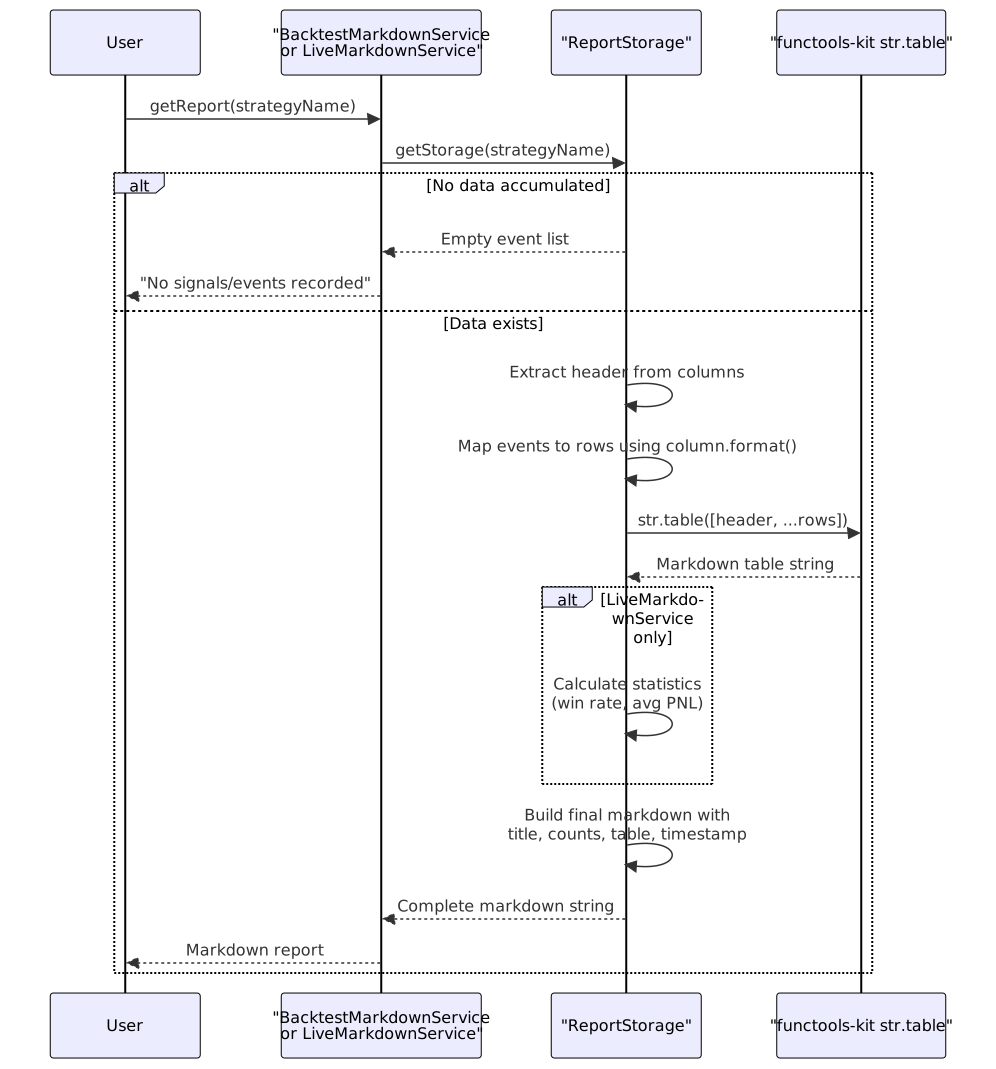
Diagram: Report Generation Sequence
The report generation process is lazy—no computation occurs until getReport() is called. This allows the services to accumulate data with minimal overhead during execution.
Table Formatting Implementation
Both services use functools-kit's str.table() utility to generate markdown tables. The process follows these steps:
- Extract Headers: Map column labels to header row
- Format Rows: Apply each column's format function to signal data
- Build Table Data: Combine header and rows into 2D array
- Generate Markdown: Pass to
str.table()for formatting
The resulting markdown follows standard table syntax:
| Signal ID | Symbol | Position | ... |
|-----------|--------|----------|-----|
| abc-123 | BTCUSD | LONG | ... |
| def-456 | ETHUSD | SHORT | ... |
Event Accumulation Strategies
BacktestMarkdownService Strategy
The backtest service implements a simple append-only accumulation:

Diagram: Backtest Event Accumulation State Machine
The filter logic at src/lib/services/markdown/BacktestMarkdownService.ts:245-247 ensures only closed signals with complete PNL information are recorded.
LiveMarkdownService Strategy
The live service maintains a comprehensive event timeline with update logic for active and closed events:

Diagram: Live Event Accumulation Logic
The update logic at src/lib/services/markdown/LiveMarkdownService.ts:187-210 and src/lib/services/markdown/LiveMarkdownService.ts:219-250 replaces previous events with the same signal ID, ensuring the report always shows the latest state of each signal.
Statistics Generation (Live Only)
The LiveMarkdownService calculates real-time performance statistics from closed events:
| Metric | Calculation | Source |
|---|---|---|
| Total Events | _eventList.length |
All recorded events |
| Closed Signals | filter(e => e.action === "closed").length |
Completed trades |
| Win Count | filter(e => e.pnl && e.pnl > 0).length |
Profitable trades |
| Loss Count | filter(e => e.pnl && e.pnl < 0).length |
Losing trades |
| Win Rate | (winCount / totalClosed) * 100 |
Percentage success |
| Average PNL | sum(e.pnl) / totalClosed |
Mean profit/loss |
These statistics appear in the report header:
# Live Trading Report: my-strategy
Total events: 247
Closed signals: 18
Win rate: 66.67% (12W / 6L)
Average PNL: +1.23%
Public API Methods
getReport(strategyName)
Generates and returns a markdown report string for the specified strategy. This method is synchronous in practice despite returning a Promise—the computation happens in-memory from accumulated data.
const markdown = await backtestMarkdownService.getReport("my-strategy");
console.log(markdown);
dump(strategyName, path?)
Saves the markdown report to disk. The method creates the directory if it doesn't exist using mkdir with recursive: true. Default paths:
- Backtest:
./logs/backtest/{strategyName}.md - Live:
./logs/live/{strategyName}.md
// Save to default location
await backtestMarkdownService.dump("my-strategy");
// Save to custom location
await liveMarkdownService.dump("my-strategy", "./custom/reports");
clear(strategyName?)
Clears accumulated data from memory. If strategyName is provided, only that strategy's storage is cleared. If omitted, all storage instances are cleared via the memoization cache.
// Clear specific strategy
await backtestMarkdownService.clear("my-strategy");
// Clear all strategies
await backtestMarkdownService.clear();
init()
Initializes the service by subscribing to the appropriate event emitter. Uses functools-kit's singleshot pattern to ensure subscription happens only once, even if called multiple times. Automatically invoked on first use.
Integration with Service Layer
The markdown services are registered in the dependency injection container and integrated into the backtest aggregator object:

Diagram: DI Integration for Markdown Services
The services are accessible through the main backtest object, providing a unified API for report generation across both backtest and live modes.
Error Handling
Both services implement defensive error handling for file system operations:
- Directory Creation: Uses
mkdirwithrecursive: trueto ensure parent directories exist - Write Failures: Catches and logs errors without throwing, allowing execution to continue
- Invalid Data: Gracefully handles empty signal lists with informative messages
Error output example from src/lib/services/markdown/BacktestMarkdownService.ts:176:
catch (error) {
console.error(`Failed to save markdown report:`, error);
}
Usage Examples
Backtest Report Generation
import { Backtest } from "backtest-kit";
// Run backtest
for await (const result of Backtest.run("BTCUSD", {
strategyName: "trend-follower",
exchangeName: "binance",
frameName: "daily",
})) {
console.log(`Signal ${result.action}`);
}
// Generate report
const markdown = await Backtest.getReport("trend-follower");
console.log(markdown);
// Save to disk
await Backtest.dump("trend-follower");
// Output: ./logs/backtest/trend-follower.md
Live Trading Report Generation
import { Live } from "backtest-kit";
// Run live trading in background
const generator = Live.background("ETHUSD", {
strategyName: "scalper",
exchangeName: "binance",
});
// Later: check current report status
const markdown = await Live.getReport("scalper");
console.log(markdown);
// Save to custom location
await Live.dump("scalper", "./reports/live");
// Output: ./reports/live/scalper.md
Performance Considerations
Memory Efficiency
- Backtest: Stores only closed signals, typically 10-1000 signals per strategy
- Live: Stores all events, but uses update logic to prevent unbounded growth for active signals
- Isolation: Memoized storage prevents cross-strategy interference
- Lazy Generation: Reports computed only when requested
Computation Overhead
- Event Processing: O(1) for backtest, O(n) for live due to signal ID search
- Report Generation: O(n) table formatting where n = number of signals/events
- File I/O: Asynchronous to avoid blocking execution thread
The services are designed to have minimal impact on execution performance, making them suitable for production use.