Timeframe Generation
Purpose and Scope
Timeframe generation is the process of creating a sequential array of timestamps that define when strategy evaluation occurs during backtesting. The FrameCoreService generates these timestamps based on a configured IFrameSchema, which specifies the start date, end date, and interval granularity. This timestamp array drives the backtest execution loop, determining at which points in historical time the strategy's getSignal() function is evaluated.
For information about how these generated timeframes are consumed during backtest execution, see Backtest Execution Flow. For details on how signals are processed at each timeframe tick, see Fast-Forward Simulation.
Frame Schema Configuration
Frames are registered via the addFrame() function using the IFrameSchema interface, which defines the backtest period boundaries and tick granularity.
Frame Schema Structure
interface IFrameSchema {
frameName: FrameName; // Unique identifier for retrieval
note?: string; // Optional documentation
interval: FrameInterval; // Tick spacing (1m, 5m, 1h, etc.)
startDate: Date; // Backtest period start (inclusive)
endDate: Date; // Backtest period end (inclusive)
callbacks?: Partial<IFrameCallbacks>; // Optional lifecycle hooks
}
Key Parameters:
| Parameter | Type | Purpose | Example |
|---|---|---|---|
frameName |
string |
Registry key for frame retrieval | "1-month-test" |
interval |
FrameInterval |
Spacing between timestamps | "1m", "15m", "1h" |
startDate |
Date |
First timestamp (inclusive) | new Date("2024-01-01T00:00:00Z") |
endDate |
Date |
Last timestamp (inclusive) | new Date("2024-01-31T23:59:59Z") |
The generated timeframe array will contain timestamps starting at startDate and incrementing by interval until reaching or exceeding endDate.
Frame Intervals
The FrameInterval type defines supported tick granularities for timeframe generation. Each interval determines the temporal resolution of the backtest.

Interval Duration Mapping:
| FrameInterval | Milliseconds | Minutes | Typical Use Case |
|---|---|---|---|
1m |
60,000 | 1 | High-frequency scalping |
3m |
180,000 | 3 | Scalping with reduced noise |
5m |
300,000 | 5 | Short-term day trading |
15m |
900,000 | 15 | Swing trading entry |
30m |
1,800,000 | 30 | Intraday momentum |
1h |
3,600,000 | 60 | Hourly trend analysis |
2h |
7,200,000 | 120 | Multi-hour position holding |
4h |
14,400,000 | 240 | Position trading |
6h |
21,600,000 | 360 | Extended swing trades |
8h |
28,800,000 | 480 | Daily session alignment |
12h |
43,200,000 | 720 | Half-day intervals |
1d |
86,400,000 | 1440 | Daily signals |
3d |
259,200,000 | 4320 | Multi-day position strategies |
Important: The SignalInterval type (used for strategy throttling) supports only "1m" | "3m" | "5m" | "15m" | "30m" | "1h", while FrameInterval includes additional hour and day intervals. This allows backtests to run at coarser granularity than signal generation.
Timeframe Generation Architecture
The frame system follows a layered architecture where schemas are registered, validated, and then used to instantiate ClientFrame instances that generate timestamp arrays.

FrameCoreService and Timeframe Retrieval
The FrameCoreService acts as the entry point for timeframe retrieval during backtest execution. It injects the MethodContext (containing frameName) and delegates to FrameConnectionService for instance creation.
Timeframe Retrieval Flow
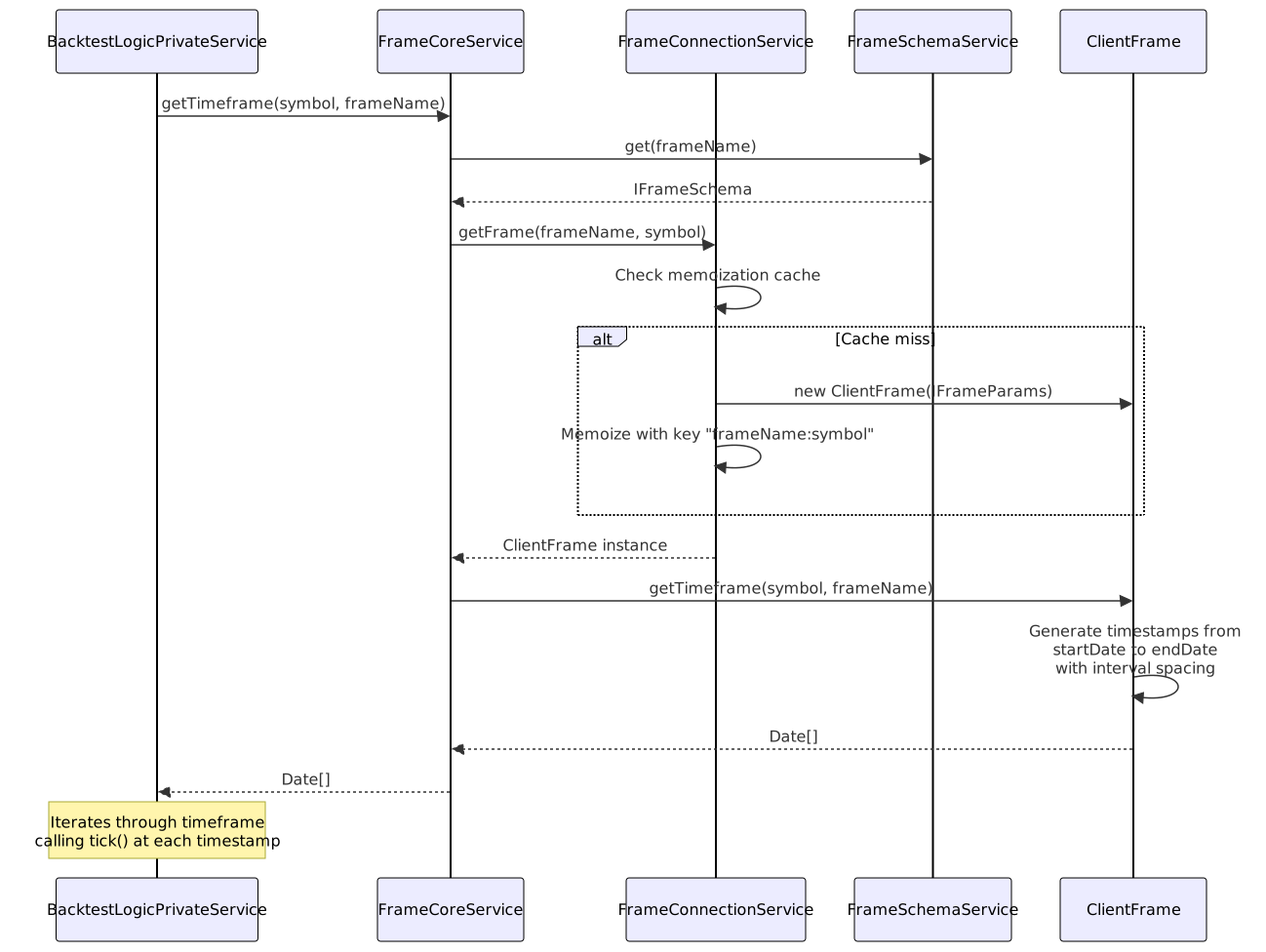
Key Points:
- Memoization:
FrameConnectionServicecachesClientFrameinstances using the composite key"${frameName}:${symbol}"to prevent duplicate instantiation - Schema Retrieval: The
IFrameSchemais fetched fromFrameSchemaServiceon each call, but theClientFrameinstance is reused - Timestamp Array:
ClientFrame.getTimeframe()returns a completeDate[]array representing the entire backtest period - Memory Efficiency: While the full array is returned, the backtest loop consumes it sequentially, allowing early termination
ClientFrame Implementation
The ClientFrame class implements the timestamp generation logic based on the configured IFrameSchema parameters.
Timestamp Generation Algorithm

Generation Process:
- Initialization: Start at
startDatetimestamp - Iteration: While
current <= endDate:- Add
currenttimestamp to array - Increment
currentbyintervalmilliseconds
- Add
- Callback: Invoke
onTimeframe()if configured in schema - Return: Full timestamp array
Example Generation:
// Frame Schema
{
frameName: "hourly-test",
interval: "1h",
startDate: new Date("2024-01-01T00:00:00Z"),
endDate: new Date("2024-01-01T03:00:00Z")
}
// Generated Timeframe Array
[
new Date("2024-01-01T00:00:00Z"), // 00:00
new Date("2024-01-01T01:00:00Z"), // 01:00
new Date("2024-01-01T02:00:00Z"), // 02:00
new Date("2024-01-01T03:00:00Z"), // 03:00
]
// Total: 4 timestamps
Integration with Backtest Execution
The generated timeframe array drives the backtest execution loop in BacktestLogicPrivateService. Each timestamp represents a moment when the strategy's getSignal() function is evaluated.
Backtest Loop with Timeframe

Execution Flow in BacktestLogicPrivateService:
// 1. Retrieve timeframes
const timeframes = await this.frameCoreService.getTimeframe(
symbol,
this.methodContextService.context.frameName
);
const totalFrames = timeframes.length;
// 2. Iterate through timeframes
let i = 0;
while (i < timeframes.length) {
const when = timeframes[i];
// 3. Evaluate strategy at this timestamp
const result = await this.strategyCoreService.tick(symbol, when, true);
// 4. Handle result (opened, active, idle, closed)
if (result.action === "opened") {
// Fetch candles and run backtest()
// Skip timeframes until signal closes
}
i++;
}
Timeframe Skipping: When a signal opens, the backtest fetches future candles and fast-forwards through the signal's lifetime. The loop skips timeframes by incrementing i until reaching the signal's closeTimestamp, avoiding redundant tick() calls while a position is active.
Frame Lifecycle Callbacks
The IFrameCallbacks interface provides a hook for observing timeframe generation completion. This is primarily used for logging, validation, or custom analytics.
onTimeframe Callback
interface IFrameCallbacks {
onTimeframe: (
timeframe: Date[], // Generated timestamp array
startDate: Date, // Frame start (from schema)
endDate: Date, // Frame end (from schema)
interval: FrameInterval // Interval used (from schema)
) => void;
}
Usage Example:
addFrame({
frameName: "1-week-backtest",
interval: "1h",
startDate: new Date("2024-01-01T00:00:00Z"),
endDate: new Date("2024-01-07T23:59:59Z"),
callbacks: {
onTimeframe: (timeframe, startDate, endDate, interval) => {
console.log(`Generated ${timeframe.length} timestamps`);
console.log(`Period: ${startDate.toISOString()} to ${endDate.toISOString()}`);
console.log(`Interval: ${interval}`);
// Validate generation
const expectedCount = Math.floor(
(endDate.getTime() - startDate.getTime()) / (60 * 60 * 1000)
) + 1;
if (timeframe.length !== expectedCount) {
console.warn(`Expected ${expectedCount} timestamps, got ${timeframe.length}`);
}
}
}
});
Common Use Cases:
| Use Case | Implementation |
|---|---|
| Logging | Log timestamp count for audit trail |
| Validation | Verify generated array matches expected size |
| Progress Tracking | Update UI with timeframe generation completion |
| Analytics | Calculate estimated backtest duration based on frame size |
| Testing | Assert correct timestamp generation in unit tests |
Frame Validation
The FrameValidationService ensures that registered IFrameSchema objects meet system requirements before they are stored in FrameSchemaService.
Validation Rules

Key Validation Checks:
- frameName: Must be non-empty string
- interval: Must be one of the valid
FrameIntervalvalues - startDate: Must be a
Dateobject earlier thanendDate - endDate: Must be a
Dateobject later thanstartDate - callbacks: If provided,
onTimeframemust be a function
Performance Considerations
Timeframe generation has several performance implications for backtest execution:
Memory Usage
| Frame Configuration | Timeframe Size | Memory Impact |
|---|---|---|
| 1-day @ 1m interval | ~1,440 timestamps | ~12 KB |
| 1-week @ 1m interval | ~10,080 timestamps | ~80 KB |
| 1-month @ 1m interval | ~43,200 timestamps | ~345 KB |
| 1-year @ 1m interval | ~525,600 timestamps | ~4.2 MB |
| 1-year @ 1h interval | ~8,760 timestamps | ~70 KB |
Recommendation: For long-term backtests (> 6 months), use hourly or daily intervals to reduce memory footprint and iteration overhead.
Iteration Overhead
Each timestamp in the timeframe array requires:
- Context setup:
ExecutionContextService.runInContext()invocation - Strategy tick:
ClientStrategy.tick()call with signal state checks - Exchange data: Potential
getAveragePrice()VWAP calculation - Progress emission:
progressBacktestEmitter.next()event
Optimization: The backtest loop skips timeframes when signals are active, reducing unnecessary ticks. When a signal opens, the loop increments i to skip past the signal's lifetime.
Example: Multi-Timeframe Strategy Testing
A common pattern is to register multiple frames with different intervals to test how strategy performance varies with tick granularity:
// High-frequency backtest (1-minute ticks)
addFrame({
frameName: "scalping-frame",
interval: "1m",
startDate: new Date("2024-01-01T00:00:00Z"),
endDate: new Date("2024-01-07T23:59:59Z")
});
// Medium-frequency backtest (15-minute ticks)
addFrame({
frameName: "swing-frame",
interval: "15m",
startDate: new Date("2024-01-01T00:00:00Z"),
endDate: new Date("2024-01-07T23:59:59Z")
});
// Low-frequency backtest (hourly ticks)
addFrame({
frameName: "position-frame",
interval: "1h",
startDate: new Date("2024-01-01T00:00:00Z"),
endDate: new Date("2024-01-07T23:59:59Z")
});
// Walker compares same strategy across different timeframes
addWalker({
walkerName: "timeframe-comparison",
exchangeName: "binance",
frameName: "scalping-frame", // Will be overridden per strategy
strategies: ["my-strategy"],
metric: "sharpeRatio"
});
// Run walker to find optimal tick interval
for (const frame of ["scalping-frame", "swing-frame", "position-frame"]) {
const stats = await Backtest.run("BTCUSDT", {
strategyName: "my-strategy",
exchangeName: "binance",
frameName: frame
});
console.log(`${frame}: Sharpe=${stats.sharpeRatio}`);
}
This approach allows empirical determination of the optimal evaluation frequency for a given strategy.