Backtest Execution Flow
Purpose and Scope
This document explains the step-by-step orchestration of backtesting execution through historical timeframes, focusing on the BacktestLogicPrivateService and its coordination with frame generation, signal processing, and candle data retrieval. The backtest execution uses an async generator pattern for memory-efficient streaming of results.
For information about configuring backtests and the Public API, see Backtest API. For details on timeframe generation itself, see Timeframe Generation. For the fast-forward simulation algorithm that processes opened signals, see Fast-Forward Simulation.
Execution Flow Overview
The backtest execution follows a pipeline where BacktestLogicPrivateService orchestrates the flow through three major service domains: Frame (timeframe generation), Strategy (signal lifecycle), and Exchange (historical data). The process streams results as an async generator, allowing early termination and preventing memory overflow on large backtests.
High-Level Execution Sequence

Service Layer Architecture
The backtest execution involves multiple service layers with clear separation of concerns. The Public service handles context injection, the Private service orchestrates the execution loop, and Global services provide domain-specific operations.
Service Layer Interaction Diagram

Execution Steps in Detail
Step 1: Context Initialization
The BacktestLogicPublicService.run() method wraps the private service with MethodContextService.runAsyncIterator() to propagate context through all operations.
Context Propagation
| Context Type | Service | Purpose |
|---|---|---|
| Method Context | MethodContextService |
Routes to correct strategy/exchange/frame schemas |
| Execution Context | ExecutionContextService |
Provides symbol, current timestamp (when), backtest flag |
The backtest instance is also cleared of any previous state via strategyCoreService.clear(), backtestMarkdownService.clear(), and riskGlobalService.clear() before execution begins.
Step 2: Timeframe Array Generation
The private service begins by fetching the complete timeframe array from frameCoreService.getTimeframe(). This array contains all timestamps to iterate through, spaced according to the configured interval.
// From BacktestLogicPrivateService.run() at line 69-72
const timeframes = await this.frameCoreService.getTimeframe(
symbol,
this.methodContextService.context.frameName
);
The timeframe generation is configured via addFrame() and handled by ClientFrame. For a 24-hour backtest with 1-minute intervals, this produces 1,440 timestamps.
<old_str>
Step 4: Tick Execution and Action Processing
For each timestamp, the service calls strategyCoreService.tick() with backtest=true. This executes the strategy's signal generation and validation logic. The result action determines the next execution path.
Tick Results by Action
| Action | Description | Candles Needed | Next Step |
|---|---|---|---|
idle |
No signal generated, throttling interval not elapsed | None | Increment i++, check stop |
active |
Should not occur in backtest (signals immediately process) | None | Increment i++ |
scheduled |
Limit order signal awaiting price activation | bufferMinutes + CC_SCHEDULE_AWAIT_MINUTES + minuteEstimatedTime + 1 |
Fetch candles, call backtest() |
opened |
Market order signal opened immediately | bufferMinutes + minuteEstimatedTime |
Fetch candles, call backtest() |
The bufferMinutes value is GLOBAL_CONFIG.CC_AVG_PRICE_CANDLES_COUNT - 1, which provides historical candles needed for VWAP calculation.
</old_str>
<new_str>
Step 3: Timestamp Iteration Loop
The service iterates through the timeframe array using a while loop with manual index management. This allows skipping timestamps when signals close. Progress is tracked via progressBacktestEmitter and stop requests are checked via strategyCoreService.getStopped().
Iteration Loop with Progress and Stop Checking

Scheduled Signal Handling
When a strategy returns a signal with priceOpen set (limit order), the backtest must monitor for price activation, potential stop-loss hits before activation, and timeout conditions.
Scheduled Signal Lifecycle in Backtest

Candle Count Calculation for Scheduled Signals
The total candles needed for scheduled signal processing is:
candlesNeeded = (CC_AVG_PRICE_CANDLES_COUNT - 1) + CC_SCHEDULE_AWAIT_MINUTES + minuteEstimatedTime + 1
Where:
(CC_AVG_PRICE_CANDLES_COUNT - 1): Buffer candles beforewhenfor VWAP calculationCC_SCHEDULE_AWAIT_MINUTES: Maximum time to wait for price activation (default: 60 minutes)minuteEstimatedTime: Expected signal lifetime after activation+1: Include thewhentimestamp as the first candle
Opened Signal Handling (Market Orders)
When a strategy returns a signal without priceOpen (market order), the signal opens immediately at the current timestamp and proceeds directly to TP/SL monitoring.
Opened Signal Candle Fetching

The buffer start time is calculated as:
// From line 318-319
const bufferMinutes = GLOBAL_CONFIG.CC_AVG_PRICE_CANDLES_COUNT - 1;
const bufferStartTime = new Date(when.getTime() - bufferMinutes * 60 * 1000);
This ensures VWAP can be calculated from the first candle onwards by including historical context.
Fast-Forward Simulation via backtest() Method
When a signal opens or activates, the backtest flow transitions to fast-forward simulation mode via ClientStrategy.backtest() rather than iterating through every timestamp manually. This dramatically improves performance.
Fast-Forward Execution Flow
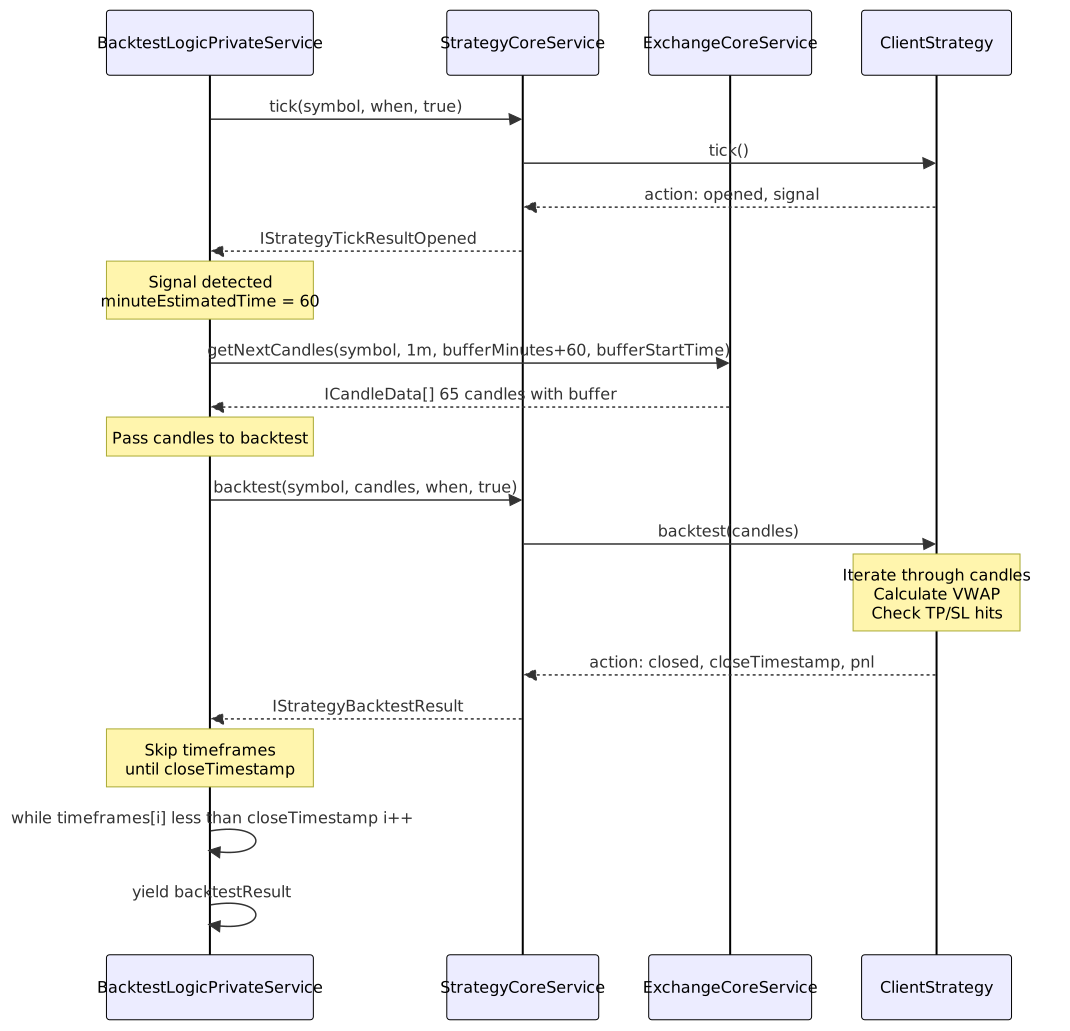
Candle Fetching with VWAP Buffer
The service fetches candles using exchangeCoreService.getNextCandles() with a buffer to support VWAP calculation. The buffer extends backwards from the signal open time.
// Calculate buffer and total candles needed
const bufferMinutes = GLOBAL_CONFIG.CC_AVG_PRICE_CANDLES_COUNT - 1;
const bufferStartTime = new Date(when.getTime() - bufferMinutes * 60 * 1000);
const totalCandles = signal.minuteEstimatedTime + bufferMinutes;
// Fetch candles starting from buffer
const candles = await this.exchangeCoreService.getNextCandles(
symbol,
"1m",
totalCandles,
bufferStartTime,
true
);
If no candles are returned (end of historical data), the iteration continues to the next timeframe without yielding a result.
Backtest Method Execution
The ClientStrategy.backtest() method receives the candle array and iterates through it, calculating VWAP from rolling windows and checking for TP/SL hits. The method always returns a closed or cancelled result.
Backtest Algorithm Flow
- If signal is scheduled: monitor for activation, cancellation, or timeout
- Once activated or already opened: calculate VWAP from rolling 5-candle windows
- Check if VWAP hits
priceTakeProfitorpriceStopLoss - If hit: return closed result with that timestamp, PnL, and close reason
- If no hit by end: return closed result with
closeReason="time_expired"
For details on the backtest algorithm, see page 9.3 (Fast-Forward Simulation).
Timestamp Skipping Logic
After receiving a closed result from backtest(), the iteration loop skips all timestamps between the current position and the signal's closeTimestamp. This prevents re-opening signals during periods when a signal was already active.
Skip Loop Implementation
// From BacktestLogicPrivateService at line 276-281
while (
i < timeframes.length &&
timeframes[i].getTime() < backtestResult.closeTimestamp
) {
i++;
}
Skipping Example Visualization

This skipping ensures:
- No duplicate signals during an active signal's lifetime
- Correct temporal progression of the backtest
- Memory efficiency (no need to store signal state between timestamps)
Memory Efficiency Patterns
The backtest execution is designed for memory efficiency, enabling backtests over millions of timestamps without exhausting memory.
Memory Efficiency Techniques
| Pattern | Implementation | Benefit |
|---|---|---|
| Async Generator | async *run() yields results one at a time |
Results streamed to consumer, not accumulated in array |
| Early Termination | Consumer can break out of for-await loop |
Allows stopping backtest early on criteria (e.g., max drawdown) |
| Single Result Yield | Only yields closed results, not idle/active |
Reduces memory footprint and consumer processing |
| Timestamp Skipping | Jumps to closeTimestamp after signal closes |
Avoids iterating through thousands of timestamps unnecessarily |
| No Signal State Storage | Signal state cleared after close in backtest mode | No memory accumulation across signal lifecycle |
Async Generator Pattern
The run() method is declared as an async generator function using async * syntax. This enables the function to yield results as they're produced rather than accumulating them in memory.
// From BacktestLogicPrivateService at line 48
public async *run(symbol: string) {
// ... execution logic
yield backtestResult; // Stream result to consumer
}
Consumer code can iterate with for await...of and break early:
for await (const result of backtestLogic.run("BTCUSDT")) {
console.log(result.pnl.pnlPercentage);
if (result.pnl.pnlPercentage < -10) break; // Stop on 10% loss
}
Complete Execution Trace
The following diagram traces a complete execution from the Public API through all service layers to the business logic and back.
End-to-End Execution Trace
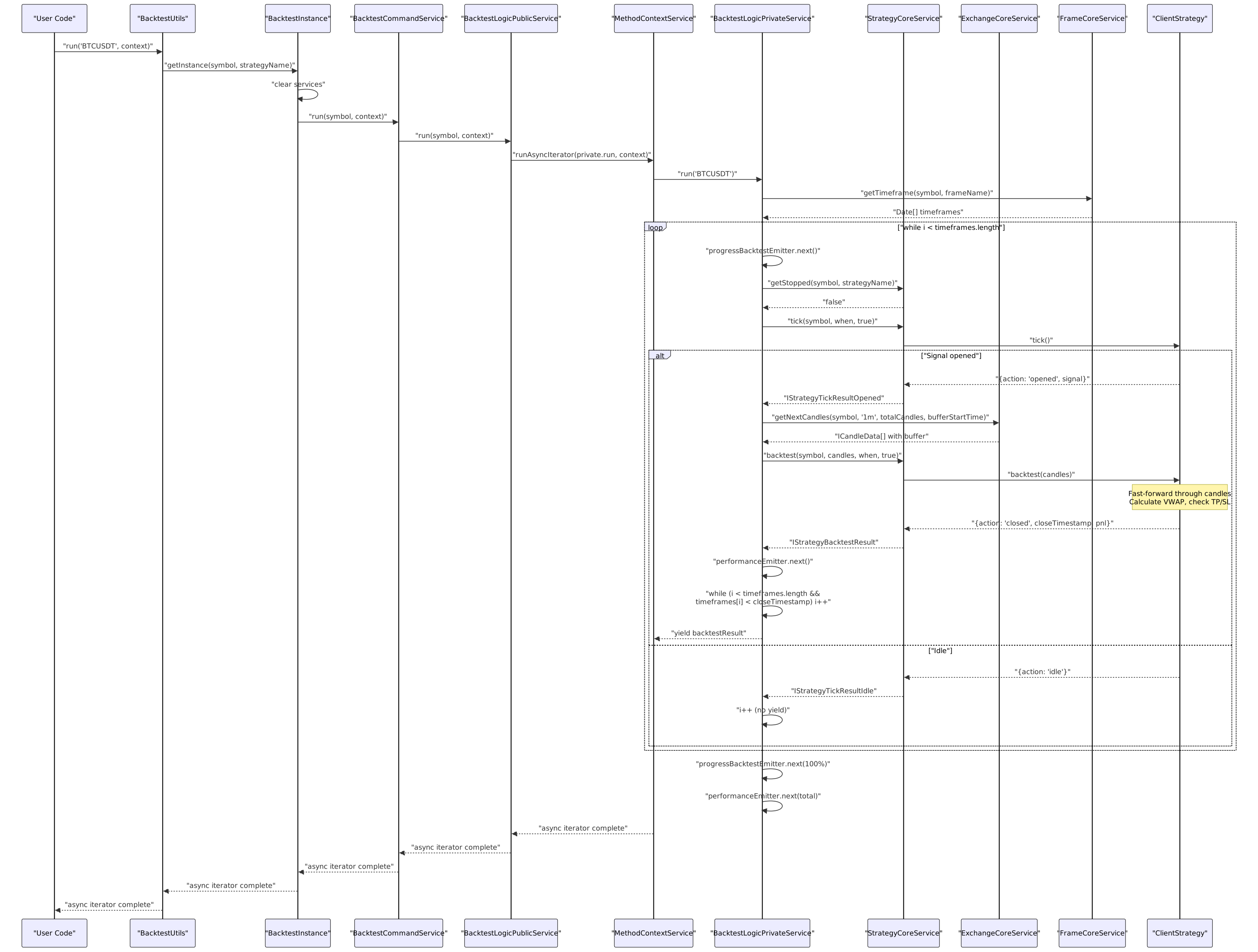
Performance Tracking and Metrics
The backtest execution tracks performance metrics at multiple granularities using performanceEmitter. These metrics enable bottleneck detection and optimization analysis.
Performance Metric Types
| Metric Type | Granularity | Tracks |
|---|---|---|
backtest_timeframe |
Per timestamp | Time spent processing each tick iteration |
backtest_signal |
Per signal | Time spent in fast-forward simulation (candle fetch + backtest) |
backtest_total |
Per execution | Total time for complete backtest run |
Each metric includes:
timestamp: Current time when metric was recordedpreviousTimestamp: Previous metric timestamp for interval calculationduration: Performance duration in millisecondsstrategyName,exchangeName,symbol: Context identifiersbacktest: true: Execution mode flag
Stop Signal Handling
The backtest execution checks for stop signals at multiple safe points to allow graceful termination. Stop signals are set via Backtest.stop() and checked via strategyCoreService.getStopped().
Stop Check Points

Stop checking ensures:
- Active signals complete their lifecycle (not interrupted mid-execution)
- Backtest stops at safe state boundaries (idle or closed)
- No new signals are opened after stop request
- Graceful cleanup and final progress emission
Error Handling and Recovery
The backtest execution includes error handling at the tick level to prevent single failures from aborting the entire backtest.
Error Handling Flow

Error Scenarios and Handling
| Scenario | Detection | Handling | Result |
|---|---|---|---|
| Tick failure | Exception in tick() call |
Log, emit error, skip timeframe | Continue backtest |
| getNextCandles failure | Exception in candle fetch | Log, emit error, skip signal | Continue backtest |
| backtest() failure | Exception in signal processing | Log, emit error, skip signal | Continue backtest |
| No candles available | candles.length === 0 |
Skip signal, continue | Continue backtest |
| Empty timeframe array | timeframes.length === 0 |
Loop never executes | Generator completes |
The errorEmitter allows external listeners to collect all errors via listenError() for logging and monitoring without interrupting execution.
Integration with Reporting
While the execution flow itself doesn't directly interact with reporting services, the yielded IStrategyTickResultClosed results are consumed by BacktestMarkdownService to accumulate statistics and generate performance reports.
The reporting integration happens at the consumer level, where the Public API's Backtest.run() or Backtest.background() methods pass results to the markdown service for accumulation.
For details on report generation, see Markdown Report Generation.
Summary
The backtest execution flow orchestrates historical simulation through a multi-layer architecture:
- Public Layer:
BacktestLogicPublicServicewraps execution with context propagation - Private Layer:
BacktestLogicPrivateServicemanages the iteration loop and coordinates services - Domain Services: Frame, Strategy, and Exchange services provide specialized operations
- Business Logic: Client classes implement pure signal processing and data fetching logic
The async generator pattern enables memory-efficient streaming, early termination, and processing of arbitrarily large historical datasets. The fast-forward simulation via backtest() method accelerates execution by avoiding tick-by-tick iteration for opened signals.
Key Characteristics:
- Memory-efficient streaming via async generators
- Fast-forward simulation for opened signals
- Automatic timestamp skipping to prevent overlap
- Clean separation between orchestration and business logic
- Context propagation through dependency injection