Timeframe Generation
This document explains how ClientFrame generates timestamp arrays for backtest iteration. The timeframe generation system produces evenly-spaced Date objects representing execution points throughout a historical period, configured by interval, start date, and end date.
For information about how these timestamps are used during backtest execution, see Backtest Execution Flow. For details on fast-forward simulation that occurs after signals open, see Fast-Forward Simulation.
Purpose and Scope
ClientFrame is responsible for generating the temporal backbone of backtesting—an array of timestamps that determines when the strategy's tick() method is evaluated. This generation happens once per backtest run and is cached for performance.
ClientFrame Architecture
ClientFrame implements the IFrame interface and resides in the Business Logic Layer. It is instantiated by FrameConnectionService based on the schema registered via addFrame().
Component Interaction

Frame Interval Configuration
The INTERVAL_MINUTES constant maps FrameInterval enum values to their minute durations. These intervals determine the spacing between generated timestamps.
| Interval | Minutes | Use Case |
|---|---|---|
"1m" |
1 | High-frequency strategies, minute-level signals |
"3m" |
3 | Short-term patterns |
"5m" |
5 | Common intraday interval |
"15m" |
15 | Medium-term intraday |
"30m" |
30 | Half-hour cycles |
"1h" |
60 | Hourly strategies |
"2h", "4h", "6h", "8h" |
120, 240, 360, 480 | Multi-hour cycles |
"12h" |
720 | Twice-daily evaluation |
"1d" |
1440 | Daily strategies |
"3d" |
4320 | Multi-day patterns |
Timestamp Generation Algorithm
The GET_TIMEFRAME_FN function implements a simple iterative algorithm to produce the timestamp array.
Algorithm Flow

Implementation Details
The core loop creates Date objects with millisecond precision:
- Start: Initialize
currentDatetostartDatefrom params - Iterate: While
currentDate <= endDate:- Clone
currentDateand push totimeframesarray - Increment
currentDatebyintervalMinutes * 60 * 1000milliseconds
- Clone
- Callback: Optionally invoke
callbacks.onTimeframefor validation/logging - Return: Final
Date[]array
The algorithm ensures inclusive boundaries—both startDate and endDate are included in the result if they align with interval boundaries.
Singleshot Caching
The getTimeframe method is wrapped with the singleshot decorator from functools-kit, ensuring the timestamp array is generated only once per ClientFrame instance.
Caching Behavior
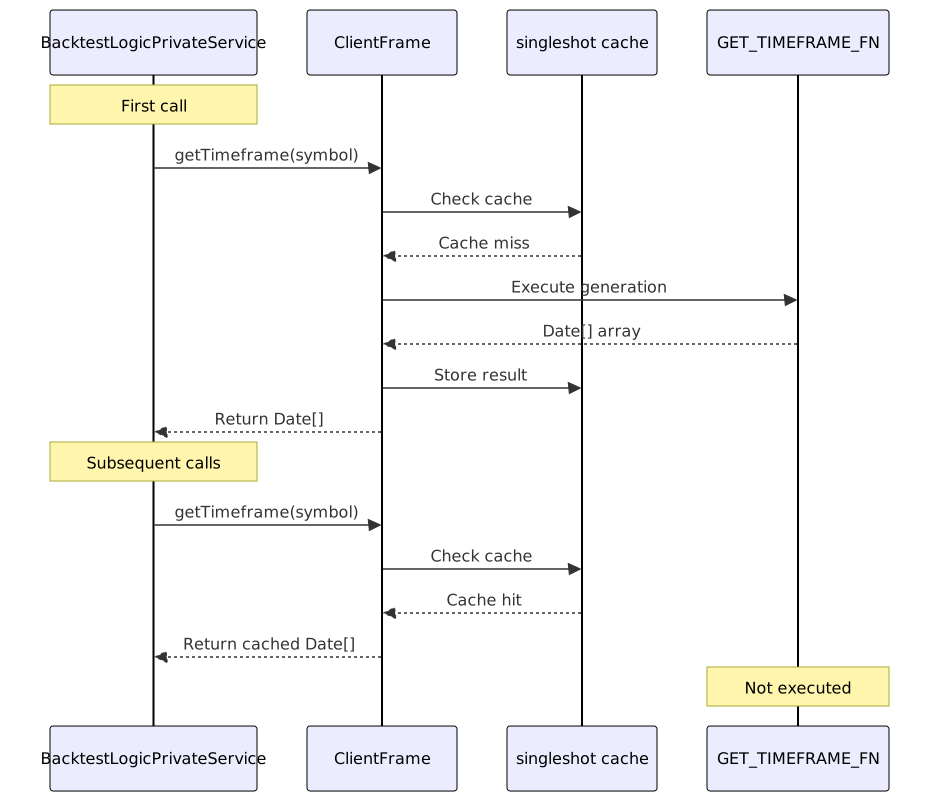
This optimization prevents redundant timestamp generation when multiple components or iterations request the same timeframe. The cache is scoped to the ClientFrame instance, which is itself memoized per frameName by FrameConnectionService.
Integration with Backtest Execution
The generated timestamp array drives the backtest loop. BacktestLogicPrivateService retrieves the timeframe and iterates through each timestamp, setting it as the execution context.
Execution Flow
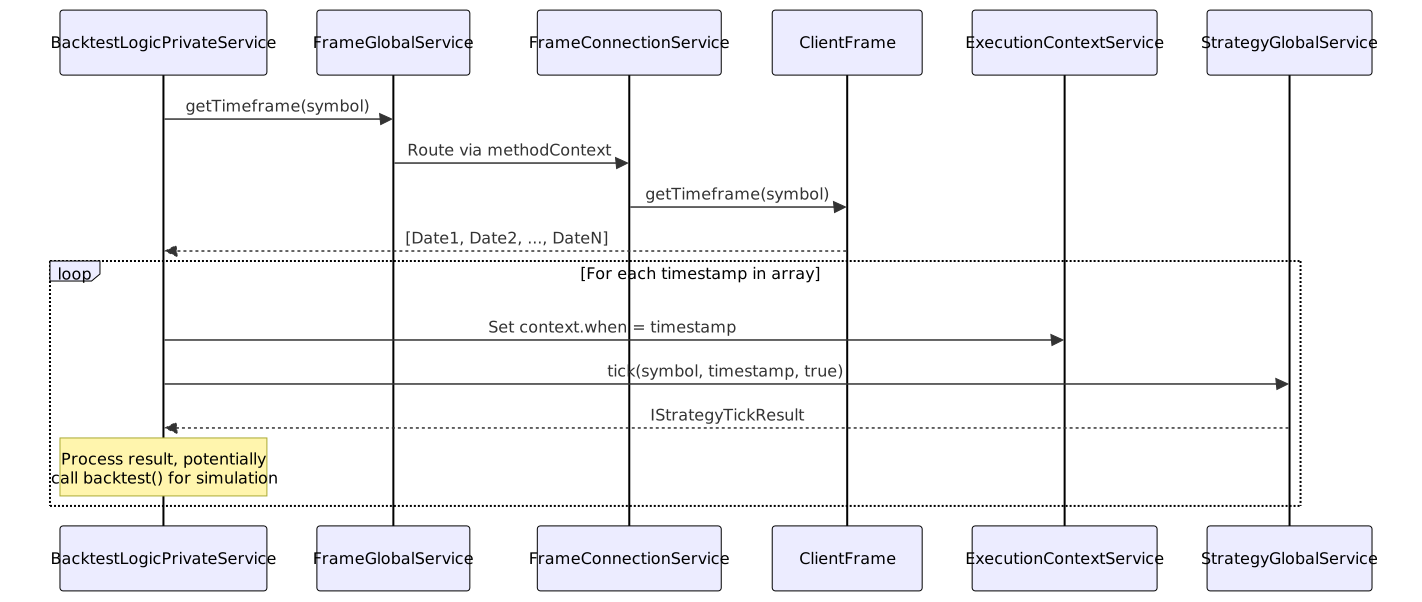
The timestamp array length directly determines backtest duration. For example:
- 30 days at 1-minute intervals: ~43,200 timestamps
- 365 days at 1-hour intervals: ~8,760 timestamps
Memory efficiency is maintained because only one timestamp is active in execution context at a time.
Configuration via IFrameSchema
Users configure timeframe generation through the IFrameSchema interface passed to addFrame(). The schema defines:
| Property | Type | Description |
|---|---|---|
frameName |
string |
Unique identifier for frame configuration |
interval |
FrameInterval |
Spacing between timestamps ("1m" to "3d") |
startDate |
Date |
Beginning of backtest period (inclusive) |
endDate |
Date |
End of backtest period (inclusive) |
callbacks |
Partial<IFrameCallbacks> |
Optional onTimeframe hook |
Registration Example
import { addFrame } from "backtest-kit";
addFrame({
frameName: "2024-Q1-daily",
interval: "1d",
startDate: new Date("2024-01-01T00:00:00Z"),
endDate: new Date("2024-03-31T23:59:59Z"),
callbacks: {
onTimeframe: (timeframes, start, end, interval) => {
console.log(`Generated ${timeframes.length} timestamps`);
console.log(`Range: ${start} to ${end}`);
console.log(`Interval: ${interval}`);
}
}
});
The callbacks.onTimeframe hook receives the generated array and configuration parameters, enabling validation, logging, or custom processing.
Error Handling
ClientFrame throws an error if an invalid interval is provided:
if (!intervalMinutes) {
throw new Error(`ClientFrame unknown interval: ${interval}`);
}
This validation occurs during the first getTimeframe() call. Since the method is wrapped with singleshot, the error is thrown only once and propagates through the call stack to the backtest orchestrator.
Implementation Pattern: Prototype Functions
The GET_TIMEFRAME_FN is defined as a standalone function accepting self: ClientFrame as a parameter. This pattern is used for memory efficiency:
const GET_TIMEFRAME_FN = async (symbol: string, self: ClientFrame) => {
self.params.logger.debug("ClientFrame getTimeframe", { symbol });
const { interval, startDate, endDate } = self.params;
// ... implementation
};
export class ClientFrame implements IFrame {
public getTimeframe = singleshot(
async (symbol: string): Promise<Date[]> =>
await GET_TIMEFRAME_FN(symbol, this)
);
}
This approach avoids creating new function closures for each ClientFrame instance, reducing memory overhead when multiple frames are registered.
Relationship to Exchange Intervals
While ClientFrame uses FrameInterval for timestamp generation, ClientExchange uses CandleInterval for fetching historical data. These two interval systems are separate:
FrameInterval: Determines when strategytick()is calledCandleInterval: Determines granularity of OHLCV data fetched
The frame interval can be larger than the candle interval. For example, a strategy might evaluate every 1 hour (frame.interval = "1h") while analyzing 100 1-minute candles (getCandles("BTCUSDT", "1m", 100)).