Signal Persistence
Signal persistence ensures crash-safe operation during live trading by atomically writing signal state to disk before yielding results. This prevents duplicate signals and enables seamless recovery after process restarts. In backtest mode, persistence is disabled for performance.
For information about signal states and transitions, see Signal States. For custom storage backends (Redis, PostgreSQL), see Custom Persistence Backends.
Overview
The persistence system provides durability guarantees for active trading signals through atomic file operations. When a signal is opened or closed, the state change is written to disk before the result is returned to the user. On restart, ClientStrategy loads the last known signal state and resumes monitoring without generating duplicate signals.
Key Components:
| Component | Purpose | Location |
|---|---|---|
PersistSignalAdapter |
Static adapter for signal CRUD operations | src/classes/Persist.ts:31-168 |
ClientStrategy.waitForInit() |
Loads persisted state on startup | src/client/ClientStrategy.ts:209-209 |
ClientStrategy.setPendingSignal() |
Writes signal state atomically | src/client/ClientStrategy.ts:220-233 |
PersistBase<ISignalData> |
Base class for file-based persistence | src/classes/Persist.ts:15-29 |
Persistence Architecture

The architecture uses a three-layer approach:
- ClientStrategy - Business logic layer that coordinates persistence calls
- PersistSignalAdapter - Domain-specific adapter that converts between
ISignalRowandISignalData - PersistBase - Generic file-based persistence with atomic write guarantees
Signal State Recovery
On initialization, ClientStrategy.waitForInit() attempts to load the last persisted signal state. This occurs once per strategy instance using the singleshot pattern from functools-kit.
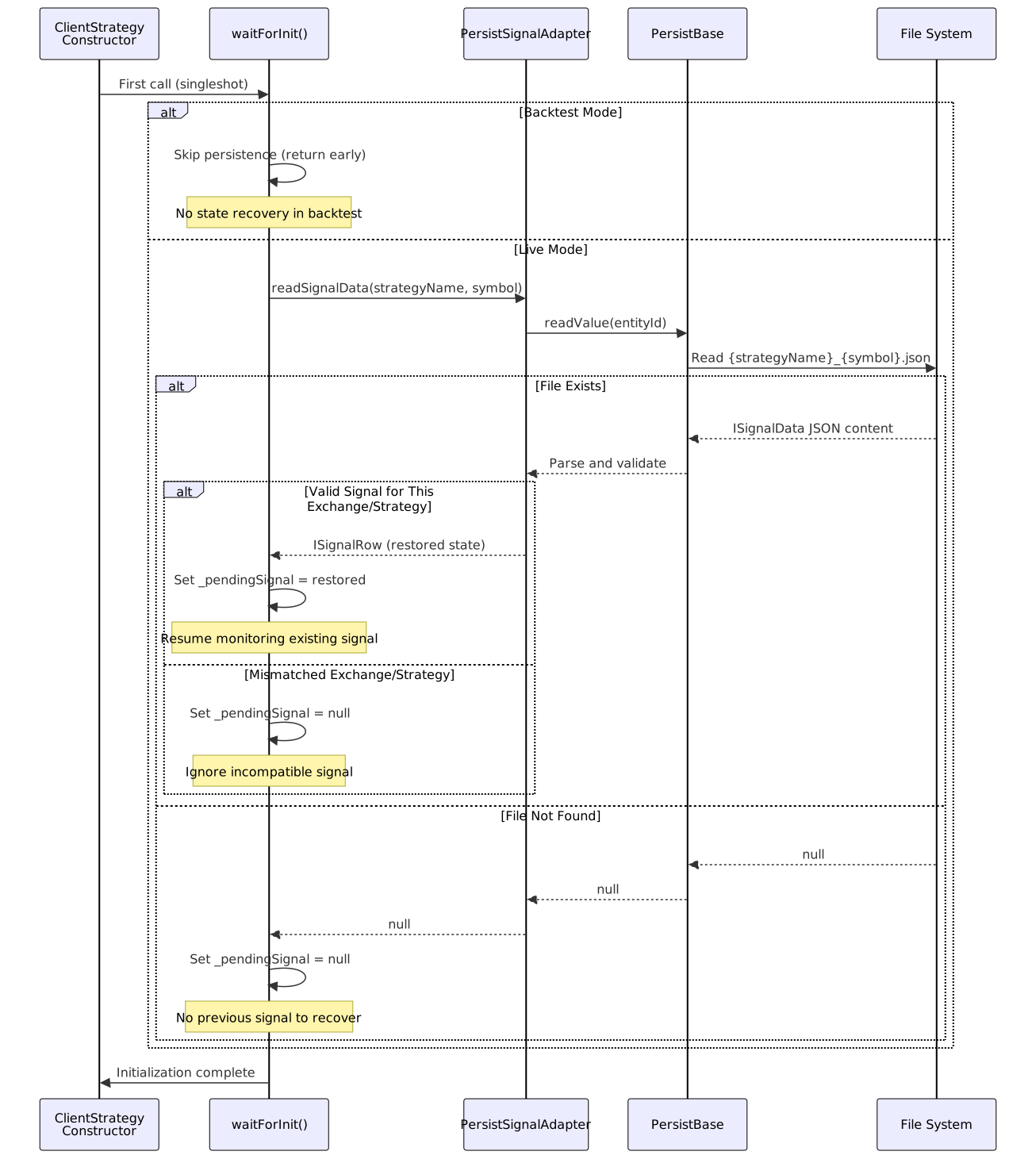
The recovery process validates that the persisted signal matches the current execution context:
// Validation checks in WAIT_FOR_INIT_FN
if (pendingSignal.exchangeName !== self.params.method.context.exchangeName) {
return; // Different exchange, ignore
}
if (pendingSignal.strategyName !== self.params.method.context.strategyName) {
return; // Different strategy, ignore
}
Atomic Write Operations
Every signal state change is persisted atomically through ClientStrategy.setPendingSignal(). The method writes to disk before the result is yielded to the user, ensuring durability.
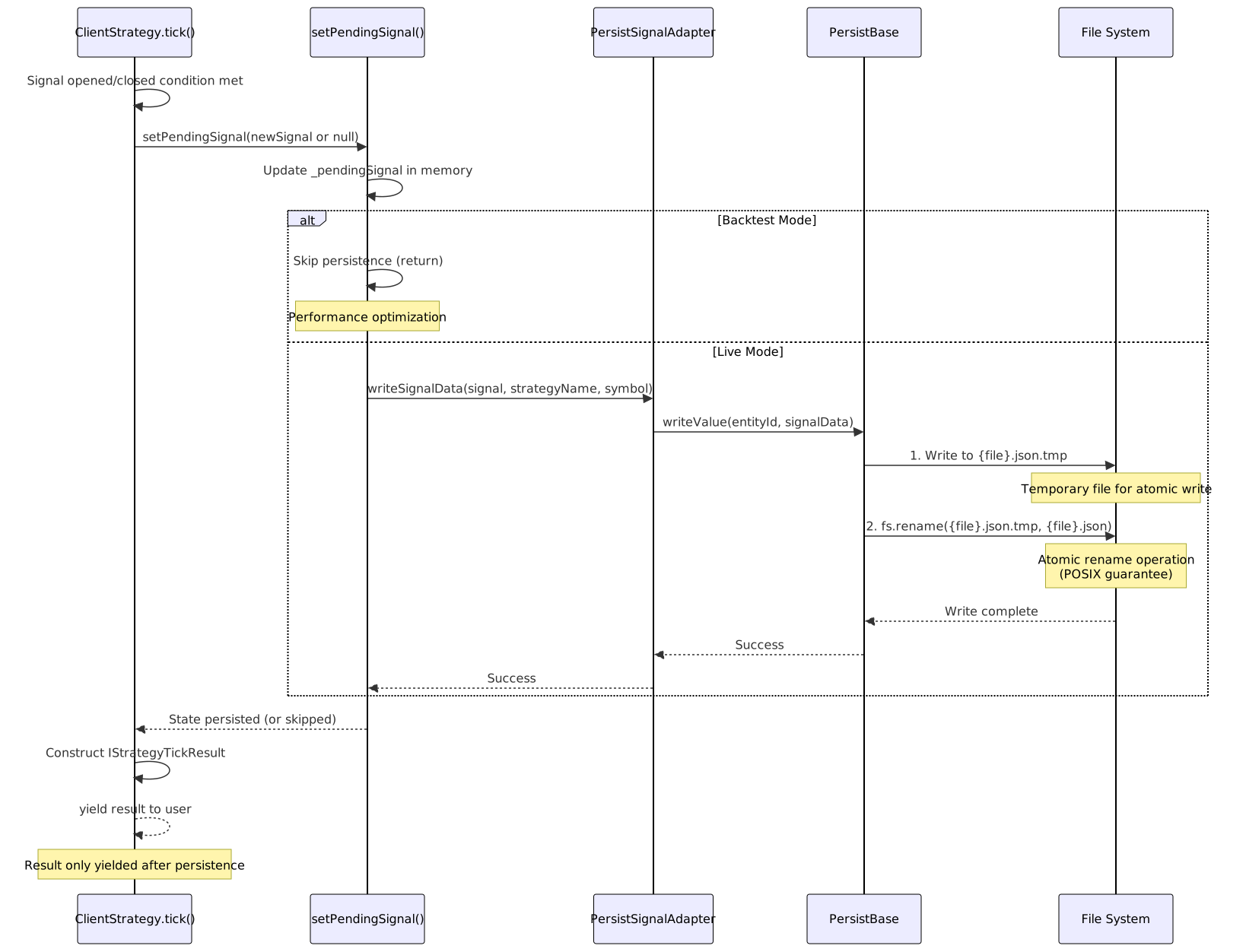
The atomic write pattern ensures crash safety:
- Write to temporary file - New state written to
{filename}.json.tmp - Atomic rename -
fs.rename()atomically replaces old file with new file - No intermediate state - File is either old state or new state, never corrupted
This pattern is implemented in PersistBase.writeValue():
File System Structure
Signals are stored in a flat directory structure under ./signal/ in the working directory. Each signal is identified by {strategyName}_{symbol} and stored as a JSON file.
Directory Layout:
./signal/
├── strategy1_BTCUSDT.json # Active signal for strategy1 on BTCUSDT
├── strategy1_ETHUSDT.json # Active signal for strategy1 on ETHUSDT
├── strategy2_BTCUSDT.json # Active signal for strategy2 on BTCUSDT
└── strategy3_SOLUSDT.json.tmp # Temporary file during atomic write
File Content Example:
{
"signalRow": {
"id": "abc123-def456-ghi789",
"position": "long",
"priceOpen": 50000.0,
"priceTakeProfit": 51000.0,
"priceStopLoss": 49000.0,
"minuteEstimatedTime": 60,
"timestamp": 1704067200000,
"symbol": "BTCUSDT",
"exchangeName": "binance",
"strategyName": "momentum-strategy",
"note": "Bullish momentum detected"
}
}
When a signal is closed, the file contains:
{
"signalRow": null
}
Entity ID Generation
The PersistSignalAdapter generates entity IDs by combining strategy name and symbol:
const entityId = `${strategyName}_${symbol}`;
This creates a unique identifier for each strategy-symbol pair. Multiple strategies can run on the same symbol without conflicts, and the same strategy can run on multiple symbols independently.
Entity ID Examples:
| Strategy Name | Symbol | Entity ID | File Path |
|---|---|---|---|
momentum-5m |
BTCUSDT |
momentum-5m_BTCUSDT |
./signal/momentum-5m_BTCUSDT.json |
mean-reversion |
ETHUSDT |
mean-reversion_ETHUSDT |
./signal/mean-reversion_ETHUSDT.json |
momentum-5m |
ETHUSDT |
momentum-5m_ETHUSDT |
./signal/momentum-5m_ETHUSDT.json |
Backtest vs Live Mode
Persistence behavior differs significantly between execution modes:

Comparison Table:
| Operation | Backtest Mode | Live Mode |
|---|---|---|
waitForInit() |
Returns immediately (no read) | Reads from ./signal/{entityId}.json |
setPendingSignal() |
Updates in-memory state only | Writes to disk atomically before return |
| Crash Recovery | Not applicable (single-process simulation) | Full state recovery on restart |
| Performance | Maximum (no I/O overhead) | Slight latency from disk writes (~1-5ms) |
| Durability | None (in-memory only) | Full durability (survives crashes) |
The mode is determined by params.execution.context.backtest:
if (this.params.execution.context.backtest) {
return; // Skip persistence
}
Persistence Lifecycle

Error Handling
Persistence operations are wrapped in trycatch patterns to handle file system errors gracefully:
Read Errors:
- File not found → Returns
null(no previous signal) - Invalid JSON → Logs warning, returns
null - Permission denied → Throws error (fatal)
Write Errors:
- Directory not exists → Creates directory automatically
- Disk full → Throws error (fatal)
- Permission denied → Throws error (fatal)
All fatal errors are logged and propagated to the caller, preventing the strategy from yielding results with unconfirmed persistence.
Custom Persistence Backends
The framework supports custom persistence implementations through the usePersistSignalAdapter() function. This allows replacing file-based storage with databases or distributed systems.
Example: Redis-backed persistence
import { usePersistSignalAdapter } from "backtest-kit";
class RedisPersistAdapter {
async readSignalData(strategyName, symbol) {
const key = `signal:${strategyName}:${symbol}`;
const data = await redis.get(key);
return data ? JSON.parse(data).signalRow : null;
}
async writeSignalData(signal, strategyName, symbol) {
const key = `signal:${strategyName}:${symbol}`;
await redis.set(key, JSON.stringify({ signalRow: signal }));
}
}
usePersistSignalAdapter(new RedisPersistAdapter());
For detailed information on implementing custom persistence backends, see Custom Persistence Backends.
Integration with Signal Lifecycle
Persistence is called at critical transition points in the signal lifecycle:

The persistence calls occur at exactly two points:
- Signal Opened - After validation, before yielding
openedresult src/client/ClientStrategy.ts:263 - Signal Closed - After PnL calculation, before yielding
closedresult src/client/ClientStrategy.ts:414
This ensures that the yielded results always reflect the persisted state, maintaining consistency between in-memory and disk state.