ClientExchange
Purpose and Scope
ClientExchange is the core data access class that provides market data to trading strategies through a unified interface. It wraps external exchange data providers (CCXT libraries, custom APIs, or database sources) and handles candle fetching, price formatting, and VWAP calculation. The class implements time-aware data fetching by using ExecutionContextService to determine the temporal boundary for historical vs. future data requests.
This document covers the implementation details of ClientExchange including its constructor parameters, core methods, retry logic, and integration with the execution context system. For exchange schema registration, see Exchange Schemas. For how ClientExchange instances are managed and memoized, see Connection Services.
Architecture Overview
ClientExchange sits in the Data & Integration Layer and serves as the boundary between the framework's execution logic and external data sources. The class is instantiated by ExchangeConnectionService, wrapped by ExchangeGlobalService for context injection, and invoked by ClientStrategy during signal generation and by backtest logic during fast-forward simulation.
Integration in System Architecture

Constructor and Configuration
ClientExchange is instantiated with an IExchangeParams object that defines the exchange name, data provider functions, formatting functions, execution context reference, and logger.
IExchangeParams Structure
| Field | Type | Description |
|---|---|---|
exchangeName |
string |
Unique identifier for the exchange (e.g., "binance", "bybit") |
getCandles |
(symbol, interval, since, limit) => Promise<ICandleData[]> |
Function to fetch candles from data source starting at since |
formatPrice |
(symbol, price) => Promise<number> |
Function to format price to exchange precision |
formatQuantity |
(symbol, quantity) => Promise<number> |
Function to format quantity to exchange precision |
execution |
ExecutionContextService |
Reference to execution context for time-aware fetching |
logger |
LoggerService |
Logger instance for debug/warn/error messages |
callbacks?.onCandleData |
(symbol, interval, since, limit, data) => void |
Optional callback invoked after fetching candles |
Constructor Invocation
const exchange = new ClientExchange({
exchangeName: "binance",
getCandles: async (symbol, interval, since, limit) => {
// CCXT implementation or custom data source
return await ccxt.fetchOHLCV(symbol, interval, since.getTime(), limit);
},
formatPrice: async (symbol, price) => price.toFixed(2),
formatQuantity: async (symbol, quantity) => quantity.toFixed(8),
execution: executionContextService,
logger: loggerService,
callbacks: {
onCandleData: (symbol, interval, since, limit, data) => {
console.log(`Fetched ${data.length} candles for ${symbol}`);
}
}
});
Core Methods
getCandles: Historical Data Fetching
The getCandles method fetches historical candles backwards from the execution context time (ExecutionContextService.context.when). This method is used by strategies during signal generation to analyze past market data.
Method Signature
async getCandles(
symbol: string,
interval: CandleInterval,
limit: number
): Promise<ICandleData[]>
Time Calculation Logic
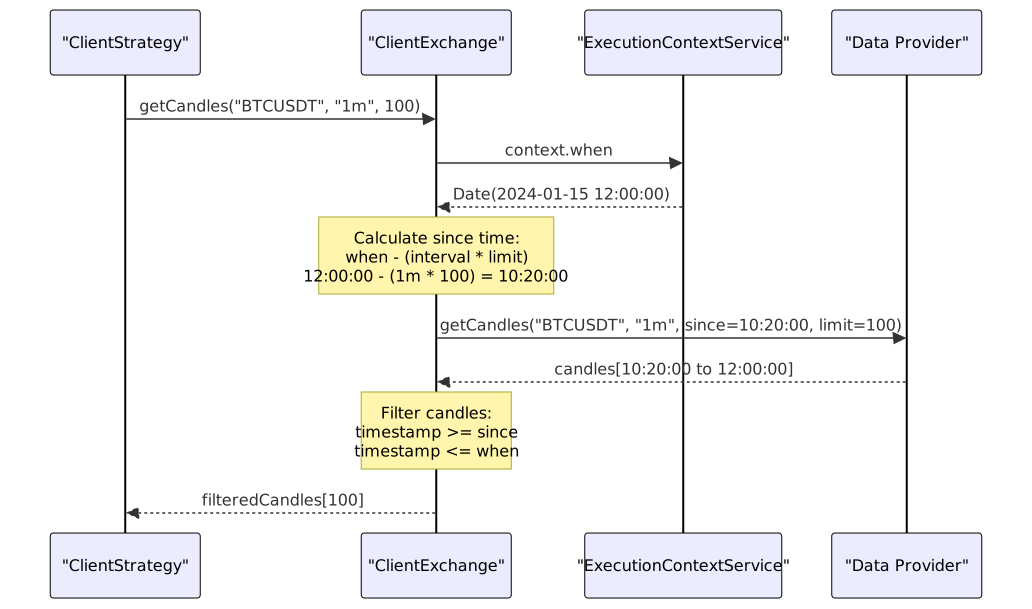
Implementation Details:
-
Time Adjustment Calculation src/client/ClientExchange.ts:201-212
- Converts interval to minutes using
INTERVAL_MINUTESmapping src/client/ClientExchange.ts:10-21 - Calculates
adjust = step * limit - step - Computes
since = when - (adjust * 60 * 1000)
- Converts interval to minutes using
-
Retry Logic src/client/ClientExchange.ts:214
- Delegates to
GET_CANDLES_FNwhich retriesCC_GET_CANDLES_RETRY_COUNTtimes - Sleeps
CC_GET_CANDLES_RETRY_DELAY_MSbetween attempts src/client/ClientExchange.ts:114-151
- Delegates to
-
Range Filtering src/client/ClientExchange.ts:217-229
- Filters candles to match
[since, when]timestamp range - Warns if fewer candles returned than requested
- Filters candles to match
-
Callback Invocation src/client/ClientExchange.ts:231-239
- Calls
params.callbacks.onCandleDataif provided
- Calls
getNextCandles: Future Data Fetching
The getNextCandles method fetches candles forwards from the execution context time. This method is only used in backtest mode to retrieve candles for signal duration simulation. It returns an empty array if the requested time range extends beyond Date.now().
Method Signature
async getNextCandles(
symbol: string,
interval: CandleInterval,
limit: number
): Promise<ICandleData[]>
Backtest vs Live Behavior

Implementation Details:
-
Time Range Validation src/client/ClientExchange.ts:265-275
- Calculates
endTime = since + (limit * interval_minutes * 60 * 1000) - Returns empty array if
endTime > Date.now() - Prevents fetching non-existent future data in live mode
- Calculates
-
Data Fetching src/client/ClientExchange.ts:277
- Uses same
GET_CANDLES_FNretry logic asgetCandles - Starts from
whentimestamp instead of adjusted historical time
- Uses same
-
Usage in Backtest src/lib/services/logic/private/BacktestLogicPrivateService.ts:127-155
- Called when scheduled signal is detected
- Fetches
CC_SCHEDULE_AWAIT_MINUTES + minuteEstimatedTime + 1candles - Used to simulate scheduled signal activation and closure
getAveragePrice: VWAP Calculation
The getAveragePrice method computes the Volume Weighted Average Price (VWAP) from the last N 1-minute candles, where N is configurable via GLOBAL_CONFIG.CC_AVG_PRICE_CANDLES_COUNT (default: 5).
Method Signature
async getAveragePrice(symbol: string): Promise<number>
VWAP Calculation Algorithm

Implementation Details:
-
Typical Price Formula src/client/ClientExchange.ts:340
typicalPrice = (high + low + close) / 3- Uses the average of high, low, and close prices
-
VWAP Formula src/client/ClientExchange.ts:339-352
VWAP = sum(typicalPrice * volume) / sum(volume)- Weights each candle's typical price by its trading volume
-
Zero Volume Fallback src/client/ClientExchange.ts:346-349
- Returns simple average of close prices if total volume is zero
- Ensures method always returns a valid price
-
Usage Context
- Called by
ClientStrategy.backtest()during signal closure simulation - Used to determine realistic fill prices in backtesting
- Called by
formatPrice and formatQuantity
These methods delegate to user-provided formatting functions to ensure prices and quantities conform to exchange-specific precision requirements.
Method Signatures
async formatPrice(symbol: string, price: number): Promise<number>
async formatQuantity(symbol: string, quantity: number): Promise<number>
Implementation: Direct delegation to params.formatPrice and params.formatQuantity with logging src/client/ClientExchange.ts:357-371
Typical Use Cases:
formatPrice: Rounds price to exchange's tick size (e.g., 0.01 for BTCUSDT)formatQuantity: Rounds quantity to exchange's lot size (e.g., 0.00001 BTC)
Validation and Retry Logic
ClientExchange implements robust validation and retry mechanisms to handle data quality issues and transient failures from external data sources.
Incomplete Candle Detection
The VALIDATE_NO_INCOMPLETE_CANDLES_FN function detects anomalous candles that result from incomplete API responses, such as prices that are orders of magnitude too low or zero volumes.
Validation Algorithm

Validation Checks: src/client/ClientExchange.ts:31-105
-
Reference Price Calculation src/client/ClientExchange.ts:39-56
- Uses median for datasets >=
CC_GET_CANDLES_MIN_CANDLES_FOR_MEDIAN - Uses average for smaller datasets (more stable)
- Uses median for datasets >=
-
Numeric Validity src/client/ClientExchange.ts:65-76
- Ensures all OHLCV values are finite (not NaN or Infinity)
-
Positivity Check src/client/ClientExchange.ts:79-89
- All OHLC prices must be positive
- Volume must be non-negative
-
Anomaly Detection src/client/ClientExchange.ts:92-104
- Flags prices below
referencePrice / CC_GET_CANDLES_PRICE_ANOMALY_THRESHOLD_FACTOR - Default factor: 10 (prices 10x lower than median are rejected)
- Flags prices below
Retry Logic
The GET_CANDLES_FN helper implements automatic retry with exponential backoff for transient failures.
Retry Flow
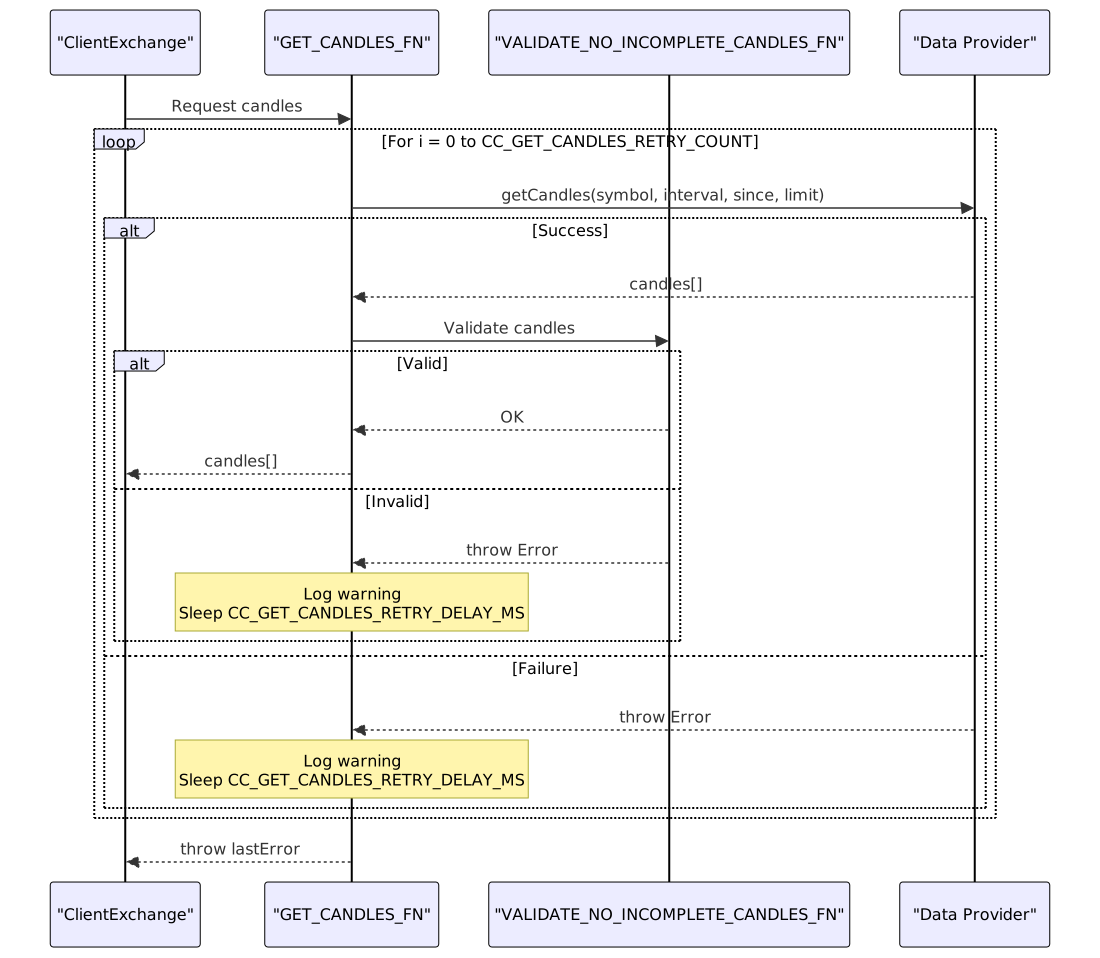
Configuration Parameters:
CC_GET_CANDLES_RETRY_COUNT: Number of retry attempts (default: 3) src/config/params.ts:15CC_GET_CANDLES_RETRY_DELAY_MS: Delay between retries in milliseconds (default: 1000) src/config/params.ts:16
Context Integration
ClientExchange depends on ExecutionContextService to determine the current temporal position, which controls the boundary between historical and future data requests.
ExecutionContext Usage

Key Context Dependencies:
-
Backtest Mode src/client/ClientExchange.ts:265-275
getNextCandleschecks ifendTime > Date.now()- Returns empty array in live mode (prevents future data access)
- Returns historical data in backtest mode
-
Time Boundaries src/client/ClientExchange.ts:211-212, src/client/ClientExchange.ts:217-223
- All candle fetches use
execution.context.whenas reference - Ensures consistent temporal perspective across all data requests
- All candle fetches use
-
Symbol Context src/interfaces/Exchange.interface.ts:18-35
- Exchange methods receive symbol from strategy invocation
- No implicit symbol storage in
ClientExchange
Usage Patterns
Strategy Signal Generation
// Inside ClientStrategy.tick()
const exchange = exchangeGlobalService.getExchange(symbol, exchangeName);
const candles = await exchange.getCandles("BTCUSDT", "1h", 24);
// Analyze candles and generate signal
const signal = strategy.getSignal(symbol, candles);
Backtest Fast-Forward Simulation
// Inside BacktestLogicPrivateService.run()
if (result.action === "opened") {
const candles = await exchangeGlobalService.getNextCandles(
symbol,
"1m",
signal.minuteEstimatedTime,
when,
true
);
const backtestResult = await strategyGlobalService.backtest(symbol, candles, when, true);
}
VWAP Price Calculation for Signal Closure
// Inside ClientStrategy.backtest()
const vwap = await this.params.exchange.getAveragePrice(symbol);
const pnl = this.calculatePnL(signal, vwap);
Custom Exchange Integration
import { addExchange } from "backtest-kit";
addExchange({
exchangeName: "custom-database",
getCandles: async (symbol, interval, since, limit) => {
const query = `
SELECT timestamp, open, high, low, close, volume
FROM candles
WHERE symbol = ? AND interval = ? AND timestamp >= ?
ORDER BY timestamp ASC
LIMIT ?
`;
const rows = await db.query(query, [symbol, interval, since.getTime(), limit]);
return rows.map(row => ({
timestamp: row.timestamp,
open: row.open,
high: row.high,
low: row.low,
close: row.close,
volume: row.volume
}));
},
formatPrice: async (symbol, price) => {
const precision = await db.getPricePrecision(symbol);
return Number(price.toFixed(precision));
},
formatQuantity: async (symbol, quantity) => {
const precision = await db.getQuantityPrecision(symbol);
return Number(quantity.toFixed(precision));
}
});