Custom Exchange Integration
This page explains how to implement custom exchange data sources by creating IExchangeSchema implementations. The framework supports any data source: CCXT exchanges, REST APIs, databases, CSV files, or WebSocket streams. The same exchange implementation works for both backtest and live trading modes.
Overview
The framework separates data retrieval (user-provided IExchangeSchema) from data processing (framework-provided ClientExchange). Users implement three methods:
getCandles()- Fetch OHLCV candle dataformatPrice()- Format prices to exchange precisionformatQuantity()- Format quantities to exchange precision
The framework wraps these implementations in ClientExchange which adds VWAP calculation, execution context awareness, and bidirectional time-travel (backwards for historical data, forwards for backtest fast-forward).
Exchange Registration Flow

Diagram: Exchange schema registration and instantiation flow
When addExchange() is called, the schema is stored in ExchangeSchemaService using the ToolRegistry pattern. On first use, ExchangeConnectionService creates a ClientExchange instance wrapping the user schema. This instance is memoized and reused for all subsequent operations.
IExchangeSchema Interface
User implementations must conform to IExchangeSchema:
| Property | Type | Required | Description |
|---|---|---|---|
exchangeName |
ExchangeName (string) |
Yes | Unique identifier for this exchange instance |
note |
string |
No | Developer documentation comment |
getCandles |
(symbol, interval, since, limit) => Promise<ICandleData[]> |
Yes | Fetch OHLCV candle data from data source |
formatPrice |
(symbol, price) => Promise<string> |
Yes | Format price to exchange precision rules |
formatQuantity |
(symbol, quantity) => Promise<string> |
Yes | Format quantity to exchange precision rules |
callbacks |
Partial<IExchangeCallbacks> |
No | Optional lifecycle event hooks |
getCandles Implementation
The getCandles method is the primary data source function. It receives time range parameters from ClientExchange and must return OHLCV candles.
Method Signature:
getCandles: (
symbol: string,
interval: CandleInterval,
since: Date,
limit: number
) => Promise<ICandleData[]>
Parameters:
| Parameter | Type | Description |
|---|---|---|
symbol |
string |
Trading pair symbol (e.g., "BTCUSDT") |
interval |
CandleInterval |
Candle timeframe: "1m", "3m", "5m", "15m", "30m", "1h", "2h", "4h", "6h", "8h" |
since |
Date |
Start date for candle fetching (inclusive) |
limit |
number |
Maximum number of candles to return |
Return Value: Array of ICandleData objects
| Field | Type | Description |
|---|---|---|
timestamp |
number |
Unix timestamp in milliseconds when candle opened |
open |
number |
Opening price at candle start |
high |
number |
Highest price during candle period |
low |
number |
Lowest price during candle period |
close |
number |
Closing price at candle end |
volume |
number |
Trading volume during candle period |
Implementation Requirements:
- Return candles from
sincedate up tolimitcount - Sort candles by timestamp in ascending order (oldest first)
- Align timestamps to interval boundaries (e.g., "1m" at :00 seconds)
- Throw descriptive errors for failed requests or invalid symbols
Example: CCXT Exchange Integration
The most common integration uses CCXT library for accessing cryptocurrency exchange APIs:
import { addExchange } from "backtest-kit";
import ccxt from "ccxt";
addExchange({
exchangeName: "binance",
getCandles: async (symbol, interval, since, limit) => {
const exchange = new ccxt.binance();
const ohlcv = await exchange.fetchOHLCV(
symbol,
interval,
since.getTime(),
limit
);
return ohlcv.map(([timestamp, open, high, low, close, volume]) => ({
timestamp,
open,
high,
low,
close,
volume,
}));
},
formatPrice: async (symbol, price) => price.toFixed(2),
formatQuantity: async (symbol, quantity) => quantity.toFixed(8),
});
Key Points:
exchange.fetchOHLCV()returns[timestamp, open, high, low, close, volume][]- Map to
ICandleDatastructure with named fields - CCXT handles rate limiting, authentication, and exchange-specific APIs
- Same code works for any CCXT-supported exchange (Binance, Bybit, etc.)
Example: Database Exchange
For fast backtesting, store historical candles in a database:
import { addExchange } from "backtest-kit";
import { db } from "./database"; // PostgreSQL, MySQL, SQLite, etc.
addExchange({
exchangeName: "binance-db",
getCandles: async (symbol, interval, since, limit) => {
return await db.query(
`SELECT timestamp, open, high, low, close, volume
FROM candles
WHERE symbol = $1 AND interval = $2 AND timestamp >= $3
ORDER BY timestamp ASC
LIMIT $4`,
[symbol, interval, since.getTime(), limit]
);
},
formatPrice: async (symbol, price) => price.toFixed(2),
formatQuantity: async (symbol, quantity) => quantity.toFixed(8),
});
Advantages over CCXT:
- 10-100x faster backtesting (no API rate limits)
- Offline operation (no network dependency)
- Consistent data (pre-downloaded and validated)
ClientExchange Time-Travel Wrapper
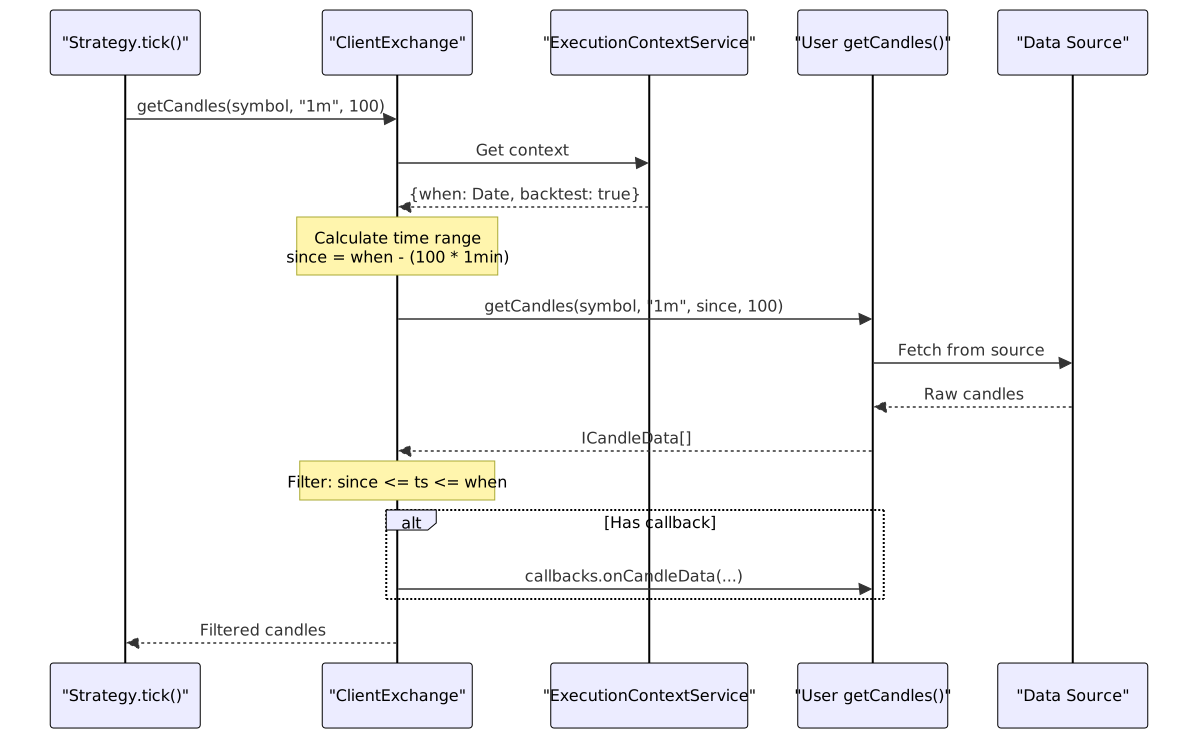
Diagram: ClientExchange wraps user schema with time-aware fetching
ClientExchange.getCandles() reads ExecutionContextService.context.when to determine the current time (historical for backtest, Date.now() for live). It calculates since = when - (interval × limit), fetches candles via user schema, then filters results to [since, when] range.
formatPrice and formatQuantity
These methods format numeric values to exchange-specific precision rules. Critical for live trading to avoid order rejection.
Method Signatures:
formatPrice: (symbol: string, price: number) => Promise<string>
formatQuantity: (symbol: string, quantity: number) => Promise<string>
Implementation Strategies:
| Strategy | Example | Use Case |
|---|---|---|
| Fixed precision | price.toFixed(2) |
Simple backtesting |
| Symbol lookup | Query from database table | Production live trading |
| CCXT markets | exchange.markets[symbol].precision.price |
Real exchange rules |
Example: Dynamic Precision Lookup
addExchange({
exchangeName: "binance-precise",
// ... getCandles implementation
formatPrice: async (symbol, price) => {
const info = await db.query(
"SELECT price_precision FROM symbols WHERE symbol = $1",
[symbol]
);
return price.toFixed(info.price_precision);
},
formatQuantity: async (symbol, quantity) => {
const info = await db.query(
"SELECT qty_precision FROM symbols WHERE symbol = $1",
[symbol]
);
return quantity.toFixed(info.qty_precision);
},
});
Lifecycle Callbacks
Optional callbacks.onCandleData is invoked after each successful candle fetch.
Callback Signature:
interface IExchangeCallbacks {
onCandleData: (
symbol: string,
interval: CandleInterval,
since: Date,
limit: number,
data: ICandleData[]
) => void;
}
Example: Data Quality Monitoring
addExchange({
exchangeName: "monitored-exchange",
getCandles: async (symbol, interval, since, limit) => {
// ... fetch implementation
},
formatPrice: async (symbol, price) => price.toFixed(2),
formatQuantity: async (symbol, quantity) => quantity.toFixed(8),
callbacks: {
onCandleData: (symbol, interval, since, limit, data) => {
console.log(`[${symbol}] Fetched ${data.length}/${limit} candles`);
if (data.length < limit * 0.9) {
console.warn(`[${symbol}] Data quality issue: expected ${limit}, got ${data.length}`);
}
},
},
});
Use Cases:
- Logging and debugging
- Metrics collection
- Data quality validation
- Cache prewarming
Framework-Provided VWAP Calculation
ClientExchange implements getAveragePrice() automatically—no user implementation required. Used by strategies for current market price.

Diagram: getAveragePrice() uses last 5 one-minute candles
Formula: VWAP = Σ(Typical Price × Volume) / Σ(Volume)
Where Typical Price = (High + Low + Close) / 3
Fallback: If totalVolume == 0, returns simple average of close prices.
Bidirectional Time-Travel
ClientExchange provides two candle-fetching directions:
| Method | Direction | Purpose |
|---|---|---|
getCandles(symbol, interval, limit) |
Backwards from context.when |
Strategy indicators (SMA, RSI, etc.) |
getNextCandles(symbol, interval, limit) |
Forwards from context.when |
Backtest fast-forward simulation |
Both methods call the same schema.getCandles() with different time ranges.

Diagram: Bidirectional candle fetching in backtest mode
Example:
- Backtest at
2024-01-15 12:00:00 - Strategy calls
getCandles("BTCUSDT", "1m", 100)for indicators → fetches[12:00 - 100min, 12:00] - Framework calls
getNextCandles("BTCUSDT", "1m", 60)for signal outcome → fetches[12:00, 12:00 + 60min]
Automatic Filtering and Validation
ClientExchange filters and validates candles returned by user schemas:
Timestamp Filtering:
// ClientExchange.getCandles() implementation
const filteredData = data.filter(
(candle) =>
candle.timestamp >= since.getTime() &&
candle.timestamp <= context.when.getTime()
);
Even if user schema returns extra candles, only those within [since, when] are used.
Count Validation:
if (filteredData.length < limit) {
logger.warn(`Expected ${limit} candles, got ${filteredData.length}`);
}
Logs warnings for data gaps or quality issues.
Service Layer Integration

Diagram: Exchange schema flows through service layers
addExchange()stores schema inExchangeSchemaServiceExchangeConnectionService.getExchange()creates memoizedClientExchangeinstanceMethodContextServiceprovidesexchangeNamevia scoped DIExecutionContextServiceprovides{when, backtest, symbol}via scoped DIClientExchangewraps user schema with enhanced functionality
Testing Custom Exchanges
Test these scenarios when implementing custom exchanges:
Data Quality Tests:
| Test Case | Validation |
|---|---|
| Complete data | All requested candles returned |
| Timestamp alignment | Candles align to interval boundaries (e.g., 1m at :00 seconds) |
| Sequential order | Ascending timestamps, no gaps or duplicates |
| Valid OHLCV | low <= open, close <= high for all candles |
| Positive volume | volume >= 0 for all candles |
Edge Case Tests:
| Test Case | Expected Behavior |
|---|---|
| Empty result | Return [] when no data available |
| Partial result | Return available candles (framework logs warning) |
| Future date | Return [] for since > Date.now() |
| Network error | Throw descriptive error with context |
| Invalid symbol | Throw descriptive error |
Performance Considerations:
- Cache candles to reduce API calls (especially for overlapping requests)
- Implement rate limiting and exponential backoff for API sources
- Use connection pooling for database sources
- Set reasonable timeouts (5-30s depending on data source)
Common Implementation Patterns
Pattern: In-Memory Caching
const cache = new Map<string, ICandleData[]>();
addExchange({
exchangeName: "cached-exchange",
async getCandles(symbol, interval, since, limit) {
const key = `${symbol}-${interval}-${since.getTime()}-${limit}`;
if (cache.has(key)) return cache.get(key)!;
const candles = await fetchFromAPI(symbol, interval, since, limit);
cache.set(key, candles);
return candles;
},
// ... formatPrice, formatQuantity
});
Pattern: Retry with Exponential Backoff
async function retry<T>(fn: () => Promise<T>, maxRetries = 3): Promise<T> {
for (let i = 0; i < maxRetries; i++) {
try {
return await fn();
} catch (error) {
if (i === maxRetries - 1) throw error;
await new Promise(resolve => setTimeout(resolve, 1000 * Math.pow(2, i)));
}
}
throw new Error("Unreachable");
}
addExchange({
exchangeName: "retry-exchange",
async getCandles(symbol, interval, since, limit) {
return await retry(() =>
fetch(`/api/candles?symbol=${symbol}...`).then(r => r.json())
);
},
// ... formatPrice, formatQuantity
});
Pattern: Connection Pooling (Database)
import { Pool } from "pg";
const pool = new Pool({ max: 10, min: 2 });
addExchange({
exchangeName: "pooled-postgres",
async getCandles(symbol, interval, since, limit) {
const client = await pool.connect();
try {
const res = await client.query(
"SELECT * FROM candles WHERE symbol=$1 AND interval=$2...",
[symbol, interval]
);
return res.rows;
} finally {
client.release();
}
},
// ... formatPrice, formatQuantity
});
Error Handling Guidelines
Exchange implementations should throw descriptive errors that help diagnose issues:
Error Message Format
throw new Error(`[${exchangeName}] ${operation}: ${reason}`);
Common Error Scenarios
| Scenario | Error Message Example |
|---|---|
| Network failure | [binance-api] getCandles: Network request failed |
| Invalid symbol | [database] getCandles: Symbol 'INVALID' not found |
| Data corruption | [csv-files] getCandles: Malformed CSV data |
| Rate limit | [rest-api] getCandles: Rate limit exceeded, retry after 60s |
| Authentication | [exchange-api] getCandles: API key invalid or expired |
Example Error Handling
addExchange({
exchangeName: "safe-exchange",
async getCandles(symbol, interval, since, limit) {
try {
const response = await fetch(/* ... */);
if (!response.ok) {
throw new Error(`HTTP ${response.status}: ${response.statusText}`);
}
const data = await response.json();
if (!Array.isArray(data.candles)) {
throw new Error("Invalid response format: missing candles array");
}
return data.candles;
} catch (error) {
throw new Error(
`[safe-exchange] getCandles failed for ${symbol} ${interval}: ${error.message}`
);
}
},
// ... other methods
});
Summary
Custom exchange integration requires implementing three core methods (getCandles, formatPrice, formatQuantity) via the IExchangeSchema interface. The framework wraps user schemas with ClientExchange to add VWAP calculation, execution context integration, and bidirectional candle fetching. This design enables backtesting and live trading with any data source while maintaining a clean separation between data retrieval and business logic.
Key implementation requirements:
- Return candles in ascending timestamp order
- Handle errors with descriptive messages
- Respect exchange precision in formatting methods
- Consider caching and rate limiting for production use