Walker Reports
Walker reports provide comparative analysis of multiple trading strategies executed on the same symbol during the same timeframe. These reports aggregate performance metrics from individual backtests and rank strategies based on a configured optimization metric (e.g., Sharpe Ratio, total PNL, win rate).
For information about walker execution flow and strategy comparison mechanics, see Walker Execution Flow and Strategy Comparison. For individual strategy backtest reports, see Backtest API.
Report Architecture
Walker reports are generated by WalkerMarkdownService, which subscribes to walker progress events and accumulates strategy results as each backtest completes.
Data Flow

Component Interaction

Report Structure
Walker markdown reports consist of four main sections: metadata header, best strategy summary, strategy comparison table, and all-signals PNL table.
Report Sections

Example Report Output
# Walker Comparison Report: my-walker
**Symbol:** BTCUSDT
**Exchange:** binance
**Frame:** 1d-backtest
**Optimization Metric:** sharpeRatio
**Strategies Tested:** 5
## Best Strategy: strategy-ma-cross
**Best sharpeRatio:** 1.45
**Total Signals:** 42
## Top Strategies Comparison
| Strategy | Sharpe Ratio | Total PNL | Win Rate | Total Trades |
| --- | --- | --- | --- | --- |
| strategy-ma-cross | 1.45 | +12.34% | 57.14% | 42 |
| strategy-rsi-divergence | 1.23 | +10.12% | 55.00% | 40 |
| strategy-macd-signal | 0.98 | +8.45% | 52.38% | 38 |
...
## All Signals (PNL Table)
| Strategy | Signal ID | Symbol | Position | PNL | Close Reason | Open Time | Close Time |
| --- | --- | --- | --- | --- | --- | --- | --- |
| strategy-ma-cross | abc123 | BTCUSDT | long | +2.45% | take_profit | 2024-01-01 | 2024-01-02 |
...
Data Models
WalkerStatisticsModel
The WalkerStatisticsModel interface aggregates all walker comparison data:
| Field | Type | Description |
|---|---|---|
walkerName |
WalkerName |
Unique identifier for this walker |
symbol |
string |
Trading pair symbol |
exchangeName |
string |
Exchange name from walker schema |
frameName |
string |
Timeframe name from walker schema |
metric |
WalkerMetric |
Optimization metric used for ranking |
totalStrategies |
number |
Total number of strategies tested |
bestStrategy |
StrategyName | null |
Name of best performing strategy |
bestMetric |
number | null |
Best metric value achieved |
bestStats |
BacktestStatisticsModel | null |
Full statistics for best strategy |
strategyResults |
IStrategyResult[] |
Results for all strategies tested |
IStrategyResult
Per-strategy result data included in comparison table:
| Field | Type | Description |
|---|---|---|
strategyName |
StrategyName |
Strategy identifier |
stats |
BacktestStatisticsModel |
Full backtest statistics |
metricValue |
number | null |
Value of optimization metric |
SignalData
Individual signal data included in PNL table:
| Field | Type | Description |
|---|---|---|
strategyName |
StrategyName |
Strategy that generated signal |
signalId |
string |
Unique signal identifier |
symbol |
string |
Trading pair symbol |
position |
"long" | "short" |
Position direction |
pnl |
number |
Profit/loss percentage |
closeReason |
CloseReason |
Why signal closed |
openTime |
number |
Position open timestamp |
closeTime |
number |
Position close timestamp |
Column Configuration System
Walker reports use a flexible column configuration system to customize which data appears in tables and how it's formatted.
Column Types

ColumnModel Interface
Each column configuration must implement four properties:
interface ColumnModel<T extends object = any> {
key: string; // Unique identifier
label: string; // Table header text
format: (data: T, index: number) => string; // Value formatter
isVisible: () => boolean; // Visibility toggle
}
Default Column Configurations
The framework provides default column sets via COLUMN_CONFIG:
| Configuration Key | Type | Usage |
|---|---|---|
walker_strategy_columns |
StrategyColumn[] |
Strategy comparison table columns |
walker_pnl_columns |
PnlColumn[] |
All-signals PNL table columns |
Users can override these defaults by passing custom column arrays to report methods.
API Methods
WalkerMarkdownService Methods
The service provides four primary methods for interacting with walker reports:
getData()
Retrieves aggregated walker statistics without generating markdown:
public getData = async (
walkerName: WalkerName,
symbol: string,
metric: WalkerMetric,
context: {
exchangeName: string;
frameName: string;
}
): Promise<WalkerStatisticsModel>
getReport()
Generates markdown report string with customizable columns:
public getReport = async (
walkerName: WalkerName,
symbol: string,
metric: WalkerMetric,
context: {
exchangeName: string;
frameName: string;
},
strategyColumns?: StrategyColumn[],
pnlColumns?: PnlColumn[]
): Promise<string>
dump()
Saves markdown report to disk:
public dump = async (
walkerName: WalkerName,
symbol: string,
metric: WalkerMetric,
context: {
exchangeName: string;
frameName: string;
},
path?: string, // default: "./dump/walker"
strategyColumns?: StrategyColumn[],
pnlColumns?: PnlColumn[]
): Promise<void>
clear()
Clears accumulated report data:
public clear = async (walkerName?: WalkerName): Promise<void>
If walkerName is provided, clears only that walker's data. If omitted, clears all walkers.
WalkerUtils / WalkerInstance Methods
The Walker utility class and WalkerInstance class provide simplified access to walker reports:

Usage Examples
Generate Report to String
import { Walker } from "backtest-kit";
const markdown = await Walker.getReport("BTCUSDT", {
walkerName: "my-walker"
});
console.log(markdown);
Save Report to Disk
import { Walker } from "backtest-kit";
// Save to default path: ./dump/walker/my-walker.md
await Walker.dump("BTCUSDT", {
walkerName: "my-walker"
});
// Save to custom path
await Walker.dump("BTCUSDT", {
walkerName: "my-walker"
}, "./custom/reports");
Access Raw Statistics
import { Walker } from "backtest-kit";
const stats = await Walker.getData("BTCUSDT", {
walkerName: "my-walker"
});
console.log("Best strategy:", stats.bestStrategy);
console.log("Best metric value:", stats.bestMetric);
console.log("Total strategies tested:", stats.totalStrategies);
Report Generation Process
Event-Driven Accumulation
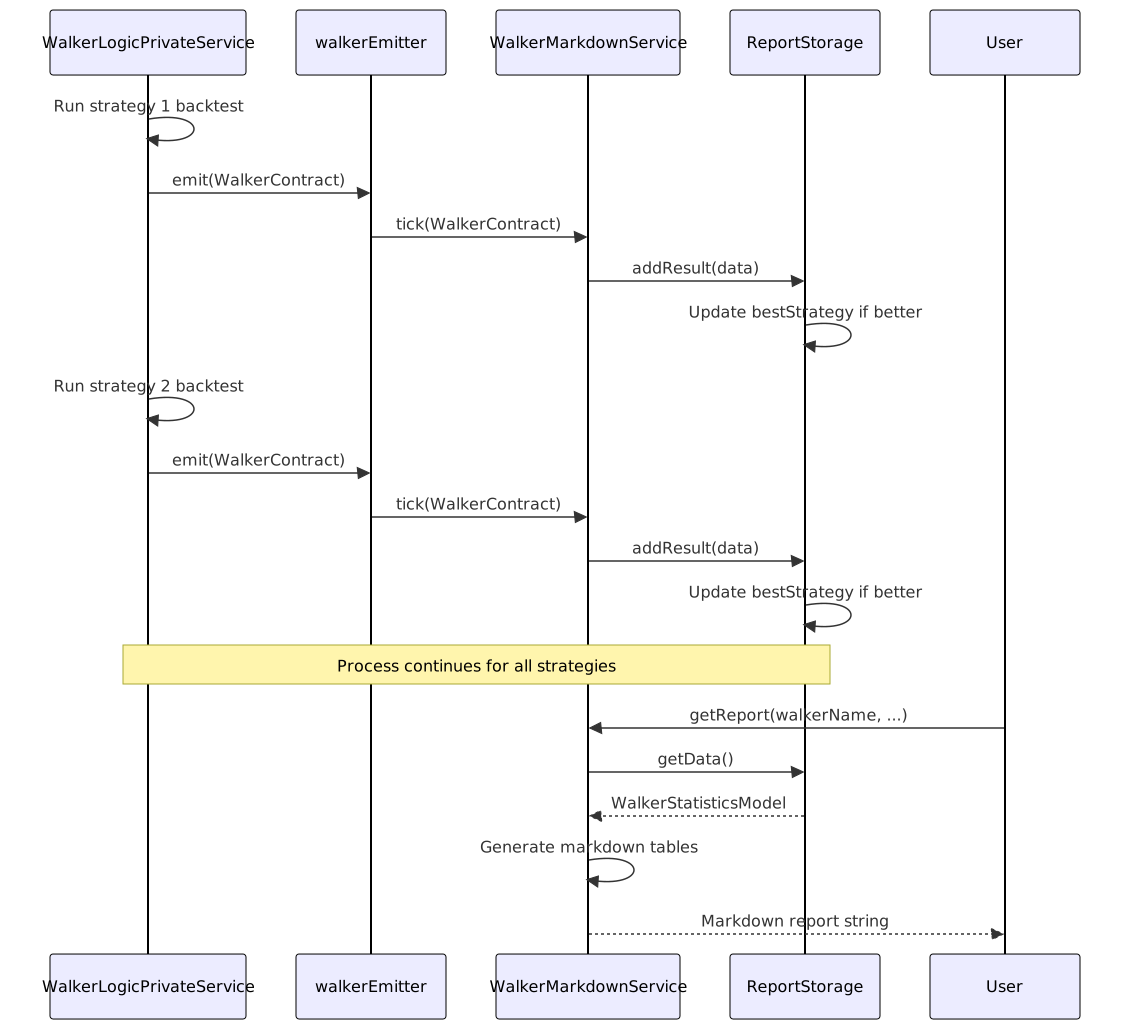
Strategy Ranking
Strategies are sorted by metric value in descending order (best first):
// Inside ReportStorage.getComparisonTable()
const sortedResults = [...this._strategyResults].sort((a, b) => {
const aValue = a.metricValue ?? -Infinity;
const bValue = b.metricValue ?? -Infinity;
return bValue - aValue; // Descending order
});
const topStrategies = sortedResults.slice(0, topN); // Top N strategies
Null metric values are treated as -Infinity and appear last in rankings.
Best Strategy Tracking
The best strategy is determined by the walker execution logic and reported via WalkerContract:
// Inside ReportStorage.addResult()
this._totalStrategies = data.totalStrategies;
this._bestMetric = data.bestMetric;
this._bestStrategy = data.bestStrategy;
// Store full statistics for best strategy
if (data.strategyName === data.bestStrategy) {
this._bestStats = data.stats;
}
Table Generation
Strategy Comparison Table
The comparison table shows top N strategies (default: 10) sorted by optimization metric:

PNL Table
The PNL table aggregates all closed signals from all strategies:
// Collect all closed signals from all strategies
const allSignals: SignalData[] = [];
for (const result of this._strategyResults) {
for (const signal of result.stats.signalList) {
allSignals.push({
strategyName: result.strategyName,
signalId: signal.signal.id,
symbol: signal.signal.symbol,
position: signal.signal.position,
pnl: signal.pnl.pnlPercentage,
closeReason: signal.closeReason,
openTime: signal.signal.pendingAt,
closeTime: signal.closeTimestamp,
});
}
}
Column Rendering
Both tables use the same column rendering logic:

Storage Management
Per-Walker Storage Isolation
Each walker gets its own ReportStorage instance via memoization:
private getStorage = memoize<(walkerName: WalkerName) => ReportStorage>(
([walkerName]) => `${walkerName}`,
(walkerName) => new ReportStorage(walkerName)
);
This ensures that multiple walkers can run simultaneously without interfering with each other's reports.
Storage Lifecycle

Memory Management
The service automatically subscribes to walkerEmitter on first use via the init() method wrapped in singleshot():
protected init = singleshot(async () => {
this.loggerService.log("walkerMarkdownService init");
walkerEmitter.subscribe(this.tick);
});
To release memory for a specific walker:
await walkerMarkdownService.clear("my-walker");
To release all walker data:
await walkerMarkdownService.clear();
Integration with Walker Execution
Walker reports are automatically populated during walker execution. No manual intervention is required:

Performance Considerations
Bounded Storage
Report storage does not have a hard limit on the number of strategy results, as the total is bounded by the number of strategies configured in the walker schema. However, each strategy's BacktestStatisticsModel contains up to 250 signals (MAX_EVENTS) to prevent unbounded memory growth.
Async Column Formatting
Column format() and isVisible() functions can be async, allowing for expensive formatting operations without blocking the event loop:
const customColumn: StrategyColumn = {
key: "custom",
label: "Custom Metric",
format: async (result) => {
// Can perform async operations
const value = await calculateExpensiveMetric(result);
return value.toFixed(2);
},
isVisible: async () => {
// Can check async configuration
return await featureFlags.isEnabled("custom-column");
}
};
Report Generation Timing
Report generation is computationally cheap after data accumulation:
- Strategy sorting: O(n log n) where n = number of strategies
- Table rendering: O(s × c) where s = strategies/signals, c = columns
- Markdown assembly: O(rows)
Reports can be generated multiple times from the same accumulated data without re-running backtests.