Live Execution Flow
Purpose and Scope
This document explains the live trading execution flow orchestrated by LiveLogicPrivateService and LiveLogicPublicService. It covers the infinite loop mechanics, real-time signal streaming, context propagation, and timing intervals used for continuous market monitoring.
For crash recovery mechanisms and state persistence, see Crash Recovery. For signal monitoring logic (take profit, stop loss, time expiration), see Real-time Monitoring. For the overall live trading system overview, see Live Trading.
Overview
Live execution in backtest-kit operates as an infinite async generator that continuously monitors trading signals at 1-minute intervals. Unlike backtesting which iterates through historical timeframes, live mode progresses in real-time using new Date() at each iteration.
The execution model consists of two layers:
- LiveLogicPrivateService: Core orchestration with the infinite loop
- LiveLogicPublicService: Public API wrapper with context management
Results stream to consumers as they occur, yielding only opened and closed signal events while filtering out idle and active states to reduce noise.
Execution Architecture
The following diagram shows how live execution flows through the service layers:
Live Execution Service Architecture

Infinite Loop Mechanics
The core of live execution is implemented in LiveLogicPrivateService.run() as an infinite async generator:
Live Loop Structure

The implementation uses these key constructs:
| Component | Purpose | Location |
|---|---|---|
while (true) |
Infinite loop for continuous monitoring | src/lib/services/logic/private/LiveLogicPrivateService.ts:58 |
new Date() |
Real-time progression (not historical) | src/lib/services/logic/private/LiveLogicPrivateService.ts:59 |
strategyGlobalService.tick() |
Check signal state at current time | src/lib/services/logic/private/LiveLogicPrivateService.ts:61 |
sleep(TICK_TTL) |
Wait 1 minute + 1ms between iterations | src/lib/services/logic/private/LiveLogicPrivateService.ts:69-80 |
yield result |
Stream opened/closed events to consumer | src/lib/services/logic/private/LiveLogicPrivateService.ts:78 |
Context Propagation
Live execution uses MethodContextService to propagate schema names (strategyName, exchangeName) through the execution chain without explicit parameters:
Context Propagation Flow
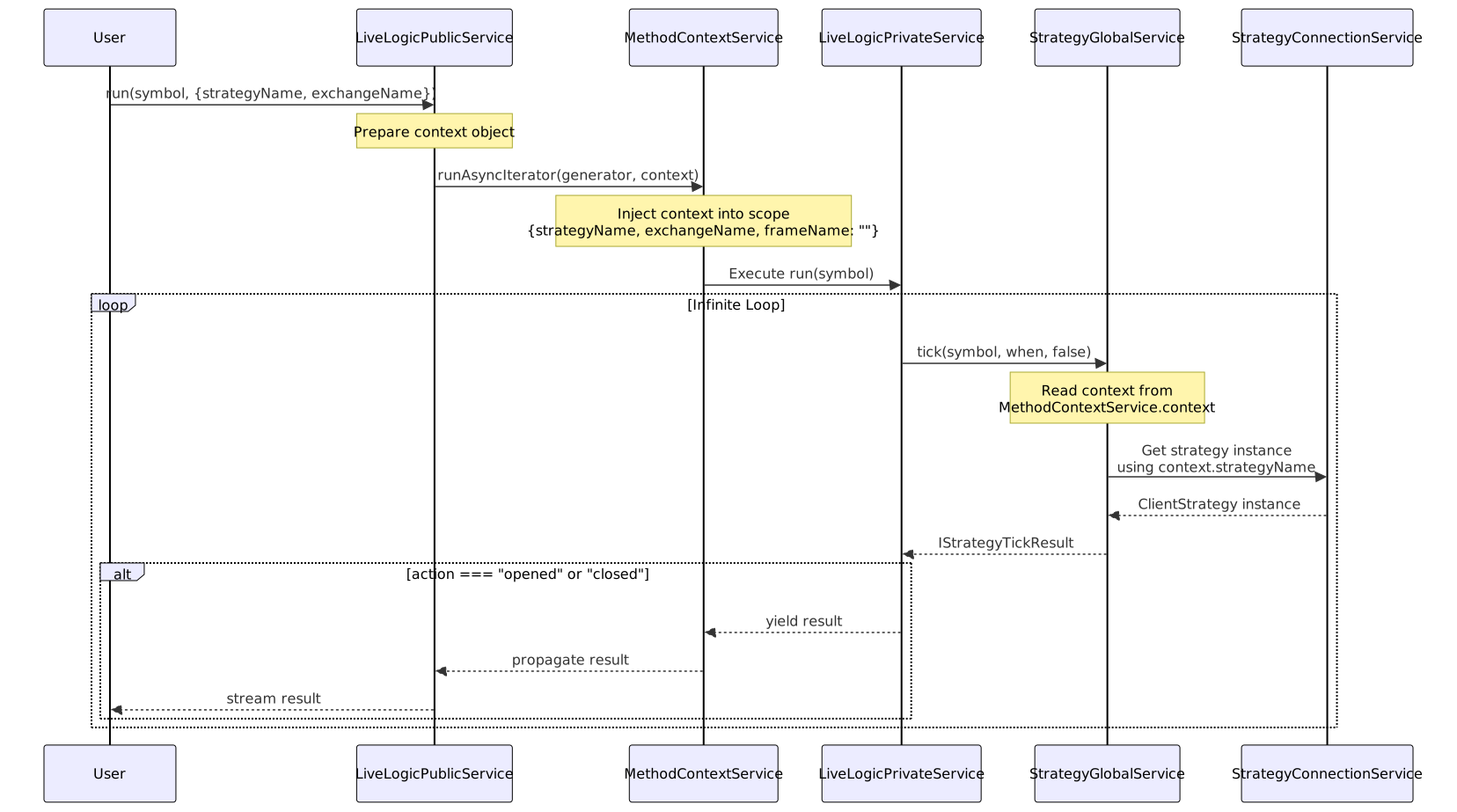
The context object contains:
interface IMethodContext {
exchangeName: ExchangeName; // Which exchange to use
strategyName: StrategyName; // Which strategy to execute
frameName: FrameName; // Empty string for live mode
}
This context is read by StrategyConnectionService and ExchangeConnectionService to route requests to the correct registered schema instances. The scoped context eliminates the need to pass these names as parameters through every function call.
Signal Event Streaming
Live execution filters and streams results based on their action type:
Result Filtering Logic

The filtering logic prevents overwhelming the consumer with status updates:
| Action Type | Yielded? | Reason | Interface |
|---|---|---|---|
idle |
❌ No | No active signal, nothing to report | IStrategyTickResultIdle |
active |
❌ No | Signal being monitored, no change | IStrategyTickResultActive |
opened |
✅ Yes | New signal created, user should know | IStrategyTickResultOpened |
closed |
✅ Yes | Signal completed with PNL, critical event | IStrategyTickResultClosed |
Timing and Intervals
Live execution uses precise timing to ensure consistent 1-minute monitoring:
Timing Constants
| Constant | Value | Purpose | Location |
|---|---|---|---|
TICK_TTL |
1 * 60 * 1_000 + 1 |
60,001ms (1 minute + 1ms) | src/lib/services/logic/private/LiveLogicPrivateService.ts:7 |
The extra 1ms ensures operations complete before the next tick begins, preventing timing edge cases.
Timing Diagram
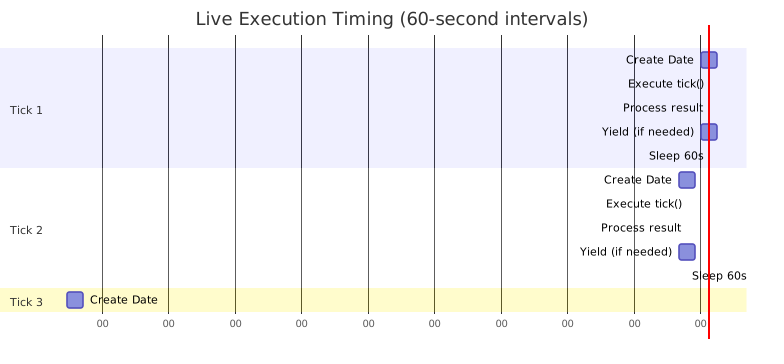
Each iteration consists of:
- Date creation (~0ms): Capture current timestamp with
new Date() - Tick execution (~100-500ms): Call
strategyGlobalService.tick()which involves VWAP calculation and signal checking - Result processing (~10ms): Log and check action type
- Yield (conditional): Stream result if
openedorclosed - Sleep: Wait for remainder of 60-second interval
Integration with Global Services
LiveLogicPrivateService coordinates with global services to execute strategy logic:
Service Interaction Diagram

Key interactions:
-
StrategyGlobalService.tick(): Wraps
ClientStrategy.tick()with execution context injection. Passessymbol,when(Date), andbacktest=falseflag. src/lib/services/logic/private/LiveLogicPrivateService.ts:61 -
ClientStrategy: Executes signal generation logic, monitors active signals, and calculates PNL when signals close.
-
ExchangeGlobalService: Called by
ClientStrategyto fetch real-time VWAP viagetAveragePrice()for price monitoring. -
Context Injection:
ExecutionContextServiceprovides{symbol, when, backtest: false}to all operations, enabling functions likegetCandles()to work without explicit parameters.
Initialization and Recovery
Before entering the infinite loop, LiveLogicPrivateService relies on ClientStrategy.waitForInit() to recover persisted state:
Initialization Sequence
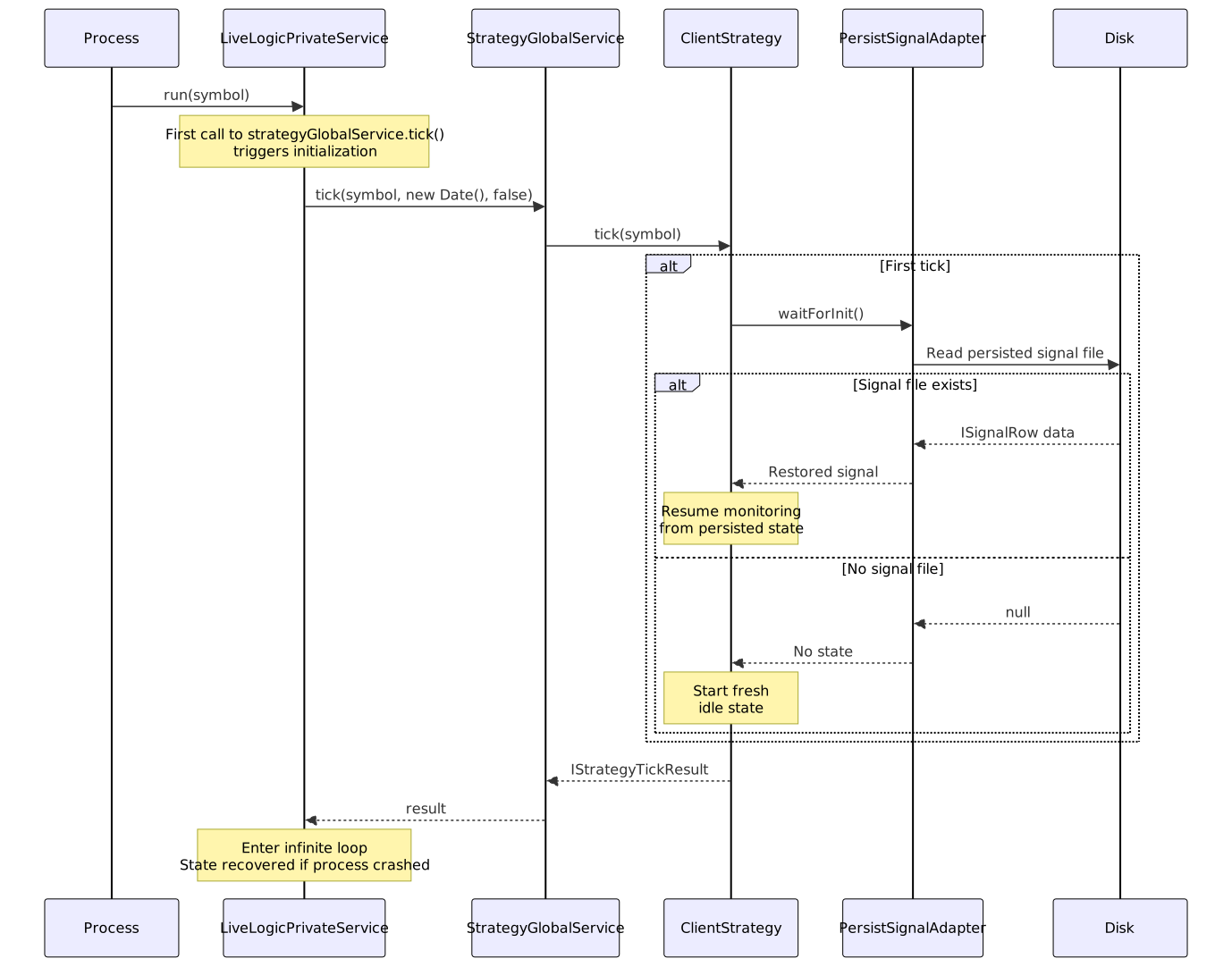
This initialization ensures:
- Crash safety: Process can restart without losing active signals
- State recovery: Active signals resume monitoring from persisted state
- No duplication: Recovered signals continue from their previous state, not re-opened
- Lazy initialization: Recovery happens on first tick, not during service construction
For detailed crash recovery mechanisms, see Crash Recovery.
Usage Example
The following example demonstrates live execution with result streaming:
import { Live } from "backtest-kit";
// Infinite generator - runs until process terminates
for await (const result of Live.run("BTCUSDT", {
strategyName: "my-strategy",
exchangeName: "binance",
})) {
if (result.action === "opened") {
console.log(`[OPENED] Signal ID: ${result.signal.id}`);
console.log(` Position: ${result.signal.position}`);
console.log(` Entry: ${result.signal.priceOpen}`);
console.log(` TP: ${result.signal.priceTakeProfit}`);
console.log(` SL: ${result.signal.priceStopLoss}`);
} else if (result.action === "closed") {
console.log(`[CLOSED] Signal ID: ${result.signal.id}`);
console.log(` Reason: ${result.closeReason}`);
console.log(` PNL: ${result.pnl.pnlPercentage.toFixed(2)}%`);
console.log(` Entry: ${result.pnl.priceOpen}`);
console.log(` Exit: ${result.pnl.priceClose}`);
}
// Loop continues indefinitely
// Use Ctrl+C or process.exit() to stop
}
Each iteration of the loop represents one 1-minute tick. Results stream immediately when signals open or close, enabling real-time event processing and logging.