ClientFrame
Purpose and Scope
ClientFrame is responsible for generating timeframe arrays used in backtesting operations. It produces an ordered sequence of timestamps from a start date to an end date at specified intervals (e.g., 1m, 1h, 1d). These timestamps serve as the iteration points for the backtesting engine, allowing strategies to be evaluated at each discrete time step.
This document covers the implementation details of ClientFrame, its integration with the service orchestration layer, and the timeframe generation algorithm. For information about how timeframes are consumed during backtest execution, see Backtest Execution Flow. For frame configuration and registration, see Configuration Functions.
Overview
In backtesting, strategies need to be evaluated at regular intervals across a historical date range. Rather than manually managing these timestamps, ClientFrame generates them programmatically based on three parameters:
- startDate: Beginning of the backtest period
- endDate: End of the backtest period
- interval: Time spacing between evaluations (1m, 5m, 1h, etc.)
The generated timeframe array is then consumed by BacktestLogicPrivateService, which iterates through each timestamp and triggers strategy evaluation.
Architecture Integration

ClientFrame Position in Service Hierarchy
ClientFrame sits at the bottom of the frame service stack. The orchestration flow is:
BacktestLogicPrivateServicerequests timeframe viaFrameGlobalServiceFrameGlobalServicesets execution context and delegates toFrameConnectionServiceFrameConnectionServicecreates or retrieves cachedClientFrameinstanceClientFramegenerates timestamp array and returns it upstream
This layered approach separates configuration (schema layer), context management (global layer), and pure business logic (client layer).
IFrame Interface
ClientFrame implements the IFrame interface, which defines a single method:
getTimeframe(symbol: string): Promise<Date[]>
The symbol parameter exists for API consistency but is not used in timeframe generation. This design allows future extensions where different symbols might require different timeframes.
Constructor Parameters
ClientFrame receives an IFrameParams object containing:
| Parameter | Type | Description |
|---|---|---|
interval |
FrameInterval |
Time spacing between timestamps (1m, 5m, 1h, etc.) |
startDate |
Date |
Beginning of backtest period |
endDate |
Date |
End of backtest period |
logger |
ILoggerService |
Logger instance for debug output |
callbacks |
Partial<IFrameCallbacks> |
Optional callbacks (e.g., onTimeframe) |
Supported Intervals
The INTERVAL_MINUTES constant maps each FrameInterval to its minute equivalent:
| Interval | Minutes | Typical Use Case |
|---|---|---|
| 1m | 1 | High-frequency strategies |
| 3m | 3 | Short-term strategies |
| 5m | 5 | Intraday strategies |
| 15m | 15 | Swing strategies |
| 30m | 30 | Multi-hour strategies |
| 1h | 60 | Hourly evaluation |
| 2h | 120 | 2-hour evaluation |
| 4h | 240 | 4-hour evaluation |
| 6h | 360 | 6-hour evaluation |
| 8h | 480 | 8-hour evaluation |
| 12h | 720 | Daily boundary tracking |
| 1d | 1440 | Daily strategies |
| 3d | 4320 | Multi-day strategies |
Timeframe Generation Algorithm

Algorithm Steps
The GET_TIMEFRAME_FN function src/client/ClientFrame.ts:37-62 performs the following steps:
- Logging: Debug log the request with symbol
- Parameter Extraction: Extract
interval,startDate,endDatefromparams - Interval Lookup: Map
intervalto minutes usingINTERVAL_MINUTES - Validation: Throw error if interval is unknown
- Initialization: Create empty array and set
currentDatetostartDate - Iteration Loop: While
currentDate <= endDate:- Clone
currentDateand push to array - Increment
currentDatebyintervalMinutes * 60 * 1000milliseconds
- Clone
- Callback Invocation: If
onTimeframecallback exists, invoke it - Return: Return generated timeframe array
Singleshot Caching Pattern
The getTimeframe method uses the singleshot pattern from functools-kit:
public getTimeframe = singleshot(
async (symbol: string): Promise<Date[]> =>
await GET_TIMEFRAME_FN(symbol, this)
);
Caching Behavior
The singleshot decorator ensures that:
- First call to
getTimeframe(symbol)executesGET_TIMEFRAME_FNand caches the result - Subsequent calls return the cached value without re-execution
- Cache key is the
symbolparameter
This optimization prevents redundant timeframe generation when multiple components request the same symbol's timeframe. Since timeframes are deterministic (same inputs always produce same output), caching is safe and improves performance.
Callback System
The IFrameCallbacks interface provides hooks for observing timeframe generation:
callbacks?: {
onTimeframe?: (
timeframes: Date[],
startDate: Date,
endDate: Date,
interval: FrameInterval
) => void;
}
Usage Scenarios
- Validation: Verify expected number of timestamps
- Logging: Track timeframe size for performance monitoring
- Testing: Assert correct timestamp spacing in unit tests
The callback is invoked after timeframe generation completes src/client/ClientFrame.ts:57-59.
Integration with Backtest Flow
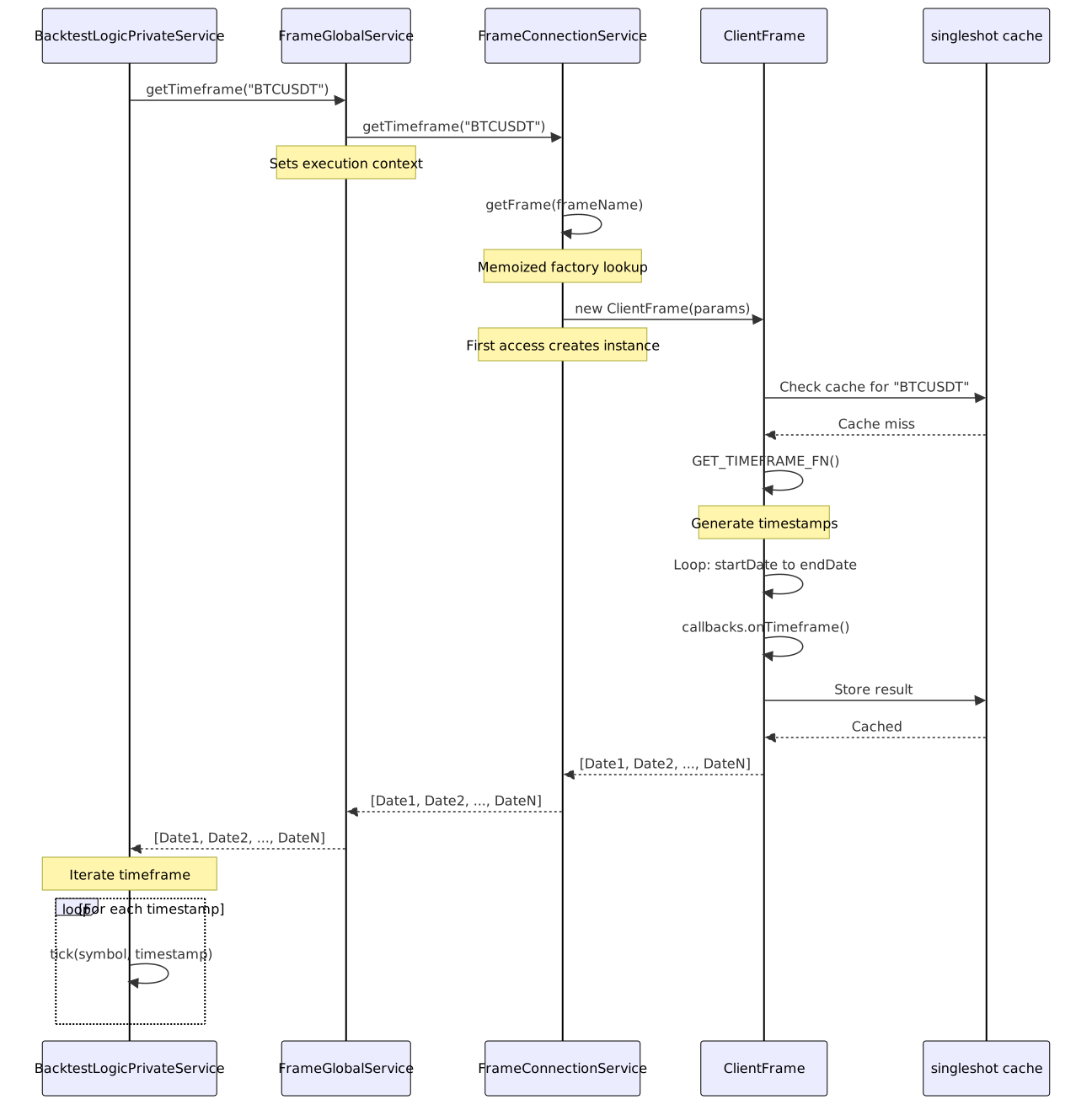
Backtest Orchestration
BacktestLogicPrivateService uses the timeframe as the outer loop for backtesting:
- Request timeframe via
FrameGlobalService.getTimeframe(symbol) - Receive array of timestamps
- For each timestamp:
- Set execution context to timestamp
- Trigger strategy evaluation
- Process signals
The timeframe array is generated once and reused for the entire backtest run, thanks to singleshot caching.
Memory Efficiency Considerations
Array Size Calculation
For a 1-year backtest with 1m intervals:
- Days: 365
- Minutes per day: 1440
- Total timestamps: ~525,600
Each Date object is approximately 24 bytes in JavaScript. Total memory for timeframe array:
- 525,600 × 24 bytes = ~12 MB
Prototype Function Pattern
The implementation uses a separate GET_TIMEFRAME_FN function instead of defining logic inline in the method src/client/ClientFrame.ts:37-62. This pattern:
- Defines the function once in memory
- Shares the function across all
ClientFrameinstances - Reduces memory overhead when multiple frame instances exist
Alternative Approaches
For extremely large backtests (e.g., 10+ years at 1m intervals), consider:
- Generator functions that yield timestamps on-demand
- Chunked timeframe processing
- Reducing interval granularity (e.g., 5m instead of 1m)
However, for typical use cases (months to years of data at 1m-1h intervals), the current array-based approach provides optimal performance.
Comparison with ClientExchange
Both ClientFrame and ClientExchange are client-layer components, but serve different purposes:
| Aspect | ClientFrame | ClientExchange |
|---|---|---|
| Purpose | Generate timeframe for iteration | Fetch candle data for strategy evaluation |
| Input | startDate, endDate, interval |
symbol, interval, limit |
| Output | Date[] |
ICandleData[] |
| Caching | Singleshot (permanent) | No caching (each request fetches fresh data) |
| Context Dependency | Uses startDate/endDate from params |
Uses execution.context.when for time reference |
| Backtest Role | Defines outer loop timestamps | Provides data for each timestamp |
ClientFrame establishes when to evaluate, while ClientExchange provides what data to evaluate. Both are orchestrated by BacktestLogicPrivateService.
Error Handling
The only error condition is an unknown interval:
if (!intervalMinutes) {
throw new Error(`ClientFrame unknown interval: ${interval}`);
}
This error occurs if:
- An invalid
FrameIntervalis passed (should be caught by TypeScript) - The
INTERVAL_MINUTESmapping is incomplete (developer error)
Since FrameInterval is a type union, TypeScript prevents invalid intervals at compile time. The runtime check serves as a defensive safeguard.
Testing Considerations
Unit Test Scenarios
- Basic Generation: Verify correct number of timestamps for known date ranges
- Interval Spacing: Assert timestamps are spaced by exact interval
- Boundary Conditions: Test when
startDate === endDate - Multiple Intervals: Verify different intervals produce correct spacing
- Callback Invocation: Ensure
onTimeframeis called with correct parameters - Caching: Verify singleshot prevents re-execution
- Unknown Interval: Assert error thrown for invalid intervals
Example Test Structure
describe('ClientFrame', () => {
it('generates correct timestamps for 1m interval', async () => {
const frame = new ClientFrame({
interval: '1m',
startDate: new Date('2024-01-01T00:00:00Z'),
endDate: new Date('2024-01-01T00:05:00Z'),
logger: mockLogger,
});
const timeframe = await frame.getTimeframe('BTCUSDT');
expect(timeframe.length).toBe(6); // 00:00, 00:01, 00:02, 00:03, 00:04, 00:05
expect(timeframe[1].getTime() - timeframe[0].getTime()).toBe(60_000);
});
});
Configuration Example
Frames are registered via addFrame in the configuration phase:
import { addFrame } from 'backtest-kit';
addFrame({
frameName: 'daily-2024',
interval: '1d',
startDate: new Date('2024-01-01'),
endDate: new Date('2024-12-31'),
});
This schema is stored in FrameSchemaService and later used by FrameConnectionService to instantiate ClientFrame with the specified parameters.