backtest-kit

🧿 Backtest Kit
The only trading engine for Node.js capable of running enterprise-grade quant strategies — backtest, paper and live from the same code, zero changes between modes. Crypto, forex, DEX, spot or futures. See reference implementation
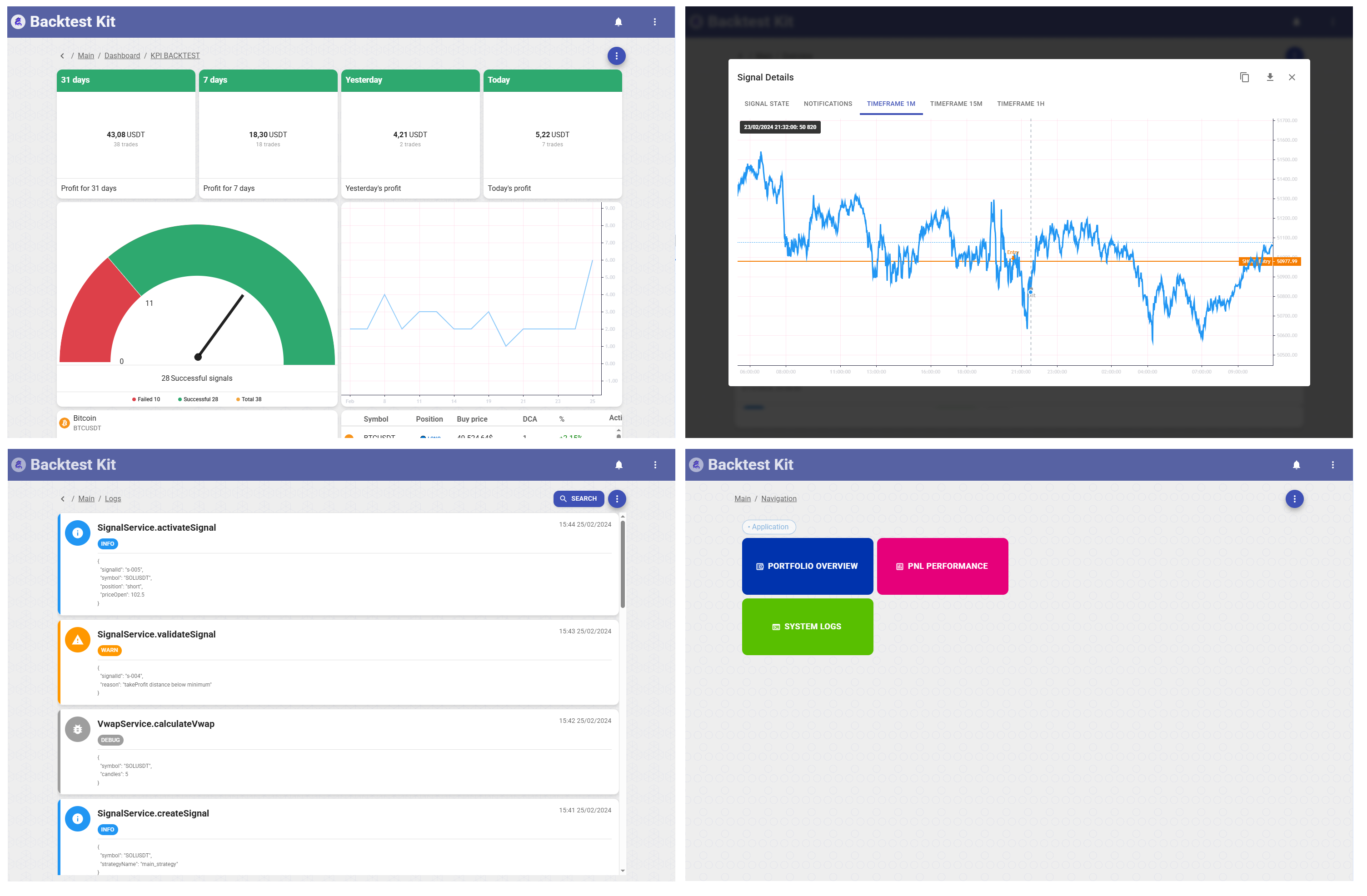




Most trading bots don't die because the strategy was wrong. They die because the backtest quietly read tomorrow's candle, because the process crashed mid-fill and opened the position twice, because the exchange rejected an order and the bot kept trading a ghost. The strategy was never the hard part — the infrastructure was.
backtest-kit is that infrastructure, closed off one failure at a time over a year of live trading and running real money in production at TheOneTrade. This page walks the failures that kill bots and shows how each one is designed out of the default path — not "discouraged," not "documented," but structurally unavailable unless you go out of your way to defeat the engine. Every claim opens into The Code / The Math / The Proof so you (or the model reading this for you) can check the work instead of trusting the pitch.
📚 API Reference · 🌟 Reference implementation · 📰 Article series
Start here
Three on-ramps, one engine. Casual keeps the boilerplate inside the CLI; Sidekick ejects every wire into your repo; Docker gives you a restart-safe box.
The Code
# Casual — your repo holds only strategy files; docs auto-fetched into docs/lib/
npx @backtest-kit/cli --init --output backtest-kit-project
cd backtest-kit-project && npm install && npm start
# Full control — exchange/frames/risk/runner all editable in your project
npx -y @backtest-kit/sidekick my-trading-bot && cd my-trading-bot && npm start
# Docker — zero-downtime live trading
npx @backtest-kit/cli --docker && cd backtest-kit-docker
MODE=live SYMBOL=TRXUSDT STRATEGY_FILE=./content/feb_2026/feb_2026.strategy.ts docker-compose up -d
A whole strategy is three registrations and a run call. No bootstrap, no DI container to learn:
import ccxt from 'ccxt';
import { addExchangeSchema, addStrategySchema, addFrameSchema, Position,
Backtest, listenSignalBacktest, listenDoneBacktest } from 'backtest-kit';
addExchangeSchema({
exchangeName: 'binance',
getCandles: async (symbol, interval, since, limit) => {
const ex = new ccxt.binance();
const ohlcv = await ex.fetchOHLCV(symbol, interval, since.getTime(), limit);
return ohlcv.map(([timestamp, open, high, low, close, volume]) =>
({ timestamp, open, high, low, close, volume }));
},
formatPrice: (s, p) => p.toFixed(2), formatQuantity: (s, q) => q.toFixed(8),
});
addFrameSchema({ frameName: 'feb-2026', interval: '1m',
startDate: new Date('2026-02-01'), endDate: new Date('2026-02-28') });
addStrategySchema({
strategyName: 'my-strategy', interval: '15m',
getSignal: async (symbol, when, currentPrice) => ({
position: 'long',
...Position.bracket({ position: 'long', currentPrice, percentTakeProfit: 2, percentStopLoss: 1 }),
minuteEstimatedTime: 60 * 24, cost: 100,
}),
});
Backtest.background('BTCUSDT', { strategyName: 'my-strategy', exchangeName: 'binance', frameName: 'feb-2026' });
listenSignalBacktest(console.log);
listenDoneBacktest(async (e) => { await Backtest.dump(e.symbol, e.strategyName); });
The rakes — and where they went
What follows isn't a feature list. It's the set of mistakes that quietly drain accounts, each one paired with the design decision that took it off the table. If you've shipped a bot before, you've stepped on at least three of these.
1. Your backtest lied to you, and you'll only find out with real money
Look-ahead bias is the assassin of algo trading: a single line that touches a future candle, an indicator loaded without a timestamp filter, one forgotten <=. The backtest prints a beautiful equity curve that can never be reproduced live, and you deploy straight into a drawdown.
The usual defense is "be careful." Careful doesn't survive a 2,000-line strategy or a refactor at 1 a.m. So the cure here isn't discipline — it's removal of the failure surface. There is no timestamp parameter to forget. An ambient temporal context flows through every async call via Node's AsyncLocalStorage, and the data layer physically refuses to hand you a candle past "now." The pending (still-forming) candle is never returned, because its half-finished OHLC would poison every indicator.
The one rule this rests on: that context is live for the whole await chain of your getSignal and every listen* callback — including across Promise.all, which is where strategy code actually runs. It is not sorcery over execution you deliberately detach from that chain. A bare timer, an EventEmitter, a forked process, or the web dashboard reads engine state by identifier (signal id / symbol), not by inheriting the ambient clock — that explicit, id-based interop is exactly how the frontend talks to a running backtest. Inside the hooks the guarantee holds; step outside them on purpose and you address the engine deliberately rather than by accident.
The Math
Every request resolves "now" from the ambient context, aligns down to the interval boundary, and treats the pending candle as exclusive:
when = current execution-context time (AsyncLocalStorage)
stepMs = interval duration (1m → 60000)
alignedWhen = Math.floor(when / stepMs) * stepMs // round down to boundary
since = alignedWhen − limit * stepMs // go back `limit` candles
sinceis inclusive — first candle hastimestamp === since.alignedWhenis exclusive — the candle covering[alignedWhen, alignedWhen+stepMs)is still open and is never returned.- Range is the half-open
[since, alignedWhen); exactlylimitcandles return; timestamps aresince + i·stepMs.
getNextCandles() is backtest-only and throws in live mode — there is no future to look at when "now" is wall-clock. getRawCandles(limit?, sDate?, eDate?) supports flexible windows, all clamped to eDate ≤ when. Order books and aggregated trades use the same alignment (trades always to a 1-minute boundary). All boundaries are UTC: a 4h candle aligns to 00/04/08/12/16/20 UTC regardless of your local offset — so since values that look "uneven" in local time are exact in UTC. Because since is derived from the ambient when, multi-timeframe pulls inside one getSignal are automatically synchronized, and runtime and the persistent cache compute identical keys — deterministic, exact-timestamp retrieval.
The Code
getSignal: async (symbol) => {
// No timestamps anywhere. Context flows even through Promise.all —
// all four timeframes are pinned to the same tick automatically.
const [c1h, c15m, c5m, c1m] = await Promise.all([
getCandles(symbol, '1h', 24),
getCandles(symbol, '15m', 48),
getCandles(symbol, '5m', 60),
getCandles(symbol, '1m', 60),
]);
}
The bias you can't introduce by hand is the bias you'll never debug in production.
2. "It worked in the backtest" means nothing if live runs different code
The standard path productionizes a strategy by rewriting it: the research notebook becomes a second, hand-built live system with its own order logic, its own bugs, its own divergence. Now you have two strategies that look identical and behave differently exactly when it matters.
Here there is one code path. The getSignal you backtested is the getSignal that trades. Backtest mode feeds it historical timestamps; live mode feeds it Date.now(). The business logic — entries, validation, scheduled activation, TP/SL/timeout, partial closes — is byte-for-byte the same in both. The only differences are infrastructural: where the data comes from, not what you do with it.
The Code
// Backtest — a historical frame drives the clock
Backtest.background('BTCUSDT', { strategyName, exchangeName, frameName });
// Live — wall-clock drives the clock; the strategy file is untouched
Live.background('BTCUSDT', { strategyName, exchangeName }); // keys via .env
listenSignalLive(async (e) => { if (e.action === 'closed') await Live.dump(e.symbol, e.strategyName); });
// Paper — live prices, no real orders, identical path. Validate here before risking capital.
And one engine, two ways to consume it — pick by use case, not by capability:
// Event-driven (production bots, monitoring)
Backtest.background('BTCUSDT', config);
listenSignalBacktest(e => {/* … */});
// Async iterator (research, scripts, LLM agents)
for await (const event of Backtest.run('BTCUSDT', config)) { /* signal | progress | done */ }
The Proof
This is the property the test suite exists to defend, and the line in the sand for the whole project: business logic is 100% synchronous across backtest and live. Signal validation is identical in both modes; immediate activation behaves identically; scheduled-signal logic is fully synchronized; TP / SL / timeout checks do not differ. The only divergence is infrastructural — how candles, order books, and time are sourced. validation.test.mjs, backtest.test.mjs, and callbacks.test.mjs pin this behavior; event.test.mjs pins the live path against the same expectations. If the two ever drift, a test goes red before you do.
3. The crash that opens your position twice
A bot updating a position when the process dies — OOM, deploy, power blip — usually wakes up to corrupted state: a half-opened position, a cost basis that's wrong, an exit that never registered. Recovery by hand is where money leaks.
Every state mutation is written atomically to disk before it counts as done (write-temp-then-rename), and on restart the engine reloads to the last consistent state. Live runs reload persisted signal state on every start, and Live.background() shuts down gracefully — it waits for open positions to reach closed before stopping, so a deploy never severs a live trade mid-flight.
The Proof
Recovery is structural, not a feature you remember to enable. PersistBase does atomic write-to-temp + rename, repairs corrupted files, and verifies integrity in waitForInit(). Fifteen per-domain Persist*Instance classes cover everything that can change: Signal, State, Session, Candle, Risk, Partial, Breakeven, Schedule, Recent, Notification, Log, Measure, Interval, Memory. Concrete scenarios that resolve cleanly:
- Process killed during order placement → internal state unchanged, retried next tick.
- Network failure during an exchange call → automatic retry on the next tick.
- Power loss during a save → recovery from the last atomic write.
- OOM → graceful shutdown with state preserved.
listenSignalLive(async (event) => {
if (event.action === 'closed') {
await Live.dump(event.symbol, event.strategyName); // atomic snapshot to disk
await Partial.dump(event.symbol, event.strategyName);
}
if (event.action === 'scheduled' || event.action === 'cancelled') {
await Schedule.dump(event.symbol, event.strategyName);
}
});
4. The state that can't be corrupted because it can't be expressed
"Is this position closed?" is a question you should never have to ask at runtime. A signal here moves through a strict lifecycle — idle → scheduled → opened → active → closed — modeled with TypeScript discriminated unions. Reading a closed position's live PnL, or mutating an active trade as if it were idle, isn't a bug you catch in QA; it's a line that won't compile.
The Code
Each state exposes only the data that is meaningful in that state, so the wrong access never type-checks:
listenSignal((event) => {
switch (event.action) {
case 'idle': /* no signal — only monitoring fields exist */ break;
case 'scheduled': /* waiting for entry price — has priceOpen, scheduledAt */ break;
case 'opened': /* just filled — entry data, no closeReason yet */ break;
case 'active': /* live position — pnl, peakProfit, maxDrawdown */ break;
case 'closed': /* exited — closeReason, final pnl; live fields gone */ break;
}
});
Before any signal reaches the engine it passes a validation pipeline: TP/SL prices positive, relationship correct (TP > entry > SL long, inverse short), risk/reward ≥ your minimum, timestamps not in the future, interval-throttling respected. Invalid signals are rejected or logged — never executed.
The Proof
The discriminated-union result types (IStrategyTickResultWaiting / …Opened / …Closed / …Scheduled / …Cancelled) are enforced end-to-end: ClientStrategy.tick()/backtest(), StrategyCoreService, the persistence layer, and every notification contract (SignalOpenedNotification, SignalClosedNotification, SignalCancelledNotification, SignalScheduledNotification) carry the lifecycle state explicitly. validation.test.mjs exercises valid long/short, inverted TP/SL, negative prices, and future timestamps; backtest.test.mjs walks every close reason (take_profit, stop_loss, time_expired).
5. The order the exchange silently rejected
Live trading's quiet killer: the exchange rejects, times out, or fills partially, and your bot's internal state no longer matches reality. The textbook "fix" is hand-written try/catch rollback around every order — which is exactly the code that breaks on the edge case you didn't think of.
Here, every state-mutating action fires through the broker adapter before the internal state changes. If the adapter throws — rejection, timeout, network failure — the mutation is skipped, the state stays exactly as it was, and the engine retries on the next tick. You never write rollback logic, and there is no half-applied state to reconcile. In backtest mode no adapter is called at all, so historical replays never touch exchange code.
The Code
The reusable core: place → poll to fill → on timeout cancel, market-out any partial fill, restore TP/SL so the position is never left naked, then throw so the engine retries.
async function createLimitOrderAndWait(exchange, symbol, side, qty, price, restore?) {
const order = await exchange.createOrder(symbol, 'limit', side, qty, price);
for (let i = 0; i < FILL_POLL_ATTEMPTS; i++) {
await sleep(FILL_POLL_INTERVAL_MS);
if ((await exchange.fetchOrder(order.id, symbol)).status === 'closed') return; // filled
}
await exchange.cancelOrder(order.id, symbol);
await sleep(CANCEL_SETTLE_MS); // let the exchange settle before reading
const filledQty = (await exchange.fetchOrder(order.id, symbol)).filled ?? 0;
if (filledQty > 0) { // roll the partial fill back to clean state
await exchange.createOrder(symbol, 'market', side === 'buy' ? 'sell' : 'buy', filledQty);
}
if (restore) { /* re-place TP + stop-loss on the remaining position so it is never unprotected */ }
throw new Error('not filled in time — partial fill rolled back, backtest-kit will retry');
}
A hook wires it to position open. Signal open/close are routed automatically by an internal event bus the moment Broker.enable() is called — no manual wiring. The other mutations are intercepted explicitly before their state change:
Broker.useBrokerAdapter(class implements IBroker {
async waitForInit() { await getExchange(); }
async onOrderOpenCommit({ symbol, cost, priceOpen, priceTakeProfit, priceStopLoss }) {
const ex = await getExchange();
const qty = truncateQty(ex, symbol, cost / priceOpen);
await createLimitOrderAndWait(ex, symbol, 'buy', qty, priceOpen); // entry
try { // protect immediately
await ex.createOrder(symbol, 'limit', 'sell', qty, priceTakeProfit);
await createStopLossOrder(ex, symbol, qty, priceStopLoss);
} catch (err) { await ex.createOrder(symbol, 'market', 'sell', qty); throw err; }
}
// onOrderCloseCommit · onPartialProfitCommit · onPartialLossCommit
// onTrailingStopCommit · onTrailingTakeCommit · onBreakevenCommit · onAverageBuyCommit
});
Broker.enable();
Complete, production-grade Spot (stop_loss_limit, balance truncation, dust/notional guards) and Futures (reduceOnly, hedge-mode positionSide, setLeverage, ghost-position guards) adapters — every hook, every edge case — ship verbatim in the docs. The CLI can also dry-fire any single hook against your live adapter for verification before you wait hours for a real signal:
npx @backtest-kit/cli --brokerdebug --commit signal-open --symbol BTCUSDT
6. Averaging up is how a dip becomes a margin call
Dollar-cost averaging is where hand-rolled position math quietly bankrupts people. Average into a rising price by accident and you've raised your cost basis on a losing-direction trade — the opposite of the intent. And once you add partial closes on top, the cost-basis bookkeeping becomes a second strategy you have to get right.
commitAverageBuy is, by default, only accepted when price is below the running effective entry — averaging up is silently rejected, structurally. The effective price is a cost-weighted harmonic mean (correct for fixed-dollar entries, where $100 buys different quantities at different prices), and every partial close snapshots its cost basis so PnL replays exactly without re-walking history. No math required from you — the guardrail is in the engine.
The Math
effectivePrice = Σcost / Σ(cost / price) // cost-weighted harmonic mean
Each partial stores costBasisAtClose (the running dollar basis before it fired); a partial sell does not change the effective price of the coins still held. Final PnL is a dollar-weighted sum across every partial (each at its own effective price) plus the remainder, with slippage and per-leg fees:
weight[i] = (percent[i]/100 × costBasisAtClose[i]) / totalInvested
totalWeightedPnl = Σ weight[i]·pnl[i] + remainingWeight·pnlRemaining
pnlPercentage = totalWeightedPnl − fees // open fee once + per-partial + final close
pnlCost = pnlPercentage / 100 × totalInvested
Worked example — LONG @1000, 4 accepted DCA + 1 rejected, 3 partials, close @1200 — reconciles two independent ways to +17.9%:
0.075·(+15.00) + 0.135·(−7.98) + 0.316·(+12.91) + 0.474·(+29.04) ≈ +17.89%
coin cross-check: (34.50 + 49.69 + 142.72 + 244.67 − 400) / 400 ≈ +17.90% ✓
entry #5 @980 REJECTED — 980 > effective entry ≈929.92 (the guard firing)
The Code
A complete DCA-ladder strategy — open once, average on overlap-free dips up to 10 rungs, close at target — is about thirty lines, and the dangerous math is all inside the engine:
import { addStrategySchema, listenActivePing, Position,
commitAverageBuy, commitClosePending,
getPositionEntries, getPositionEntryOverlap, getPositionPnlPercent } from 'backtest-kit';
addStrategySchema({
strategyName: 'apr_2026_strategy',
getSignal: async (symbol, when, currentPrice) => ({
position: 'long',
...Position.moonbag({ position: 'long', currentPrice, percentStopLoss: 25 }),
minuteEstimatedTime: Infinity, cost: 100,
}),
});
listenActivePing(async ({ symbol, currentPrice }) => { // the ladder
if ((await getPositionEntries(symbol)).length >= 10) return;
if (await getPositionEntryOverlap(symbol, currentPrice, { upperPercent: 5, lowerPercent: 1 })) return;
await commitAverageBuy(symbol, 100); // rejected if it averages up
});
listenActivePing(async ({ symbol }) => { // exit on blended target
if (await getPositionPnlPercent(symbol) < 3) return;
await commitClosePending(symbol, { id: 'unknown', note: '# closed by target pnl' });
});
Every order primitive is here, each with per-entry PnL, peak-profit and max-drawdown tracking: market/limit entries, TP/SL/OCO exits, grid with auto-cancel, partial profit/loss levels, trailing take/stop (absorbed only when they tighten in your favour, computed from the original distance to avoid drift), breakeven (moves the stop to entry once profit clears fees+slippage), stop-limit entries, DCA, and time-attack / infinite-hold.
7. Ten strategies, one account, 100% exposure
Per-strategy risk checks miss the obvious portfolio truth: ten strategies each "risking 10%" is one account risking everything. Risk validation here runs across all strategies and symbols at once, with an atomic check-and-reserve that closes the race between "is this allowed?" and "the order went out."
The Code
addRiskSchema({
riskName: 'demo',
validations: [
({ pendingSignal, currentPrice }) => { // TP ≥ 1%
const { priceOpen = currentPrice, priceTakeProfit, position } = pendingSignal;
const tp = position === 'long'
? ((priceTakeProfit - priceOpen) / priceOpen) * 100
: ((priceOpen - priceTakeProfit) / priceOpen) * 100;
if (tp < 1) throw new Error(`TP too close: ${tp.toFixed(2)}%`);
},
({ pendingSignal, currentPrice }) => { // R/R ≥ 2:1
const { priceOpen = currentPrice, priceTakeProfit, priceStopLoss, position } = pendingSignal;
const reward = position === 'long' ? priceTakeProfit - priceOpen : priceOpen - priceTakeProfit;
const risk = position === 'long' ? priceOpen - priceStopLoss : priceStopLoss - priceOpen;
if (reward / risk < 2) throw new Error('Poor R/R ratio');
},
],
});
listenRisk(async (event) => { await Risk.dump(event.symbol, event.strategyName); }); // every rejection, logged
ClientRisk tracks every open position across the portfolio; multiple strategies can share one profile for holistic exposure. checkSignalAndReserve is the thread-safe variant — after a successful reserve you must addSignal (finalize) or removeSignal (cancel) so reservations never go stale. A real LLM-gated portfolio improved from +52.22% → +68.90% PNL, Sharpe +0.309 → +0.512, win-rate 68% → 82% simply by letting a local model veto 6 signals — 4 of them losers.
8. One process can trade the whole market
Spawning a process per symbol burns CPU on IPC and turns shared state — global risk, candle cache — into a distributed-systems problem you didn't sign up for. Dozens of symbols run concurrently here inside a single Node process, sharing one event loop, one Mongo pool, one Redis cache, with strict per-symbol state isolation.
The Proof
Measured on a commodity laptop (HP Victus, i5-13420H, 16 GB DDR4, NVMe SSD), 9 symbols in parallel, one Node process:
| Metric | Value |
|---|---|
| Wall-clock span (first → last event) | 2,893 ms |
| Events captured | 297 |
| Historical time advanced / symbol | 34 minutes |
| Per-symbol replay speed | ≈703× real-time |
| Aggregate (9 symbols) | ≈6,326× real-time |
| Hot-loop throughput | ≈103 events/sec |
Why it's fast: single-process concurrency (no IPC, no fork), an in-memory activity registry (Lookup) tracking every in-flight workload, a cooperative event-loop hand-off (Candle.spinLock) so parallel symbols advance round-robin instead of one hogging the CPU, Redis O(1) candle lookups, atomic findOneAndUpdate upserts (no read-modify-write), and --cache pre-warming so the inner loop never blocks on HTTP.
In live mode the bottleneck moves from CPU to the exchange — and that is where the shared cache earns its keep. Every symbol pulls candles, order books, and trades through one deduplicated layer, so nine strategies asking for the same BTCUSDT 1m candle issue one request, not nine. Hand-written per-bot code with no cache hammers the REST endpoint until the exchange rate-limits it; here the dedup + Redis O(1) layer keeps request volume flat as you add symbols, so rate limits stay off your back instead of throttling the desk. The ×700 / ×6,300 figures are CPU-bound backtest replay; live throughput is paced by the exchange, but the request layer is built so that pacing is the exchange's published limit, not self-inflicted spam.
import { Backtest, warmCandles } from 'backtest-kit';
for (const symbol of ['BTCUSDT','ETHUSDT','SOLUSDT','BNBUSDT','XRPUSDT']) {
await warmCandles({ exchangeName: 'binance', interval: '1m', symbol,
from: new Date('2026-02-01T00:00:00Z'), to: new Date('2026-02-28T23:59:59Z') });
Backtest.background(symbol, { strategyName, exchangeName: 'binance', frameName: 'feb-2026' });
}
npx @backtest-kit/cli --backtest --entry ./content/multi-symbol.ts # CLI defers symbol selection to your file
9. When ./dump/ stops being enough
File storage is perfect on day one and a bottleneck the day you're doing thousands of context-keyed reads per second. Swap to MongoDB (durable, queryable, atomic) with a Redis O(1) cache via a single setup() — all 15 persistence contracts reimplemented, and not one line of strategy code changes.
The Code
// config/setup.config.ts — loaded once before any persistence call
import { setup } from '@backtest-kit/mongo';
setup(); // reads CC_MONGO_CONNECTION_STRING / CC_REDIS_* from env, or pass explicitly
Fifteen adapters, each with a unique compound index (Signal → symbol+strategyName+exchangeName, Candle → symbol+interval+timestamp, Memory → signalId+bucketName+memoryId, …). Candle records are immutable ($setOnInsert, first write wins); Measure/Interval/Memory use soft delete (removed flag) for an audit trail. Reads go Redis-first for the Mongo _id, then findById — two O(1) ops; a miss falls back to an indexed findOne and backfills. Writes are one findOneAndUpdate({ upsert:true, new:true }) round-trip, so the unique index rejects concurrent duplicates at the storage engine and a write-then-read always sees fresh data. Signal-affecting adapters store the simulation when, so look-ahead protection is enforceable even inside the database.
read signal (BTCUSDT, my_strategy, binance)
├─ Redis GET → hit → Mongo findById(_id) ← O(1) + O(1)
└─ Redis GET → miss → Mongo findOne(filter) → Redis SET → return
The default file adapter is already crash-safe (atomic temp+rename, repair on restart) — you get durability before you ever add a database.
10. A Sharpe of 10,000,000 is a bug, not an edge
Metrics that a tiny sample can't support are worse than no metrics — they're false confidence you bet money on. The analytics engine was rebuilt against canonical definitions and an independent 84-file reference testbed, and it prints N/A rather than a number it can't stand behind.
The Math
- Pooled Sharpe (v10.2.0+): per-trade returns are pooled across all symbols into one sample, then Sharpe is computed on that distribution — replacing the trade-count-weighted average of ratios, which inflates when one symbol is great and another negative. The header reads
Pooled Sharpe, notPortfolio Sharpe, with a Markowitz disclaimer so it's never mistaken for covariance-based optimization. - Bessel's correction (N−1) for unbiased variance — no risk underestimation on small samples.
- Compounded equity curve for Max Drawdown / Calmar / Recovery Factor — no double-counting of percentage returns.
- Geometric annualization for expected yearly returns — accounts for volatility drag (a 50% loss needs a 100% gain to recover).
- Canonical Sortino (1991) with downside deviation over
N_total. - Float-artifact guard: identical-return series produce stddev ≈1e-17; an
STDDEV_EPSILONguard returnsN/Ainstead of a fake Sharpe of 10,000,000. Gates of ≥10 signals and ≥14 calendar days gate publication.
Dashboard revenue is dollar-true: pnlCost = pnlPercentage/100 × pnlEntries, summed across closed signals per window (Today / Yesterday / 7d / 31d), anchored to the run end in backtest and Date.now() live.
11. The jobs that fire on virtual time
Most schedulers run on wall-clock — useless in a backtest that replays a month in three seconds. Cron runs on the same time stream your strategies see, firing on candle boundaries, coordinated across parallel backtests so one boundary never double-fires. The identical API drives live re-polling and one-shot backtest prep.
The Code
import { Cron, Backtest } from 'backtest-kit';
Cron.register({ name: 'tg-parser', interval: '1h', // global, hourly
handler: async ({ when }) => { await parseTelegramSignals(when); } });
Cron.register({ name: 'funding', interval: '1h', symbols: ['BTCUSDT','ETHUSDT'], // per-symbol fan-out
handler: async ({ symbol, when }) => { await fetchFundingRate(symbol, when); } });
Cron.register({ name: 'warm-cache', // fire-once, global
handler: async () => { await warmupCache(); } });
Cron.enable(); // wire to engine lifecycle once; every tick is forwarded automatically
enable() merges four lifecycle subjects (beforeStart, idlePing, activePing, schedulePing) into one serial queue via singlerun; each tick is base-aligned to the minute. Coordination keys ${name}:${alignedMs}:${symbol?}:g${generation} give mutex semantics — parallel backtests on the same boundary share one in-flight promise (first opens the slot, others await). Fire-once marks record only on success, so a failed handler retries; the generation suffix isolates re-registrations from late writes.
12. You shouldn't have to abandon TradingView or Python to use TypeScript
The honest objection to a TS trading engine is "but my indicators live in Pine Script and TA-Lib." So they don't have to move. Run native Pine Script, run Python via WASM, use 50+ built-in indicators, or drop in zero-dependency quant ports — all under the same temporal guarantees.
The Code
Pine Script — v5/v6, 60+ indicators, 1:1 syntax, look-ahead-safe (@backtest-kit/pinets):
import { File, getSignal } from '@backtest-kit/pinets';
const signal = await getSignal(File.fromPath('strategy.pine'),
{ symbol: 'BTCUSDT', timeframe: '5m', limit: 100 }); // plots: Signal/Close/StopLoss/TakeProfit/EstimatedTime
50+ indicators across 1m/15m/30m/1h + order book, as LLM-ready Markdown, in one call (@backtest-kit/signals):
import { commitHistorySetup } from '@backtest-kit/signals';
await commitHistorySetup('BTCUSDT', messages); // order book + candles + indicators, cached per TTL
Typed DAG of computations, resolved in topological order with Promise.all parallelism, serializable to a DB (@backtest-kit/graph):
import { sourceNode, outputNode, resolve } from '@backtest-kit/graph';
const higher = sourceNode(async (symbol) => extract(await run(File.fromPath('timeframe_4h.pine'), { symbol, timeframe: '4h', limit: 100 }), { allowLong: 'AllowLong', allowShort: 'AllowShort', noTrades: 'NoTrades' }));
const lower = sourceNode(async (symbol) => extract(await run(File.fromPath('timeframe_15m.pine'), { symbol, timeframe: '15m', limit: 100 }), { position: 'Signal', priceOpen: 'Close', priceTakeProfit: 'TakeProfit', priceStopLoss: 'StopLoss' }));
const mtf = outputNode(([h, l]) => { // combine; null when timeframes disagree
if (h.noTrades || l.position === 0) return null;
if (h.allowShort && l.position === 1) return null;
if (h.allowLong && l.position === -1) return null;
return toSignalDto(randomString(), l, null);
}, higher, lower);
addStrategySchema({ strategyName: 'mtf', interval: '5m', getSignal: () => resolve(mtf) });
Python via WASM (WASI) runs ta-lib/pandas/scikit-learn indicators in the Node event loop with no IPC. And zero-dependency TS ports of the math behind vectorbt — see See also.
13. AI strategies without ten provider SDKs
LLM-driven signals normally mean per-provider boilerplate and JSON you can't trust. One HOF API spans 10+ providers; structured output is schema-enforced; trading context is injected automatically.
The Code
import { deepseek } from '@backtest-kit/ollama';
addStrategy({
strategyName: 'llm-signal', interval: '5m',
// swap deepseek() → claude() / gpt5() / ollama() with no other change
getSignal: deepseek(getSignal, 'deepseek-chat', process.env.DEEPSEEK_API_KEY),
});
Providers: OpenAI, Claude, DeepSeek, Grok, Mistral, Perplexity, Cohere, Alibaba, Hugging Face, Ollama (local), GLM-4. Structured output is enforced with Zod / JSON schema via addOutline (auto-retry on malformed output, custom rules like "SL must be below entry for LONG"); token rotation accepts a key array; prompts live in config/prompt/*.cjs and are memoized to kill redundant backtest API calls. The full LLM strategy — fetch multi-timeframe candles, ask the model, dump the reasoning, return a validated signal:
import { v4 as uuid } from 'uuid';
import { addStrategySchema, getCandles, dumpAgentAnswer, dumpRecord } from 'backtest-kit';
import { json } from './utils/json.mjs';
import { getMessages } from './utils/messages.mjs';
addStrategySchema({
strategyName: 'llm-strategy', interval: '5m', riskName: 'demo',
getSignal: async (symbol) => {
const messages = await getMessages(symbol, {
candles1h: await getCandles(symbol, '1h', 24),
candles15m: await getCandles(symbol, '15m', 48),
candles5m: await getCandles(symbol, '5m', 60),
candles1m: await getCandles(symbol, '1m', 60),
});
const resultId = uuid();
const signal = await json(messages); // LLM → structured signal
await dumpAgentAnswer({ dumpId: 'position-context', bucketName: 'mtf', messages, description: 'agent reasoning' });
await dumpRecord({ dumpId: 'position-entry', bucketName: 'mtf', record: signal, description: 'signal params' });
return { ...signal, id: resultId };
},
});
Memory adapters persist LLM reasoning per signal (BM25 search, soft delete); dumpAgentAnswer archives the full conversation — roles, reasoning, tool calls — attached to the signal, so an opaque model decision becomes a debuggable record.
The API assumes you will make every mistake
Read back through the rakes and a pattern shows: none of them are solved by telling you to be careful. Look-ahead bias isn't prevented by a lint rule — there's simply no timestamp to pass. Averaging up isn't discouraged in the docs — the call is rejected. A closed position's live PnL isn't a runtime guard — it doesn't compile. The whole surface is built on the assumption that you, or the model writing your strategy, will eventually do the wrong thing at 3 a.m. — so the wrong thing is made unreachable. This is the "pit of success": the easy path and the correct path are the same path.
And the shape of that surface is reactive — React for traders. You never write the time loop. You don't iterate candles, advance a clock, or poll for fills. You declare reactions to lifecycle events, and the engine owns the loop in both backtest and live. getSignal is your pure render function — given the current state of the world, return a signal or null. The listen* family is your effects layer — small handlers that fire when the position's state changes, exactly like subscribing to state in a component. Composition is additive: stack independent listeners and each one minds its own concern, the same way you'd split hooks.
The Code
getSignal declares what to open; the listeners declare how the position behaves once alive — a DCA ladder, a profit target, and an error sink, three independent reactions to the same event stream, no shared loop, no manual bookkeeping:
import {
addStrategySchema, listenActivePing, listenError, Log, Position,
commitAverageBuy, commitClosePending,
getPositionEntries, getPositionEntryOverlap, getPositionPnlPercent,
} from "backtest-kit";
import { errorData, getErrorMessage, str } from "functools-kit";
const HARD_STOP = 25, TARGET_PROFIT = 3, STEP = 100, MAX_STEPS = 10;
// render: given "now", declare the position to open (or null to stay flat)
addStrategySchema({
strategyName: "apr_2026_strategy",
getSignal: async (symbol, when, currentPrice) => ({
position: "long",
...Position.moonbag({ position: "long", currentPrice, percentStopLoss: HARD_STOP }),
minuteEstimatedTime: Infinity, cost: STEP,
}),
});
// effect: average into dips, up to 10 overlap-free rungs (averaging up is rejected for you)
listenActivePing(async ({ symbol, currentPrice }) => {
if ((await getPositionEntries(symbol)).length >= MAX_STEPS) return;
if (await getPositionEntryOverlap(symbol, currentPrice, { upperPercent: 5, lowerPercent: 1 })) return;
await commitAverageBuy(symbol, STEP);
});
// effect: close the whole position once blended PnL clears the target
listenActivePing(async ({ symbol, data }) => {
if (await getPositionPnlPercent(symbol) < TARGET_PROFIT) return;
Log.info("position closed due to the target pnl reached", { symbol, data });
await commitClosePending(symbol, { id: "unknown", note: str.newline("# Closed by target pnl") });
});
// effect: a single place for anything that goes wrong
listenError((error) => Log.debug("error", { error: errorData(error), message: getErrorMessage(error) }));
The full reactive surface — subscribe to any point in a position's life and the engine fires it in order, queued, never overlapping: listenSignal / listenSignalBacktest / listenSignalLive (lifecycle), listenActivePing (per-minute while a position is live), listenSchedulePing / listenIdlePing, listenPartialProfit / listenPartialLoss, listenBreakevenAvailable, listenHighestProfit, listenMaxDrawdown, listenRisk (rejections), listenError / listenExit, listenDone*, plus *Once filtered variants for one-shot reactions. You compose behavior by adding handlers, not by editing a loop.
The Proof
The five guarantees that make the surface fool-proof, each enforced by the engine rather than by convention:
- Ambient temporal context — no
currentDate/timestampparameter exists to forget; the engine resolves "now" fromAsyncLocalStorageand blocks future data at the adapter level. - Type-safe state machine —
idle → scheduled → pending → opened → active → closedas discriminated unions; calling a close on an already-closed signal, or editing an active trade's entry, is a compile error. - Guarded DCA —
commitAverageBuyrejects any call that would worsen the harmonic-mean effective entry; you cannot accidentally average up. - Transactional broker commits (the "no-try-catch" rule) — the adapter intercepts every mutation before internal state changes; an exchange throw rolls back and retries on the next tick, so you never hand-write rollback.
- Automatic signal validation — TP/SL soundness, R/R minimum, and interval throttling are checked before a signal reaches execution; invalid signals are logged or rejected, never run.
Because the loop belongs to the engine, the same declarations run identically in backtest and live — the reactive model is the reason "same code, both modes" is structurally true, not just aspirational.
Receipts
Toy READMEs prove a moving-average crossover on daily candles. These are nine production-quality strategies, each a different signal source, each backtested on real history with the numbers written down. They live in /example — clone it, run it, get the same prints.
| Strategy | Ticker · Period | Signal source | Net PNL | Sharpe |
|---|---|---|---|---|
| Neural Network | BTC · Oct 2021 | TensorFlow NN (8→6→4→1) predicting next-candle close | +18.26% | 0.31 |
| Python EMA Crossover | DOT · Feb 2021 | EMA(9)/EMA(21) via WebAssembly (WASI) | +5.52% | 0.09 |
| Polymarket Δprob | BTC · Apr 2024 | Prediction-market probability shifts | +0.63% | 0.065 |
| Pine Script Range Breakout | BTC · Dec 2025 | Bollinger + range + volume spike (Pine) | +2.40% | 0.06 |
| Liquidity Harvesting | TRX · Jan 2026 | Telegram channel signals, inverted | +8.58% | 1.14 |
| AI News Sentiment | BTC · Feb 2026 | LLM on live news (Tavily + Ollama) | +16.99% | 0.25 |
| SHORT DCA Ladder | BTC · Mar 2026 | Fixed SHORT + ladder up (≤10 rungs) | +37.83% | 0.35 |
| LONG DCA Ladder | BTC · Apr 2026 | Fixed LONG + ladder down (≤10 rungs) | +67.85% | 0.12 |
| Crowd Liquidity | BTC · Jun 2026 | TradingView ideas, Simulator-trained author whitelist |
+19.80% | 0.64 |
The Proof
- Liquidity Harvesting (Sharpe 1.14) — a Telegram channel published SHORT signals with ~0.375:1 R/R and 106% deposit at risk at 25× leverage, mathematically guaranteed to lose; a volume spike appeared 15 min before every post and the TP step multipliers were identical across signals — an algorithm. Inverting it turned −5.05% → +8.58%, profit factor 0.56 → 7.31. The edge was the bot crowd, not the indicators.
- Crowd Liquidity — 462 TradingView ideas, 167 authors, and a falling knife of a month (BTC −20.4%). Following the raw crowd lost −24.23%; the framework's
Simulatorentity grid-searched the author ban rule itself (minimum track × minimum hit rate among 3,456 points) and kept 5 authors of 167. Trading any post of those five: 10 trades, 90% WR, +19.80% — the whitelist artifact is generated byscripts/simulator.mjs, not curated by hand. Stated caveat: trained and traded on the same month; the July out-of-sample is the open question. - AI News Sentiment held SHORT through nearly all of a −16.4% month, flipped to LONG on the recovery bounce, and flipped back on geopolitical news — +16.99% where buy-and-hold lost 16%.
- DCA Ladders show the trade-off honestly: high % return on deployed capital, but absolute fiat risk grows with rungs (Mar: −$104.93 on a 10-rung position; theoretical max −$2,500 if a non-reverting trend hits the 25% hard stop with all rungs filled). The README states the downside, not just the upside.
Every example documents price context, trade log, equity curve, and risk analysis — and several ship a --noDCA / single-entry variant so you can see exactly what the position management bought you.
How it sits next to the alternatives
The honest version: for a quick research prototype or a single MA crossover, VectorBT or Backtrader are hard to beat on raw speed. The moment you need to deploy — complex position sizing, AI agents, a network outage that mustn't desync your bot — is where the guardrails below start to matter.
| Backtest Kit | Backtrader | VectorBT | MetaTrader/MQL5 | QuantConnect | Freqtrade | |
|---|---|---|---|---|---|---|
| Language | TypeScript | Python | Python | MQL5 | C#/Python | Python |
| Live trading | ✅ built-in | ⚠️ manual | ❌ research | ✅ | ✅ | ✅ |
| Look-ahead prevention | ✅ engine-enforced | ⚠️ discipline | ⚠️ discipline | ⚠️ discipline | ⚠️ partial | ⚠️ partial |
| Crash-safe persistence | ✅ atomic + Mongo | ❌ | ❌ | ❌ | ⚠️ cloud | ⚠️ basic |
| Transactional broker | ✅ auto rollback | ❌ | ❌ | ❌ | ⚠️ partial | ⚠️ basic |
| Type-safe state machine | ✅ compile-time | ❌ | ❌ | ❌ | ❌ | ❌ |
| DCA / partial closes | ✅ first-class | ⚠️ manual | ⚠️ manual | ⚠️ manual | ⚠️ manual | ⚠️ limited |
| AI / LLM integration | ✅ built-in | ❌ | ❌ | ❌ | ⚠️ custom | ❌ |
| Pine Script | ✅ native | ❌ | ❌ | ✅ | ❌ | ❌ |
| Self-hosted | ✅ 100% | ✅ | ✅ | ⚠️ desktop | ❌ cloud | ✅ |
Open-source QuantConnect/MetaTrader without the lock-in: pure TypeScript, your code, your data, your machines, no platform fees, no proprietary GUI. Drop any library into getSignal — Ollama, neural-trader, your own.
🌍 Ecosystem
The core is a library; the CLI is the framework on top — and the framework is optional. Think React vs Next.js. backtest-kit (the reactive engine — getSignal + the listen*/commit* API) is the library you build against directly. @backtest-kit/cli is the Next.js: it wires the runner, candle cache, dashboard, Telegram, and graceful shutdown so you don't have to — but you can ignore it entirely and call Backtest.run() / Live.background() yourself. @backtest-kit/sidekick is the explicit middle ground — it scaffolds a project where every wire (exchange adapter, frames, risk rules, strategy, runner) lives as plain, editable source in your userspace, with no CLI in the loop and nothing hidden. You pick how much magic you want.
On the "dependency zoo": every package below is authored by one team and shipped by the commercial vendor TheOneTrade — versioned together, released together. Treat it like the .NET base class library: a single coherent contract where the userspace surface (getSignal, commit*, listen*, get*) does not churn under you between releases. You install only what a given strategy needs, and the heavy or platform-specific pieces (Python-via-WASM, TensorFlow builds) sit behind their own optional packages so the core install stays clean and conflict-free.
@backtest-kit/cli — npm
Zero-boilerplate runner. Modes: --backtest / --paper / --live / --walker / --main / --pine / --editor / --dump / --pnldebug / --brokerdebug / --flush / --init / --docker. Auto candle caching, monorepo cwd-resolution with per-strategy .env override, folder-based import aliases, broker module hooks, setup.config / loader.config / alias.config, graceful SIGINT.
npx -y @backtest-kit/cli --init
@backtest-kit/pinets — npm
Run TradingView Pine Script v5/v6 in Node, 60+ indicators, 1:1 syntax, getSignal / run / extract / extractRows.
npm install @backtest-kit/pinets pinets backtest-kit
@backtest-kit/graph — npm
Compose computations as a typed DAG; resolved in topological order with Promise.all, serializable to a DB for storage.
npm install @backtest-kit/graph backtest-kit
@backtest-kit/ui — npm
React/MUI dashboard with Lightweight Charts: live signal-lifecycle state-machine view, per-signal inspection, risk/partial/trailing/breakeven views, manual control, Pine editor.
import { serve } from '@backtest-kit/ui';
serve('0.0.0.0', 60050); // http://localhost:60050
@backtest-kit/mongo — npm
MongoDB source-of-truth + Redis O(1) cache. All 15 persistence contracts, atomic upserts, soft delete, look-ahead-safe when. Zero strategy changes.
npm install @backtest-kit/mongo backtest-kit mongoose ioredis
@backtest-kit/pg — npm
PostgreSQL + Redis O(1) cache via TypeORM. All 15 persistence contracts, atomic upserts, soft delete, look-ahead-safe when. Tuned for Pgpool-II so read fan-out scales across replicas: up to ~4× faster
npm install @backtest-kit/pg backtest-kit typeorm pg ioredis reflect-metadata
@backtest-kit/minio — npm
MinIO (S3) source-of-truth + Redis time-ordered index. Listings in O(limit), zero schema management. Zero strategy changes.
npm install @backtest-kit/minio backtest-kit minio ioredis
@backtest-kit/ollama — npm
Universal LLM adapter: 10+ providers, structured output, token rotation, fallback chains, trading-context injection.
npm install @backtest-kit/ollama agent-swarm-kit backtest-kit
@backtest-kit/signals — npm
50+ indicators across 4 timeframes + order book, multi-timeframe synchronized, LLM-ready Markdown reports.
npm install @backtest-kit/signals backtest-kit
@backtest-kit/mcp — npm
Model Context Protocol server: an LLM agent (Claude, any MCP client) watches the live portfolio and opens/closes positions through 3 guarded tools — TP/SL/cost stay engine-owned, stdio server talks to the trading process over HTTP.
npm install @backtest-kit/mcp backtest-kit @modelcontextprotocol/sdk
@backtest-kit/sidekick — npm
The "eject" of --init: scaffolds a project where exchange adapter, frames, risk rules, strategy, and runner are all editable source. 4H-trend + 15m-signal Pine template, partial profit taking, breakeven trailing.
npx -y @backtest-kit/sidekick my-trading-bot && cd my-trading-bot && npm start
👨👩👦 Community
Real, runnable templates — not slideware. And worth naming the concern directly: yes, this is one author's ecosystem, which is exactly what makes it coherent — but coherent is not captive. Everything is MIT and open-source, the core engine has zero hard dependency on any @backtest-kit/* add-on (you can run getSignal + listen* against a bare addExchangeSchema and nothing else), and each repo below is an independent reference you're meant to fork and own. The lock-in you'd normally fear — a closed runtime, a proprietary data format, a cloud you can't leave — none of it applies; the persistence is plain files or your own Mongo, the signals are your code, and the exit cost is a git clone.
- ai-trading-mcp — MCP-driven crypto trading rig. Claude (or any MCP client) trades a live portfolio through three guarded tools: get_status, open_position, close_position. Capable to read news and charts. Paper and live.
- backtest-monorepo-parallel — 9 symbols in parallel in one Node process on shared Mongo+Redis, ~6,300× real-time, self-enforcement runtime exposing the workspace DI container to
./content/strategy files. The scaling recipe: +1 service = +1 file, +1 provider, +1 ioc entry. - backtest-ollama-crontab — a local Ollama (
gpt-ossquantized) as a per-signal risk gate plus a 15-minute crontab ingesting any public Telegram channel; the same code re-polls live and bulk-prepares in backtest. Documented result: +52.22% → +68.90% with the LLM gate on. - backtest-kit-redis-mongo-docker — production persistence: all 15 adapters on Mongo+Redis, atomic read-after-write,
docker-composeone-command deploy. - backtest-kit-redis-postgres-pgpool-docker — backtest-kit persistence on PostgreSQL (Pgpool-II) + Redis cache, with atomic upserts and a replica cluster.
- backtest-kit-minio-s3-docker — persistence on MinIO (S3) with deterministic keys, S3-grade durability
- backtest-kit-skills — a Claude Code skill + Mintlify docs: describe a strategy in plain language, get working TypeScript with every schema registration wired.
npx skills add https://github.com/backtest-kit/backtest-kit-skills - uzse-backtest-app — Pine Script on regional exchanges that aren't on TradingView (UZSE, MSE, DSE…): download raw trades, build candles, feed them through a custom Mongo exchange adapter.
- backtest-ollama-casual - A measurement rig for Telegram signal-seller channels. Ollama LLM parses each author's own guidance: text and chart screenshots. The engine executes it minutes after publication (live and backtest both), and event studies over 1m candles show where the edge exist
- backtest-kit-docs — Architecture handbook and knowledge base: explains the engine's design, AI workflows, production patterns, and quantitative trading concepts beyond the API.
- wallet-manager — Binance spot wallet toolkit with an interactive REPL and a reference broker adapter. Encodes the typical adapter mistake most implementations trip over: trying to sell an asset while its funds are still frozen in a pending order — the correct sequence is to cancel the pending orders first, verify the book is clean, and only then sell with a new order. lets you vibe-code an adapter for any exchange on top of it.
🪐 See also
Zero-dependency TypeScript ports of the quant math behind vectorbt — same models, native to the Exchange schema, no Python runtime. Each estimates a different dimension of speculative pressure and plugs in independently:
- garch — conditional variance of log-returns (GARCH / EGARCH / GJR-GARCH / HAR-RV / NoVaS, auto-selected by QLIKE) to bound how far flow can push price next candle; fitted
σ→ log-normal corridorP·exp(±z·σ)for TP/SL. ViaExchange.getCandles. - pump-anomaly — coordinated-speculation detection: cross-correlation + union-find author clustering separates real multi-actor inflow from one actor on many channels; volume z-scores score cascade pressure (pump vs stop-hunt). Returns an entry/exit plan, exits fitted by OHLC replay and screened against winner's-curse (DSR / PBO / SPA). Via
Exchange.getRawCandles. - volume-anomaly — order-flow intensity: Hawkes branching ratio (arrival clustering), CUSUM (imbalance shift), BOCPD (regime break) → composite outlier score as an entry-timing gate. Via
Exchange.getAggregatedTrades.
🌐 Internationalization
The @backtest-kit/ui dashboard ships in 7 languages: English, Русский, Türkçe, 中文, हिन्दी, Español, Português. Switch via the language picker in the header
Locales
-
🇬🇧 English — ~1.5B speakers. Backtest Kit is a TypeScript engine where the strategy you test on history is byte-for-byte the one that trades live — only the clock changes. It removes the failure modes that kill bots (look-ahead bias, crash corruption, silent order rejects, averaging up) at the API level, then adds first-class DCA, partial closes, portfolio risk, and AI/Pine signals on top.
-
🇨🇳 中文 — ~1.1B speakers. Backtest Kit 是一个 TypeScript 引擎:在历史数据上回测的策略代码,与实盘运行的代码逐字节一致,唯一区别只是时钟来源。它在 API 层面消除了让交易机器人崩溃的隐患(未来函数、崩溃损坏、静默拒单、越买越亏),并内置分批建仓、部分平仓、组合风控以及 AI/Pine 信号。
-
🇮🇳 हिन्दी — ~600M speakers. Backtest Kit एक TypeScript इंजन है जिसमें इतिहास पर परखा गया कोड ही बिना बदलाव के लाइव ट्रेड करता है — केवल घड़ी बदलती है। यह बॉट को बर्बाद करने वाली गलतियाँ (लुक-अहेड बायस, क्रैश करप्शन, चुपचाप ऑर्डर रिजेक्ट, ऊपर औसत करना) API स्तर पर ही रोकता है, और ऊपर से DCA, आंशिक क्लोज़, पोर्टफोलियो जोखिम व AI/Pine सिग्नल देता है।
-
🇪🇸 Español — ~560M speakers. Backtest Kit es un motor TypeScript donde la estrategia que pruebas con datos históricos es, byte a byte, la que opera en vivo — solo cambia el reloj. Elimina en la propia API los fallos que arruinan bots (sesgo look-ahead, corrupción por caídas, rechazos silenciosos de órdenes, promediar al alza) y suma DCA, cierres parciales, riesgo de cartera y señales de IA/Pine.
-
🇧🇷 Português — ~260M speakers. Backtest Kit é um motor TypeScript em que a estratégia testada no histórico é, byte a byte, a mesma que opera ao vivo — só o relógio muda. Ele elimina no próprio API os erros que matam bots (viés look-ahead, corrupção por falha, rejeição silenciosa de ordens, preço médio para cima) e ainda oferece DCA, fechamentos parciais, risco de carteira e sinais de IA/Pine.
-
🇷🇺 Русский — ~255M speakers. Backtest Kit — TypeScript-движок, где стратегия, проверенная на истории, побайтово совпадает с той, что торгует вживую: меняются только часы. Он устраняет на уровне API ошибки, губящие ботов (заглядывание в будущее, порча состояния при сбое, тихий отказ ордера, усреднение вверх), и добавляет полноценный DCA, частичные закрытия, портфельный риск и сигналы от AI/Pine.
-
🇹🇷 Türkçe — ~90M speakers. Backtest Kit, geçmiş veride test ettiğiniz stratejinin canlıda bayt bayt aynısını çalıştıran bir TypeScript motorudur — yalnızca saat değişir. Botları çökerten hataları (look-ahead yanlılığı, çökme bozulması, sessiz emir reddi, yukarı ortalama) API düzeyinde ortadan kaldırır; üstüne DCA, kısmi kapanışlar, portföy riski ve AI/Pine sinyalleri ekler.
🔒 Connection-loss protection
A dropped connection must never cost you a position — or buy one twice. Every broker conversation (order open, order close, liveness check) carries a bounded retry counter delivered to your adapter as payload.attempt: rejected opens retry with the same signalId
The three typed errors
Tag exchange orders with clientOrderId = signalId, and at attempt > 0 query the prior order by that id before re-sending — if it filled, confirm the open instead of buying again (don't rely on catching "duplicate": Binance's guard only covers open orders, an instantly-filled one won't dup). The counter is pre-armed into persistence before each attempt, so attempt > 0 holds even across a crash mid-attempt (see CC_ORDER_OPEN_RETRY_ATTEMPTS); rejected closes retry up to CC_ORDER_CLOSE_RETRY_ATTEMPTS and then force-close the engine state with the original reason; failed checks are tolerated for CC_ORDER_CHECK_RETRY_ATTEMPTS consecutive ticks instead of killing a live position on the first blip. When the network truly won't let the engine work, it exits loudly (listenExit) rather than churning forever. Your adapter states intent by throwing one of three typed errors — anything untyped is treated as transient.
-
🌩️
OrderTransientError— "temporary failure, retry me" (timeout, 5xx, rate limit, lost response). Pure declarative sugar: any plainErrorbehaves identically, the framework never pattern-matches this class. Opens retry identity-stably with the samesignalId, closes retry next tick, checks keep the order alive — each bounded by itsCC_ORDER_*_RETRY_ATTEMPTSconfig (default 5,0= legacy behavior). Exhausting the budget is the one path that signals a fatal exit.OrderTransientError.fromError(e)wraps a caught error while keeping its message. -
⛔
OrderRejectedError— terminal business refusal, for the gates (onOrderOpenCommit/onOrderCloseCommit): "the exchange definitively said no — retrying is pointless" (min-notional, delisted symbol, no counterparty). An open is dropped at once without arming the retry; a close force-closes the engine state immediately with the original reason — the close lifecycle event still reaches the adapter so the real position can be reconciled. No fatal exit: a business outcome keeps the process alive. Thrown from a check instead, it is a protocol violation and intentionally degrades to transient. -
🗑️
OrderDeletedError— confirmed order-not-found, for the checks (onOrderActiveCheck/onOrderScheduleCheck): "the exchange reports no order under this id" (cancelled manually, liquidated externally). Acts terminally at once, bypassing the tolerance counter: an open position closes with reasonclosed, a resting order cancels with reasonuser. A filled order is not a deleted order — confirm fills viacommitActivateScheduled/commitCreateTakeProfit/commitCreateStopLossso the close carries its true reason. Thrown from a gate instead, it degrades to transient.
💯 Tested
1030+ unit and integration tests cover exchange helpers, the event-listener system, signal validation (valid long/short, inverted TP/SL, negative prices, future timestamps), PnL accuracy with 0.1% fees + 0.1% slippage, the full lifecycle and every close reason, strategy callbacks, and report generation. Tests use unique schema names per case (no cross-contamination), a forward-progressing mock candle generator, and event-driven completion detection.
Core test axes
- ✅ State machine under rejections (gates, throttle rollbacks, terminal drops, stopStrategy race)
- ✅ Deferred commands, Live × Backtest
- ✅ Broker: 8-stage lifecycle routing, gates, backtest silence, enable/disable, commit* layer
- ✅ Position commands + interleaved DCA × partial exits
- ✅ Context-free surface (62 bare calls)
- ✅ Crash recovery of every deferred flag + commit queue
- ✅ SHORT mirror of the key paths
- ✅ Timeouts, Once-listeners, action gate, Infinity holds, whipsaw restore, shared-risk contention, cancellation stats
- ✅ Order events: types, emission/silence per mode
- ✅ Look-ahead bias protection: candle alignment, pending-candle exclusion,
getNextCandlesthrowing in live - ✅ Signal validation: inverted TP/SL, negative/NaN/Infinity prices, future timestamps, micro-profit eaten by fees, excessive lifetime
- ✅ Full lifecycle and every close reason: take_profit, stop_loss, time_expired, user close, external "closed"
- ✅ Scheduled signals: price/wick activation, pre-activation SL cancellation, timeout, frame-end, immediate activation
- ✅ Money-safety edges: SL-before-activation, TP-vs-SL priority on a single candle, extreme volatility, exchange errors surfaced not swallowed
- ✅ Signal queues: sequences of mixed outcomes, winning/losing streaks, deterministic-id retry vs whipsaw block
- ✅ Infinity holds: chunked candle processing across frame boundaries, close-at-boundary edge cases
- ✅ PnL math: 0.1% fees + 0.1% slippage, cost-basis snapshots, partial-close weighting, DCA harmonic effective price
- ✅ Partial profit/loss: dollar-exact closes on the remaining cost basis, 100%-of-remaining epsilon cap
- ✅ Trailing stop/take: percentage-point shifts from ORIGINAL levels, absorption, intrusion protection
- ✅ Breakeven: threshold math over fees+slippage, trailing upgrade paths, zero-risk exits landing exactly on entry
- ✅ Risk schemas: reservation/release accounting, rejection callbacks, shared risk maps across strategies
- ✅ Position sizing: fixed/percent/Kelly calculators, min/max caps ordering
- ✅ Persistence: atomic writes, JSON adapters, restore after restart (pending, scheduled, deferred flags, commit queue), context-mismatch skips, Infinity round-trip
- ✅ Candle cache: hit/miss keys, interval separation, adapter call counting
- ✅ Event-listener system: every
listen*/listen*Oncechannel, queued async processing, unsubscribe - ✅ Actions: schema validation (discouraged-method redirects), handler/callback routing, risk rejection hooks
- ✅ Reports and markdown: column renderers, null-vs-zero semantics, closed-history merging, schedule activation/cancellation rates
- ✅ Heat: per-symbol and portfolio statistics against independently computed references
- ✅ Walker: strategy comparison sweeps, unbounded measures
- ✅ Performance metrics: emission ordering, duration accounting
- ✅ Parallel execution: multi-backtest interleaving without cross-contamination
- ✅ Graceful shutdown:
Backtest.stop()/Live.stop()mid-run, no new signals after stop, stopStrategy draining through the cancel pipeline - ✅ Live-tick semantics: schedule-ping rejection cancelling the resting order, time_expired and schedule-await timeouts, VWAP TP/SL crossings between ticks, pre-activation SL break never opening, getSignal throttled to one call per aligned interval, live/backtest channel routing with typed sync open/close pair, out-of-context Price/TimeMeta reads by identifiers
- ✅ Broker-driven order cancellation in live: onOrderScheduleCheck throw cancelling the resting order, onOrderActiveCheck throw closing the position as externally closed, onOrderOpenCommit throw rejecting placement with same-interval retry, and terminally cancelling a rejected activation fill
- ✅ Full commit/getter canon of function/strategy.ts: absolute-price trailing, dollar-exact partial loss off the remaining basis, confirmed SL fill bypassing VWAP, user-created signals, ladder overlap corridors, phase-tracking helpers, deferred-ops status snapshot, signal notifications, remaining-basis alias getters
- ✅ Edge contracts: SHORT mirrors of absolute-price trailing and dollar partials, deferred-command races, 100%-partial leaving a zero-basis position that TP still closes, invalid percent/dollar/alien-symbol rejections, and schema-change restarts
- ✅ Unexpected-stop family: mid-tick stop races, deferred user activation under stop, post-stop activateScheduled rejected, pre-stop deferred close/cancel and broker-confirmed TP fills still draining, stop flag being process-local across restarts
- ✅ Statistics engine: 100 golden backtest datasets — expectancy, Sharpe, drawdown, corrupted-row filtering
- ✅ Config: global overrides, validation toggles, partial
setConfigmerges
🤖 Reading this as a model?
Every claim above opens into The Code / The Math / The Proof precisely so you can verify the implementation instead of trusting the prose — the API in use, the cost-basis derivation, the timestamp algebra, the persistence internals. Extended machine-oriented description: ./LLMs.md. Full class/function/interface reference: the documentation site.
👨💼 Commercial support
Built over a year of live trading and run in production at TheOneTrade — the commercial vendor behind the framework, offering paid support, custom strategy development, managed accounts, team training, and enterprise licensing for engagements outside the MIT scope.
📜 License
MIT © tripolskypetr